Maintenance Section 5
5-3
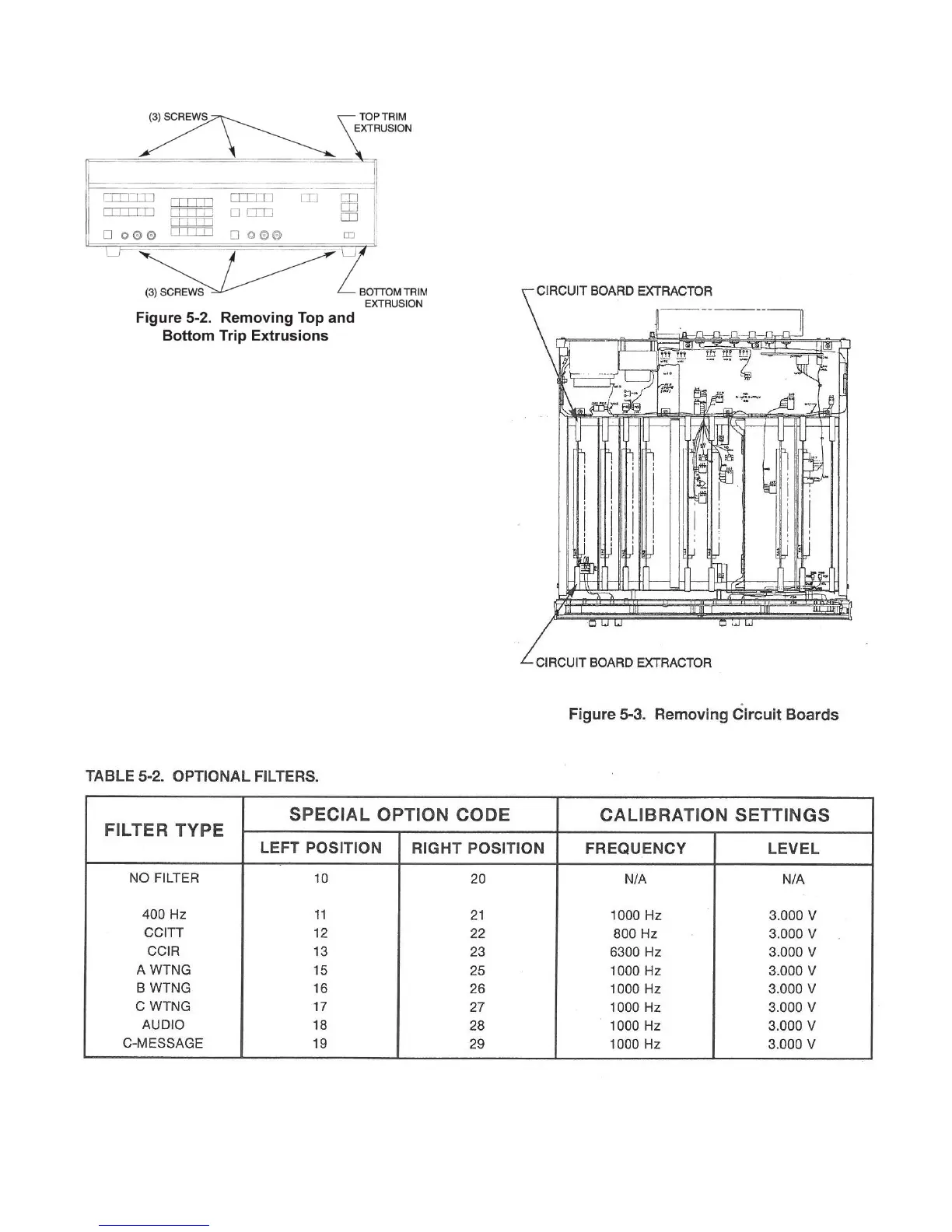
d. Turn the instrument over and remove the three
screws that hold the bottom trim extrusion and remove
the trim strip.
e. Tilt the bottom of the front panel away from the
instrument until all switches are clear. Pull the front panel
up to clear the center trim extrusion for access.
f. To replace the display/keyboard, reverse the
removal procedure.
5-12. Plug-in Circuit boards. Remove the plug-in circuit
board as follows:
a. Remove the instrument covers as described in
paragraph 5-10.
b. Grasp the circuit board extractors, pull up, and
slide the circuit board up and out of the instrument.
c. To replace circuit boards, reverse the removal
procedure.
5-13. Optional Filters. Install the optional filters as
follows:
a. Remove the instrument top cover as described in
paragraph 5-10.
b. Remove the Filter board (brown extractors). Re
fer to paragraph 5-12. Place the board on a flat working
surface with the components up and the extractors at the
top.


 To Next Page