125
Group adjustment
Triggering the group adjustment
Double click on the input channel of the group adjustment.
Make sure the pull-up resistor is enabled, if you selected ‘active low’
trigger polarity
Connect the input pin to GND using a push-button
Download the configuration on the C 60
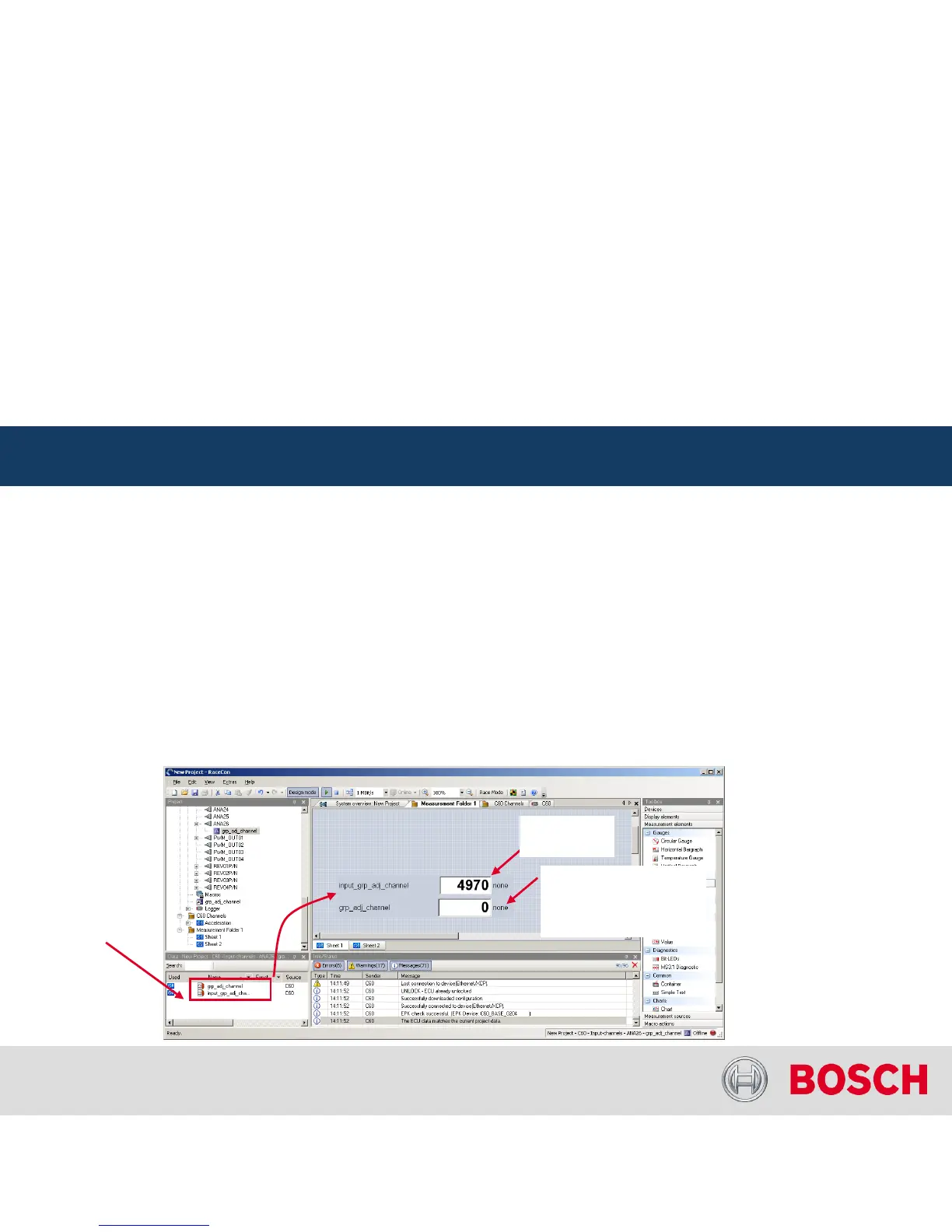
Drag the ‘grp_adj_channel’
and the ‘input_grp_adj_channel’
to an online measurement sheet
Press and release the push-button
The measurement labels indicate the state of the input pin and the state of the adjustment
Hint: A display alarm can be linked to the trigger channel indicate that the trigger has been detected
C 60 Online Measurement
Internal | BEG/EMS1 CsM
| 6/4/2010 | ©
Bosch Engineering GmbH 2009. All rights reserved, also regarding any disposal, exploitation,
reproduction, editing, distribution, as well as in the event of applications for industrial property rights.
Motorsport
C 60 Online Measurement + Calibration
Drag channels on
measurement
sheet
Voltage at
input pin
State of adjustment
0 -
Idle
1 -
Adjustment triggered
2 -
Adjustment lock time




 To Next Page