EasyManua.ls Logo

Bosch D4412 - User Manual

Bosch D4412
76 pages
Print Icon
To Next Page IconTo Next Page
Loading...
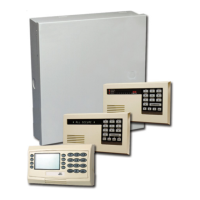
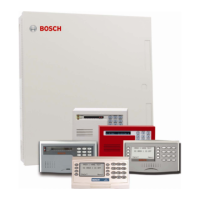
Control Panels D6412/D4412
Operation and Installation Guide

Table of Contents

Questions and Answers

  • J
    jessicalopezAug 14, 2025
    Why is Cmd 50 not working on my Bosch Control Panel?
    • T
      tedwardsAug 14, 2025
      If Cmd 50 (Move to Area) isn't working on your Bosch Control Panel, it's likely because there are no points assigned to the area you're trying to move to. To resolve this, program at least one point and assign it to the particular area. After doing so, Cmd 50 should function as expected.
  • S
    stephaniemillerAug 17, 2025
    What to do if PK32 does not work on Bosch Control Panel?
    • M
      Mallory DiazAug 17, 2025
      If PK32 is not functioning correctly (upload, download, erase, etc.) on your Bosch Control Panel, it probably hasn't been enabled in the panel firmware. To enable it, go to Nibble 0257 and enable PK32. Refer to Section 2.5 Programming Options in the D6412/D4412 Program Entry Guide (P/N: 45351) for detailed instructions.
  • K
    Kirsten BlanchardAug 20, 2025
    What to do if Bosch Control Panel shows Point 1 as faulted?
    • J
      Jason BernardAug 20, 2025
      If your Bosch Control Panel indicates that Point 1 is faulted, even with a 1K EOL resistor in place, the issue might be due to an incorrect resistor value. Point 1 requires a 2.2K EOL resistor, while the system is programmed for 1K EOL resistors. Replace the 1K EOL resistor on Point 1 with a 2.2K EOL resistor to resolve this.
  • W
    wramosAug 25, 2025
    Why does my Bosch D4412 armed All On change to Part On by itself?
    • B
      Bryan WilliamsAug 25, 2025
      If your Bosch Control Panel switches from All On to Part On automatically, it might be because the 'All On – No Exit' arming option is enabled, and no one triggered an Exit Delay Point when the panel was armed. As a result, the panel didn't arm those internal points. To disable this feature, see the D6412/D4412 Program Entry Guide (P/N: 45351), Global Open/Close Options, Arming Options 1 (Nibble 0258).
  • A
    Alyssa ValenzuelaAug 27, 2025
    How to fix Bosch Control Panel not entering Programmer’s Mode?
    • M
      Mark SmithAug 28, 2025
      If you're unable to enter Programmer's Mode on your Bosch Control Panel, there are a few potential reasons: * One or more areas might be armed. Disarm all armed areas, as Programmer's Mode cannot be accessed while areas are armed. Note that an Installer's Keypad can bypass this. * Programming might be disabled. Check Programming Options, Installer Switch, and Daylight Savings Time Options (Nibble 0257) in the D6412/D4412 Program Entry Guide (P/N: 45351) to ensure Installer Switch, Keypad Programming, and PK32 (Programming Key) are enabled. * The Installer Switch must be closed to enter Programmer's Mode. Refer to sections 3.4.2 and 13.2 in the installation guide for details.
  • A
    Ashley MckenzieAug 31, 2025
    What to do if Bosch Control Panel doesn't arm an area with a valid passcode?
    • K
      Kyle WarrenAug 31, 2025
      If you've entered a valid passcode to arm an area on your Bosch Control Panel, but the area doesn't arm, there could be two reasons: * No points are programmed for that area. Add at least one point to each area. * The user doesn't have the appropriate authority level to arm the system. Ensure all users who need to arm/disarm the system have the correct authority level. See Authority Level Configuration in the D6412/D4412 Program Entry Guide (P/N: 45351).
  • A
    adkinsjeffreySep 3, 2025
    How to enable Open/Close Reports for Part On Mode on Bosch D4412?
    • K
      Kelly Drake DDSSep 3, 2025
      If Open/Close Reports are enabled on your Bosch Control Panel, but they are not being sent when the panel is in Part On Mode, it indicates that Open/Close Reports for Part On Mode is not programmed correctly. To fix this, go to the Areas section of the D6412/D4412 Program Entry Guide (P/N: 45351) and find the Area # Opening/Closing Reporting Options parameter. Enable 'Opening/Closing Reports for Part On Modes' for Nibbles 0296, 0318, 0340, and 0362.
  • J
    James HallSep 6, 2025
    Why is my Bosch D4412 not following report routing?
    • M
      martinkathrynSep 6, 2025
      If your Bosch Control Panel isn't following the programmed report routing, it's likely because the Lock Area Reporting parameter is enabled. To correct this, set the Lock Area Reporting parameter to 0 (disabled). See the D6412/D4412 Program Entry Guide (P/N: 45351) for more details.
  • T
    Tyler DixonSep 10, 2025
    Why do off-board points display as missing on my Bosch system?
    • T
      Tracey CastilloSep 10, 2025
      If off-board points added to your Bosch system are displaying as missing, the Device Location parameter is likely programmed incorrectly. To fix this, see Locations in the D6412/D4412 Program Entry Guide (P/N: 45351). Verify the type of device added (e.g., RF point, off-board point, etc.). In the Device Location parameter, enter the correct value based on the Device Parameter Selections (1 = on-board; 2 = DX2010; 3 = DX2010, Doubled; 4 = RF Receiver 1: 5 = RF Receiver 2). Point configuration is locked into only those configuration types in the Device Parameter Selections.

Summary

Installation

Before You Begin

Recommends reviewing guides and gathering necessary documents before installation.

Installing the Assembly

Steps for physically mounting the control panel.

Finishing the Installation

Covers final steps like earth ground, battery, and device wiring.

Programming the Panel

Guide for programming the panel using a keypad or Remote Account Manager.

System Testing

Instructions for performing a complete functional test of the system.

Power Supply

Primary Power

Covers AC power circuit and transformer installation.

Secondary Power

Details battery installation, replacement, and supervision.

Power Outputs

Output Programming

Instructions on configuring programmable outputs like siren drivers and alarm outputs.

Telephone Connections

On-Board Sensor Loops

Off-Board Sensor Loops

On-Board Outputs

Off-Board Outputs

Arming Devices

SDI Devices

Installers Keypad and Installer Mode

Installers Keypad Connector

Connecting an installer's keypad for panel programming.

Entering the Installer Mode

Steps and passcode to enter the installer mode.

Installers Menu

Accessing tests, RF functions, and programming options.

Installation Label

Troubleshooting

Arming Issues

Troubleshooting common problems related to arming the system.

Point Issues

Troubleshooting common problems related to sensor points and devices.

Bosch D4412 Specifications

General IconGeneral
BrandBosch
ModelD4412
CategoryControl Panel
LanguageEnglish

Related product manuals