External Interface Manual en | 37
Bosch Security Systems B.V. | 2004 April | External Interface Manual
9 Camera Control Data
9.1 Introduction
The Camera Control software application modules can generate camera related commands to be used for a
video switcher and send these commands to the serial port of the CCU.
For the serial communication a fixed set of settings is used to initialise the serial port. These settings are:
Baudrate = 19200
Data bits = 8
Stop bits = 1
Parity = none
9.2 Camera Control Commands
Camera control commands are divided into three categories, which each fulfil a subset during the use of the
camera control application. The categories are:
Installation Commands Commands which are used during the installation of the
camera assignments. During this process the seats are
chained to a camera and a pre-position.
During this process also the preparation and operational
commands can be used.
Preparation Commands Commands which are used during preparation of the
camera control. That is during start-up of the camera
application.
During this process also the operational commands can be
used.
Operational Commands Commands which are used during operational process of
the camera control.
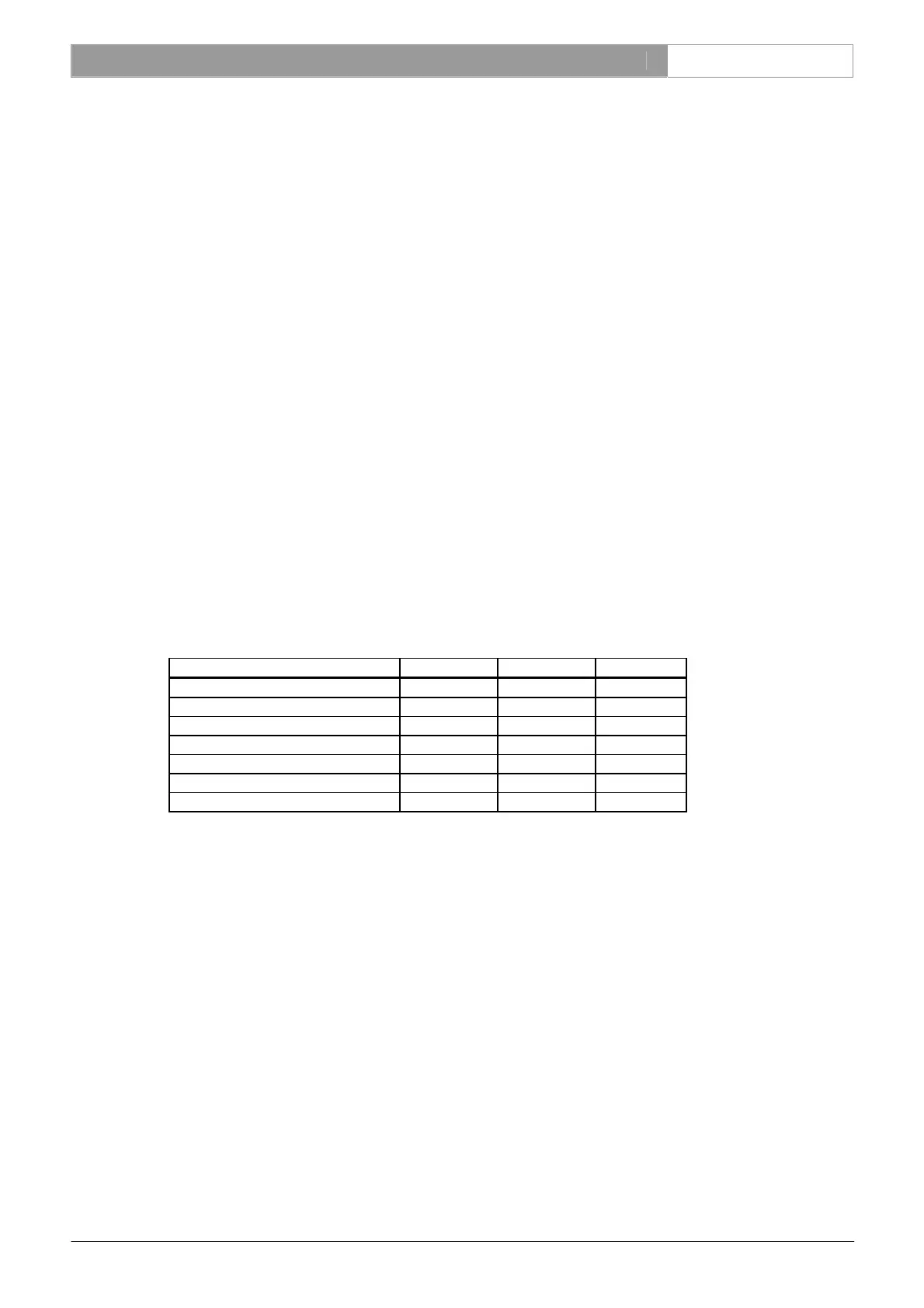
In the following table describes which command is used in which category:
Command Installation Preparation Operation
TOP-TITLE-OVERRIDE Yes Yes Yes
BOTTOM-TITLE-OVERRIDE Yes Yes Yes
MON-OVL-ENABLE No Yes No
MON-CAM Yes No No
MON+CAM No No Yes
PREPOS-SET Yes No No
PREPOS Yes Yes Yes
9.2.1 TOP-TITLE-OVERRIDE
Display top “text” over the camera title shown on monitor (mon#).
Command Syntax
TOP-TITLE-OVERRIDE “text” mon#
where:
text
Text to display on the monitor. String of at most 16 characters. This text
will be converted to the Allegiant character set, see 9.2.8 Text conversion
DCNCC.INI
mon#
Monitor number. A decimal number in the range 0 - 255.
This command overrules the text displayed on the top line, where normally the camera text is located. DCN
uses this command to clear the camera text for the audience monitors.
9.2.2 BOTTOM-TITLE-OVERRIDE
Display bottom “text” over the camera title shown on monitor (mon#).
Command Syntax
BOTTOM-TITLE-OVERRIDE “text” mon#
where:








 To Next Page