70 en | Mechanical installation of Contribution Devices DICENTIS
2021.01 | V2.2 |
Hardware Installation Manual
Bosch Security Systems B.V.
Item Description
12 Microphone button - Enables or disables the microphone. The microphone
button has a red LED that comes on when the microphone is enabled (on-air). A
green LED shows that the booth is not in use.
13 Mute button - Temporarily disables the microphone.
Connecting Interpreter desks
Two RJ45 compatible connections for system communication and power are available for
quick and easy connection of the interpreter desks. Loop-through cabling can be applied by
using DICENTIS System cables or star cabling using standard CAT-5e cables and PoE switches.
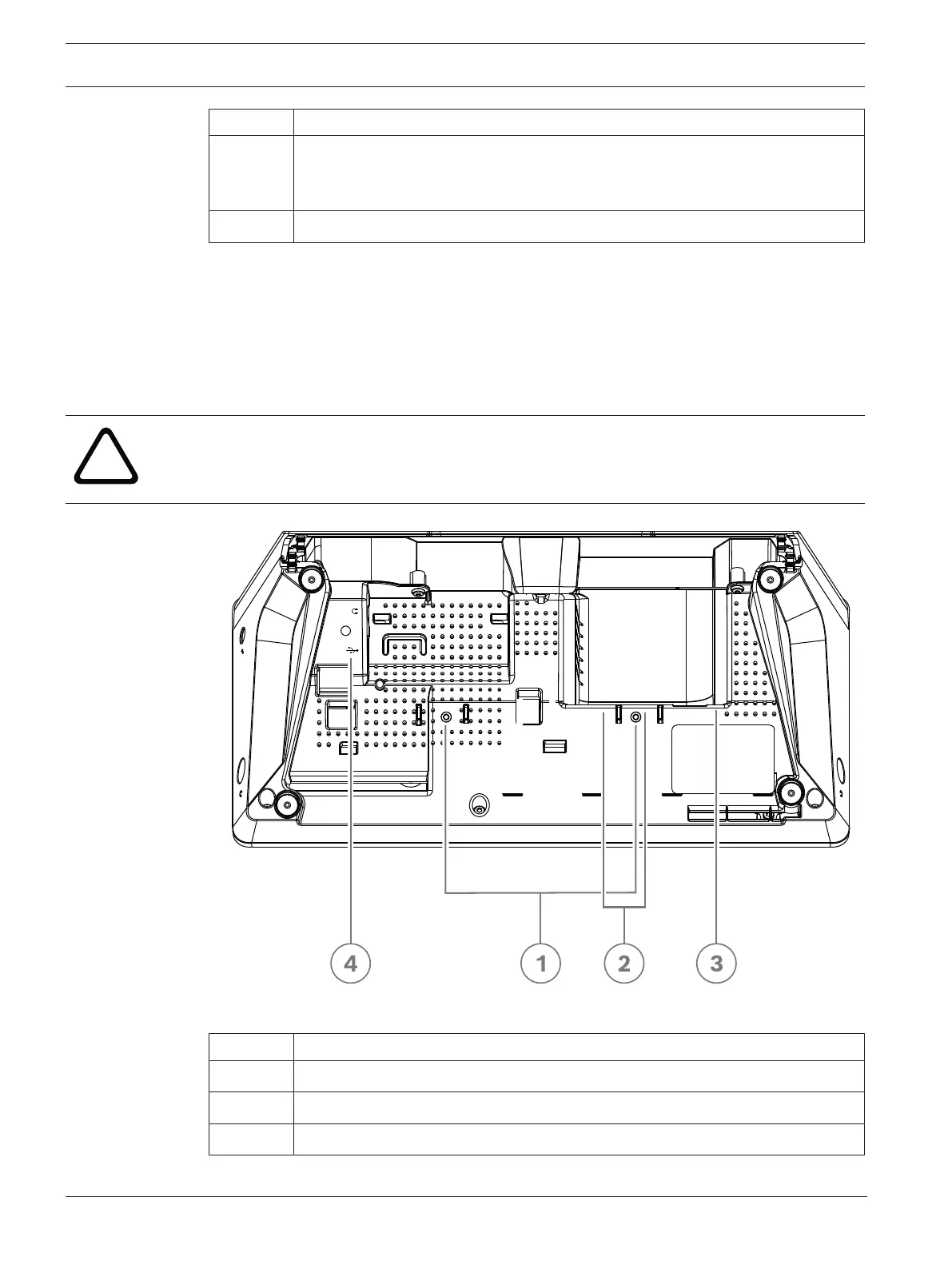
Installing Interpreter desks
The interpreter desks can be installed free-standing or fixed in more permanent installations
(table-top) using mounting screws.
Warning!
The screws must be M3 and should not be screwed in deeper than 5 mm (0.2 inches) to avoid
damaging the device.
Figure7.8: DCNM-IDESK / DCNM-IDESKVID bottom view
Item Description
1 Screw insert for fixed installation
2 2 x RJ45 connection input/output for system power cable
3 HDMI video output (DCNM-IDESKVID only)











 To Next Page