10
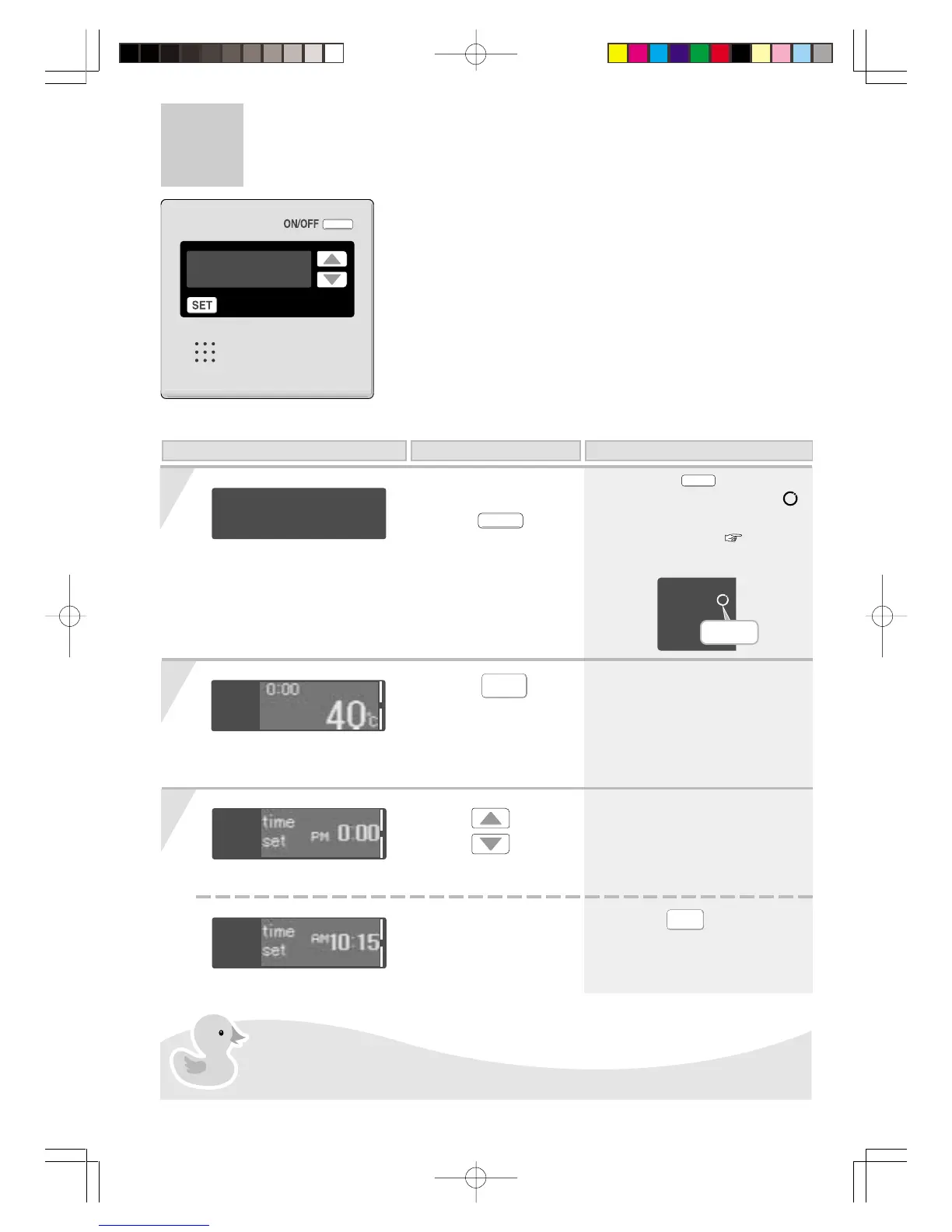
When using RCM3211
Clock Adjustment
Press the
ON/OFF
button to turn it
“On”.
1
On this Display Operation Description
Press the
SET
button to change the
display until “time
set” is shown.
2
Use the
buttons
to adjust the clock.
3
< Completion of setting >
* When the
SET
button is pressed,
or the console is left untouched for
about 20 seconds, the settings
screen ends.
(Eg.: AM 10:15)
* The time changes in 1-minute
increments with each press on the
button, and then in 10-minute
increments if the button is kept
pressed down.
(Eg.: 40°C)
In the event of a power cut or after disconnecting the power supply, when the
power is restored, the clock on the display screen shows “0:00”, so the clock
needs to be re-set.
< Display detail >
Blinking
* The
is lit.
*
When Circulation is on, the
symbol blinks and circulation mode
starts automatically. ( P15)




 To Next Page