7
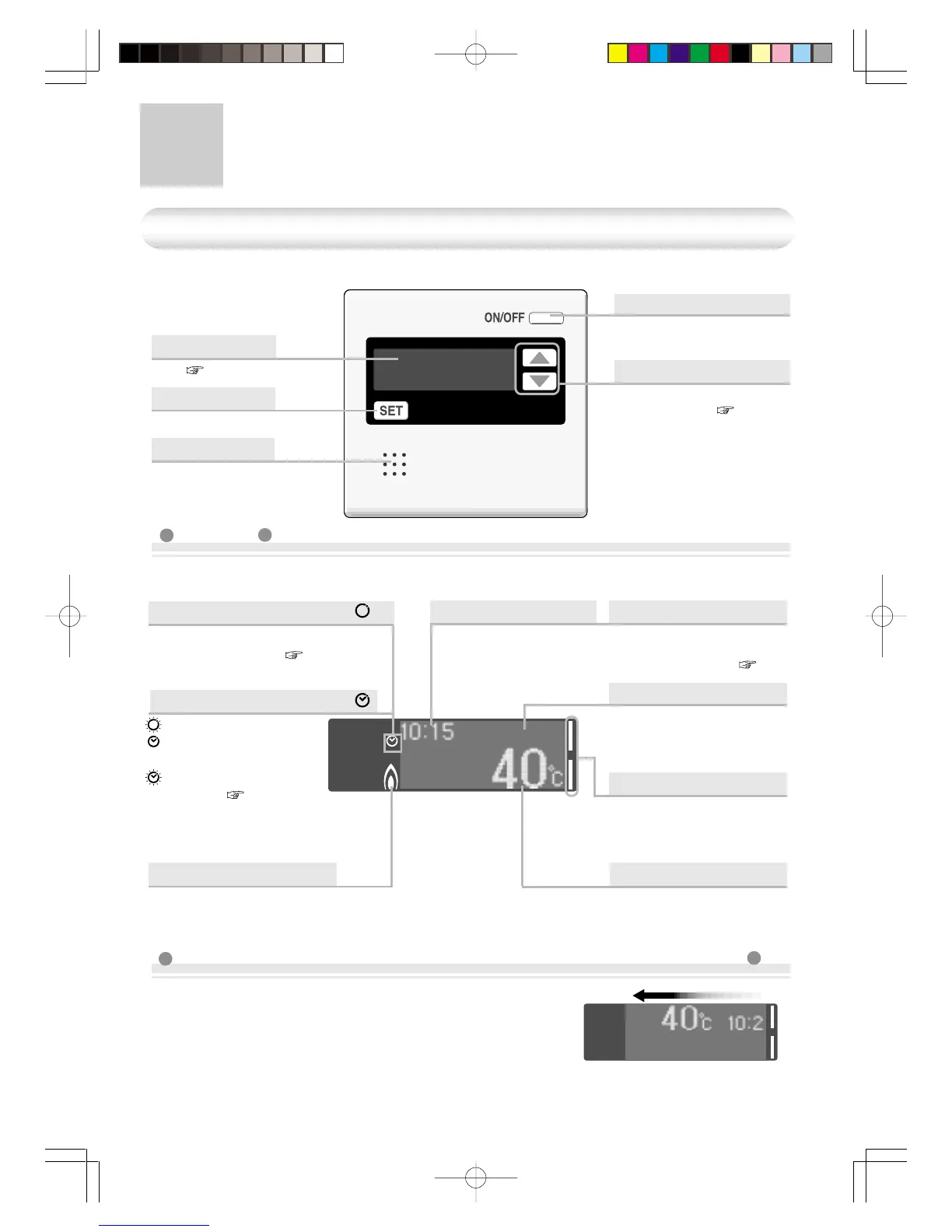
The illustration below shows the remote controller display. What is actually displayed depends
on how the water heater is set.
< Scroll display > to prevent the remote controller screen from burning out
( This page)
Names and Functions of Each Parts-1
Main Remote Controller (RCM3211) <Included/Optional>
Display
Set Button
For other settings.
Speaker
Power On/Off Button
For turning the heater on
and off.
Selection Button
• Used to adjust the
temperature. ( P12)
• Used for other settings.
• Details are memorized
upon adjustment or
setting.
Display
* In order to prevent the screen burning out, about 10 minutes
after any remote control operation, the screen display begins
to scroll sideways.
* As soon as the remote controller is used again, the scrolling
stops.
Current time (when the clock
is set) the hot water tempera-
ture scrolls sideways.
* This remote controller is basically used with KM3211WHQ.
When this is displayed, circulation
mode is on. ( P15 and 19)
Circulation mode Display
Timer Display for Hot Water
Blinking
:
During circulation
Lit :
Circulation
timer
is set.
Blinking
:During setting
( P17 and 19)
for circulation
mode.
Timer Display
When the hot water tem-
perature is set between 60
- 80°C, “hi-temp” blinks for
10 seconds.
High Temperature Display
(Eg.: 40°C)
Selection switches that can
be operated are indicated
by the bar display lighting
up or blinking.
Selection Bar Display
Temperature Setting
This is displayed when the
burner is on.
Burner On Display
(Eg.: 10:15)
Error Display
Error is displayed when
malfunction occurs.
( P36)




 To Next Page