18
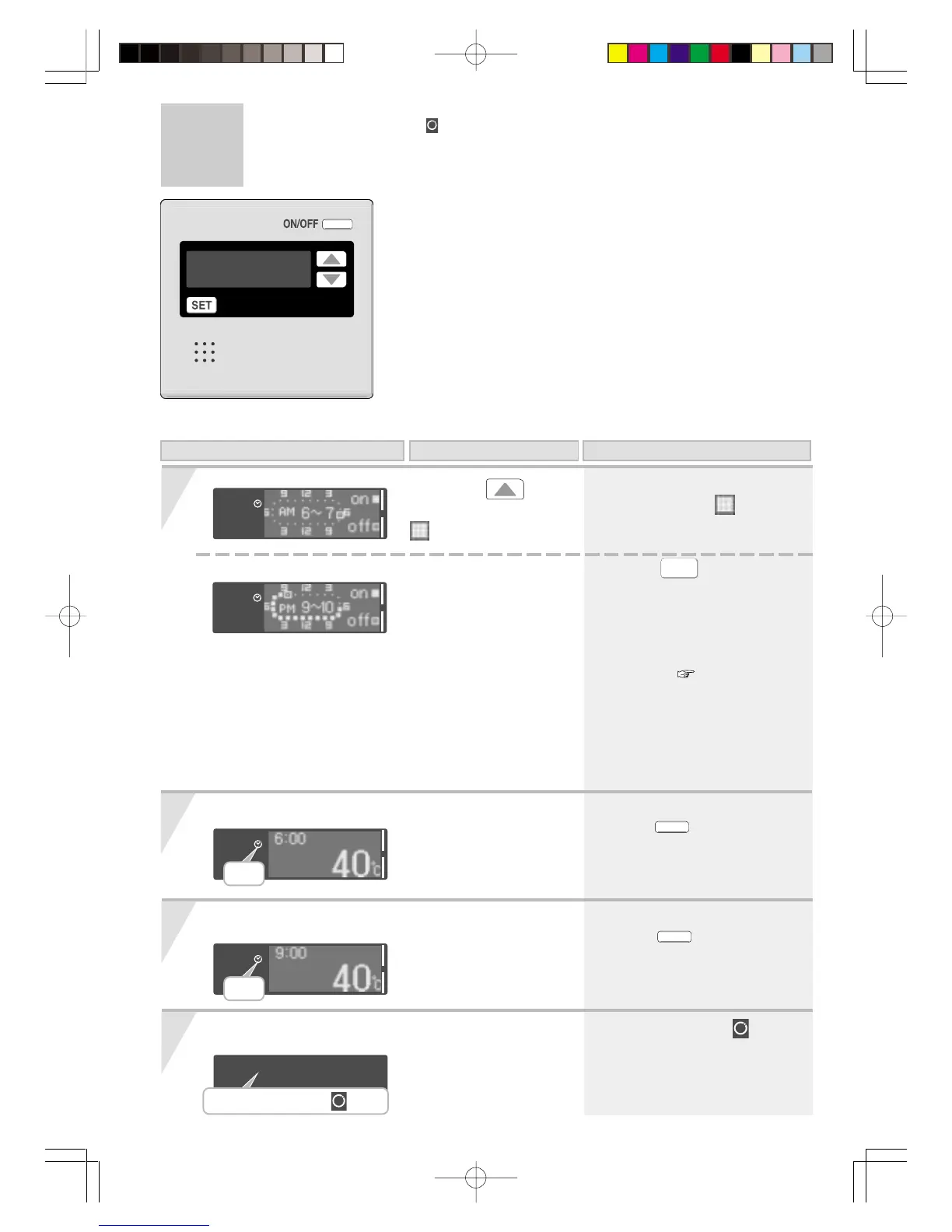
Timer Setting Period for Circulation-2
5
< Completion of setting >
* When the
SET
button is pressed,
or the console is left untouched for
about 20 seconds, the settings
screen ends.
* If the clock is not adjusted, the
screen for clock adjustment will
be shown. ( P10)
* The setting details will show
the on/off run time of the
circulation pump.
Note; the circulation pump will
commence operation in
the next run time period.
Circulation starts
Circulation stops
* Circulation starts.
*
ON/OFF
automatically
switches “ON.”
* Circulation ends.
*
will not be turned
“OFF” automatically.
(Continued)
When the operation switch is turned “Off”
*
About 1min. later the will not
be displayed, but it will have
the memory of the timer
setting.
Press the button
several times, until the
is set to “PM 8 - 9”.
* Circulation operates during the
period set by the .
On this Display Operation Description
When using RCM3211
Display of on the remote controller
Blinking
Lamp on
About 1min. later unlit




 To Next Page