24 en | Operation Plena Easy Line SD Tuner BGM source
PLE-SDT_OM | V1.0 | 2012.02 Installation and Operation manual Bosch Security Systems B.V.
8.3 FM tuner
1. Press the button USB/SD-TUNER (39) of the remote control to select and operate the FM
tuner.
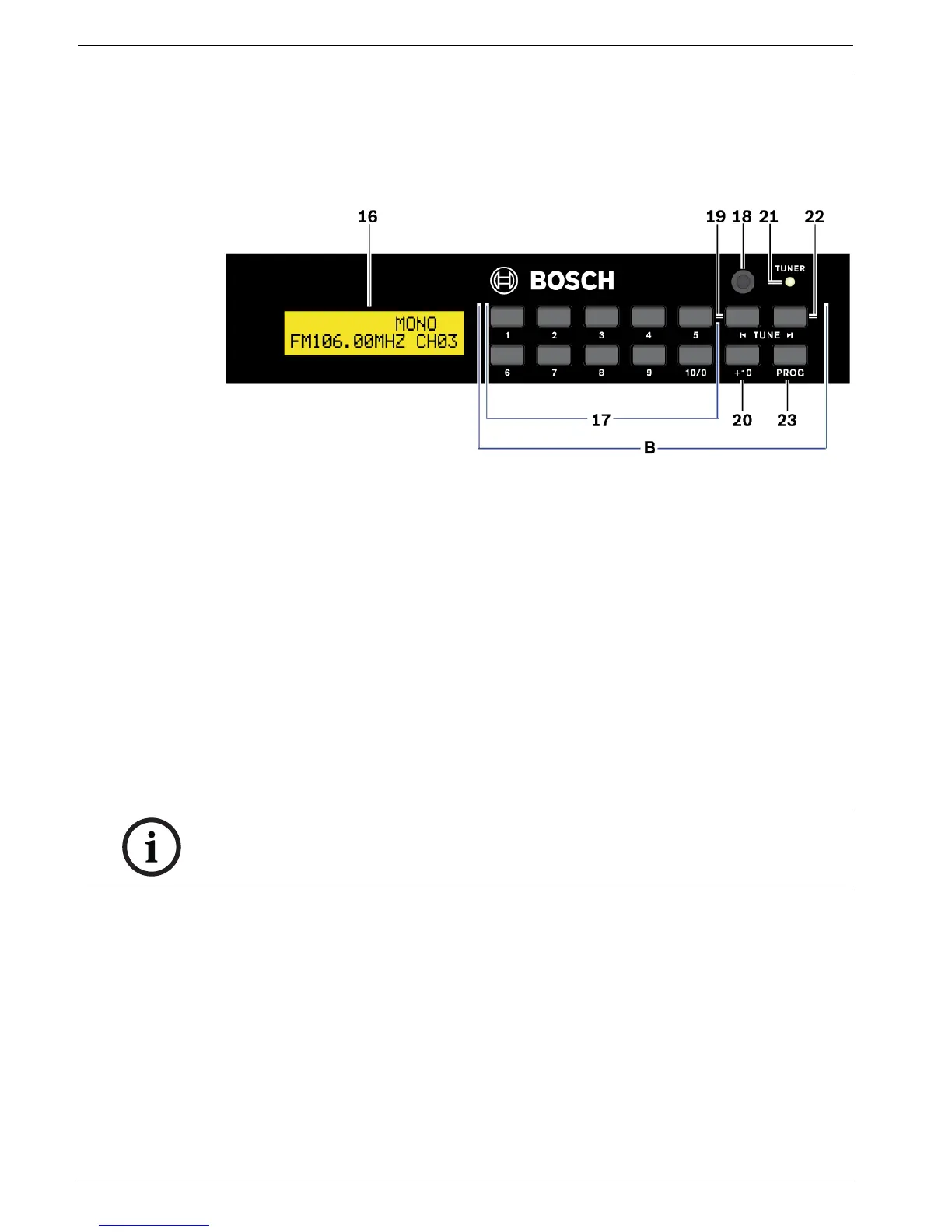
– The green LED TUNER (21) will light up.
Figure 8.3 FM tuner front view
8.3.1 Search a FM radio frequency
Use the buttons TUNE |< (19) or >| (22) to search for a FM radio frequency:
1. Press the button |< or >| once to fine tune. Or,
2. Press and hold (± 1 second) the button |< or >| to search for (strong) FM radio
frequencies automatically. Or,
Use the button SEARCH (43) of the remote control to search for a (strong) FM radio
frequency automatically:
1. Press the button SEARCH for approx. 2 seconds to start the searching.
8.3.2 Preset FM radio frequency selection
Stored FM radio frequency presets (maximum 30) are selected by pressing:
1. The button 1 to 10/0 (17) for presets 1 to 10. Or,
2. The button 1 to 10/0 (17) following by the button +10 (20) for preset positions 11 to 30:
– 1st actuation of button +10: Preset 11 up to 19.
– 2nd actuation of button +10: Preset 20 up to 30.
8.3.3 Sequentially FM radio frequency preset selection
1. Press the buttons |<< PRESET >>| (42) of the remote control to scroll up/down between
the stored presets.
NOTICE!
For FM tuner preset programming, refer to Section 7.1 FM tuner.


 To Next Page