Plena Easy Line SD Tuner BGM source System Overview | en 11
Bosch Security Systems B.V. Installation and Operation manual PLE-SDT_OM | V1.0 | 2012.02
3.5.3 Remote control
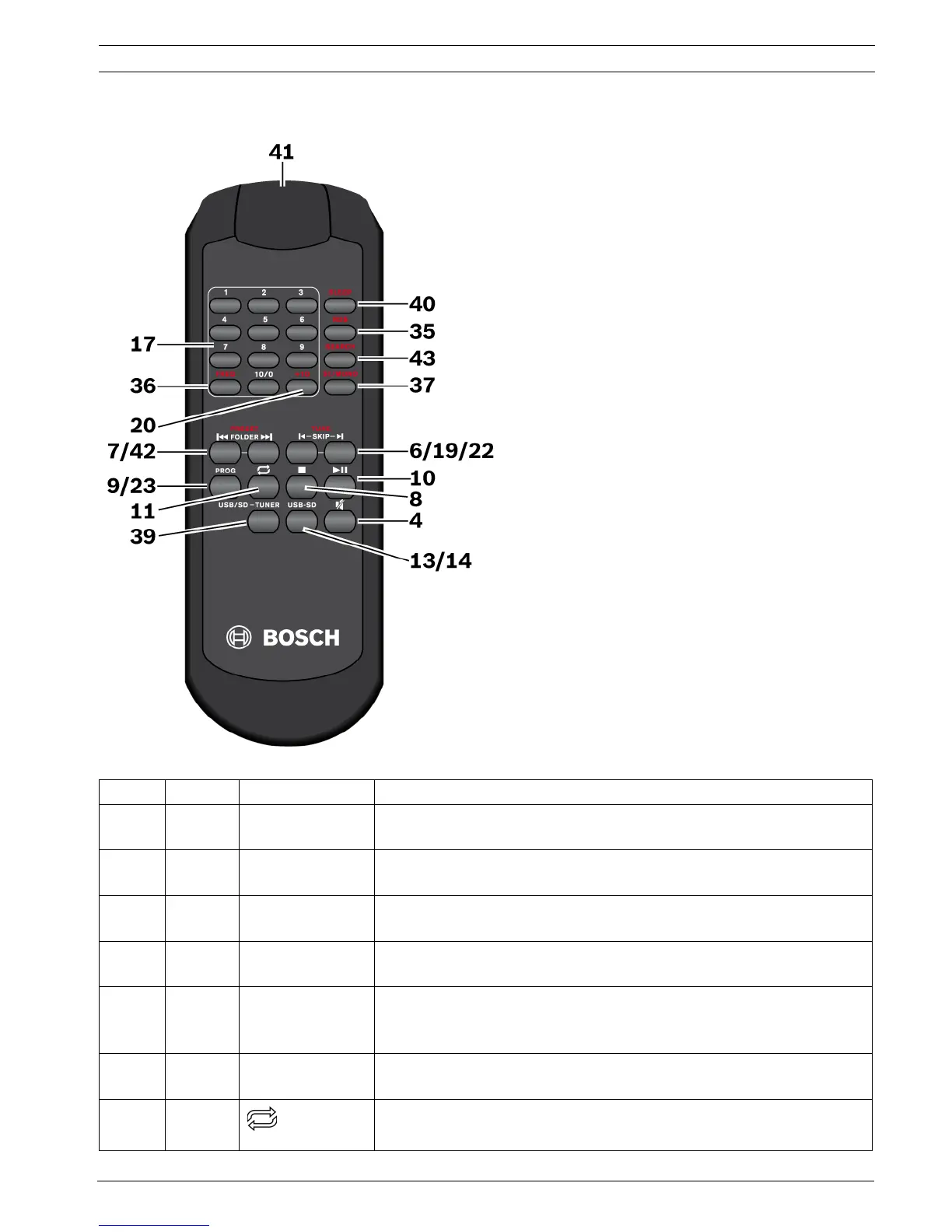
Figure 3.3 Remote control (The numbers of the remote control and in the table, are identical to the numbers of the unit.)
Number Function Button Description
17 / 20 TUNER,
USB/SD
1-9, 10/0, +10 Radio frequency preset selection or track selection.
Refer to Section 8.3 FM tuner or Section 8.2.2 Track selection.
36 TUNER FREQ Manual selection of FM radio frequency.
Refer to Section 8.3.4 Manual selection of a FM radio frequency.
42 TUNER |<< PRESET >>| Scroll up/down radio frequency presets.
Refer to Section 8.3 FM tuner.
7USB/SD|<< FOLDER >>| Scroll up/down MP3 folder selection.
Refer to Section Selection of folders and search for folders, page 22.
9USB/SDPROG To switch to the programming mode to compile an individual track
sequence.
Refer to Section 8.2.4 Making a playlist.
23 TUNER PROG To save the selected radio frequency to a preset.
Refer to Section 7.1.2 Preset radio frequency programming.
11 USB/SD To select the repeat and random replay functions.
Refer to Section 8.2.3 Repeat functions and random play.


 To Next Page