MoveMode en
11
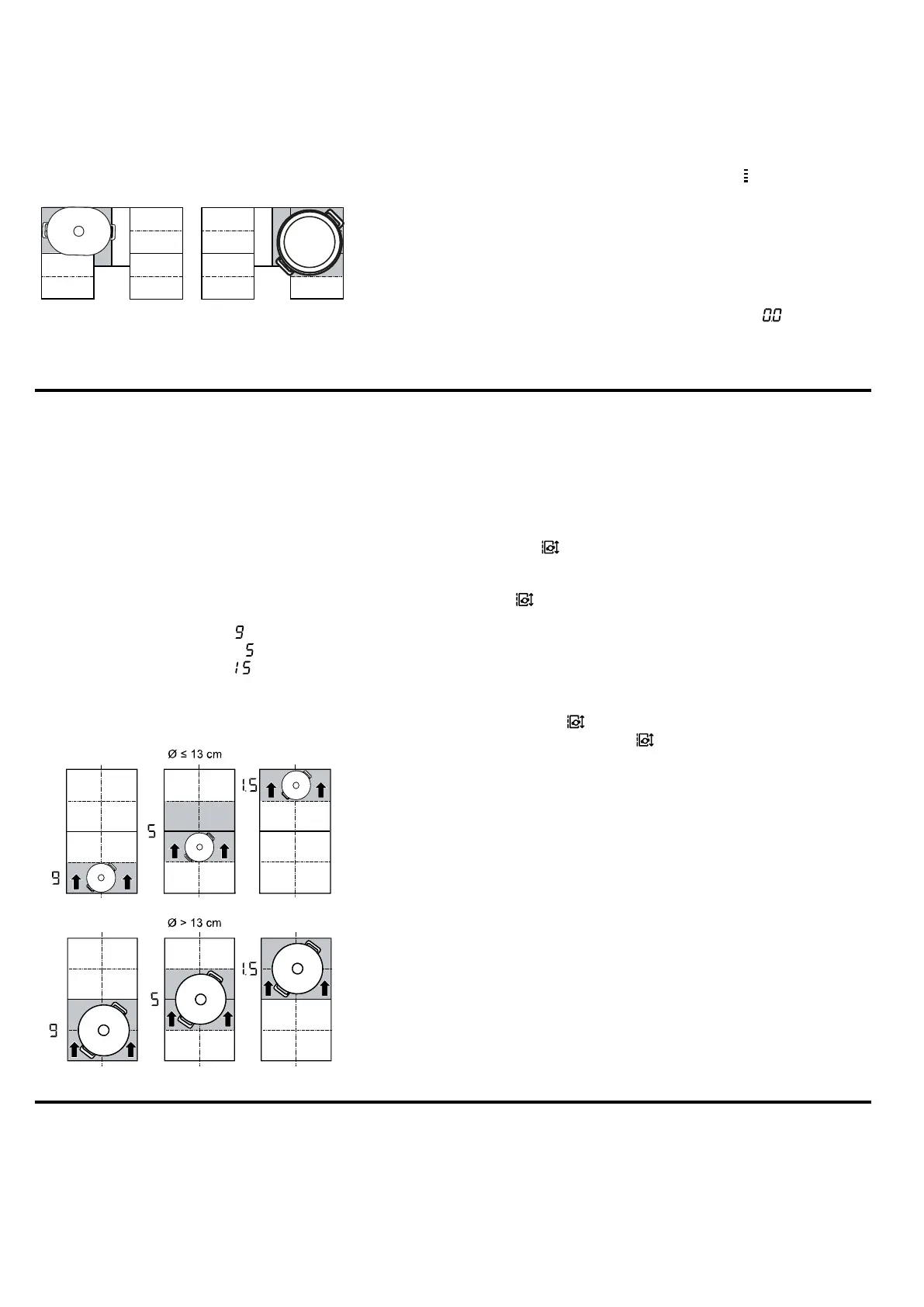
Depending on the size of the cookware and the
covered cooking surface, you can switch on the flexible
cooking zone as two separate cooking zones or as one
connected cooking zone:
9.2 Activating Extended FlexInduction
1.
Place the cookware on the flexible cooking zone so
that it covers the extension.
2.
Select the cooking zone and the power level. The
displays for the cooking zone and for the extended
zone light up.
a The zone is activated.
Note:If the display does not light up, lift the cookware
and place it back on the cooking zone.
9.3 Deactivating Extended FlexInduction
▶
Select the cooking zone and set it to in the set-
tings range.
a The function has been deactivated.
MoveMode
10 MoveMode
You can use this function to change the power level of
an item of cookware by simply sliding it forwards or
backwards in the flexible cooking zone. The zone is di-
vided into three areas with different power levels.
10.1 Positioning and moving the cookware
Only use one item of cookware. The cooking area de-
pends on the cookware used, as well as its size and
positioning.
Each cooking area has a preset power level:
¡ Front area = power level
¡ Middle area = power level
¡ Rear area = power level .
You can change the standard setting of the preset
power levels. You can find out how to do this in the
"Basic settings" section →Page20.
10.2 Activating MoveMode
Requirement:Only place one item of cookware on a
flexible zone.
1.
Select one of the two cooking zones in the flexible
zone.
2.
Press .
a The power level in the area in which the cookware
is located lights up in the cooking zone display next
to .
a The function is switched on.
Note:You can change the power levels during cook-
ing.
10.3 Deactivating MoveMode
▶
Touching
a The display beside switches off.
a The function has been deactivated.
Time-setting options
11 Time-setting options
Your hob has various functions for setting the cooking
time:
¡ Switch-off timer
¡ Timer
¡ Count-up timer




 To Next Page