
 Need help?
Do you have a question about the Bosch Rexroth CS550 and is the answer not in the manual?
Details how to mount the microcontroller, including orientation, surface requirements, and hole spacing.
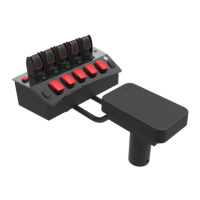
Explains mounting methods for displays, encoder boxes, and joystick armrest consoles using ball mounts and tube mounts.
Provides dimensional drawings and measurements for the display unit, showing key dimensions.
Presents dimensional drawings and measurements for the joystick assembly, including overall size and key features.
Details the procedure for connecting and disconnecting the microcontroller, including alignment and locking tabs.
Explains how to connect and disconnect solenoid connectors, focusing on the mating and un-mating process.
Describes how to connect CANBUS extension, RCE harness, and power harness to the armrest and other components.
Details the main harness connections, including molded and thread-on connectors for solenoids, sensors, and CANBUS.
Instructions for unpacking and checking supplied parts against the packing list for completeness.
Guidance on untying and laying out cables to ensure proper lengths and setup for installation.
The provided document is an installation manual for the Rexroth Bosch Group CS 550, 551, 550i, 551i/150RC Spreader Joystick Controller. This system is designed for controlling spreading operations, likely in agricultural or municipal applications such as de-icing or fertilization. The manual outlines the components, installation procedures, and basic testing for the system.
The CS 550/551/550i/551i/150RC system is a comprehensive electronic control solution for spreaders, integrating a joystick controller with a microcontroller and various sensors to manage spreading functions. At its core, the system allows for precise control over material distribution, including spinner speed, conveyor/auger feed, gate position, and liquid pre-wet application. The system supports both "Heads Up" (CS-551i) and Canbus (CS-550i) display options, providing operators with clear visual feedback and control interfaces.
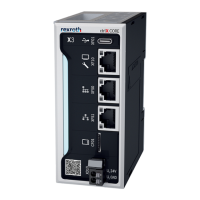
The microcontroller, which can be mounted either horizontally or with connectors facing downwards (never upwards), acts as the central processing unit, interpreting operator commands from the joystick and display, and translating them into signals for the hydraulic valves and other actuators. The system is designed to interface with a variety of sensors, including gate cylinder position sensors, hydraulic motor rotation sensors, and liquid pump flowmeters, to provide real-time feedback and enable closed-loop control.
The joystick (CS-150 Canbus Joystick) serves as the primary input device for the operator, offering intuitive control over key spreading parameters. This allows for fine adjustments during operation, enhancing efficiency and accuracy. The system also incorporates an encoder box, particularly for the CS-551i, which likely processes rotational or positional data from mechanical components, further contributing to precise control.
The main harness connects the microcontroller to all peripheral components, including solenoids for valve actuation and various sensors. The system is capable of managing multiple functions simultaneously, such as anti-ice feed, boom control (left, right, and center), and different conveyor/auger feed modes (imperial and metric). It also supports advanced features like material detection and change, and can be configured for specific applications like tow plows.
The CS 550/551/550i/551i/150RC system is designed for ease of use and operational flexibility. The display units (CS-551i "Heads Up" Display or CS-550i Canbus Display) provide a user-friendly interface for monitoring and adjusting spreading parameters. The joystick console is ergonomically designed for operator comfort, with a tube mount that allows for forward and backward adjustment to optimize armrest position. A ratchet clamp secures the rotation of the tube and bracket, ensuring stability during operation.
The system supports various spreading modes and functions, which can be selected and adjusted via the display and joystick. For instance, operators can control spinner feed, conveyor/auger feed, and liquid pre-wet feed independently. The integration of sensors allows for automatic adjustments based on real-time conditions, such as ground speed and material flow, contributing to consistent and accurate spreading.
The system includes diagnostic LEDs on the 2-position molded connectors for solenoids, which aid in troubleshooting by indicating the status of each solenoid. This feature helps operators and maintenance personnel quickly identify and address issues. The modular design, with distinct connectors for sensors, CANBUS, and auxiliary digital inputs, simplifies wiring and system expansion.
The installation notes emphasize proper grounding and cable routing to ensure reliable operation and prevent damage. The system is designed to be robust, with microcontrollers mounted to avoid contact with oil and salt spray, and cables routed to prevent abuse or damage. The use of dielectric grease on external cable connections is recommended to prevent corrosion, enhancing the system's longevity in harsh operating environments.
The manual provides several guidelines for maintaining the CS 550/551/550i/551i/150RC system, primarily focusing on proper installation and electrical practices to prevent damage and ensure long-term reliability. A key maintenance feature is the clear labeling of cables and connectors, which simplifies installation, troubleshooting, and replacement of components. The function chart details the primary and secondary functions of each cable label, aiding in correct wiring and system diagnosis.
Electrical safety and protection are paramount. The manual explicitly warns against removing the fuse holder on the main harness and provides a fuse chart with appropriate ratings for different harness types (e.g., 2-2 MAIN HARNESS, 4-4 MAIN HARNESS, 150 RCE IN-VALVE HARNESS, 150 RCE IN-CAB HARNESS). Failure to maintain proper fuse protection can lead to product damage and fire hazards, which are not covered by warranty. This highlights the importance of using the correct fuses for system protection.
The installation notes also serve as maintenance guidelines, emphasizing the importance of a dedicated 12V power supply and ground wire to prevent electrical interference and ensure stable operation. Disconnecting battery terminals before welding on the vehicle and when wiring electronic devices is crucial to protect the system from voltage spikes. Mounting microcontrollers in locations protected from environmental elements like oil and salt spray extends their lifespan.
For cable connections, the manual details the proper mating and un-mating procedures for both microcontroller and solenoid connectors, including extending and pushing sliding tabs for the microcontroller and pressing a metal retainer for solenoids. This ensures secure connections and prevents damage during installation or servicing. The recommendation to use grommets when routing cables through metal openings prevents cable chafing and damage over time.
The installation test checklist provides a structured approach to verifying system functionality after installation, which doubles as a diagnostic tool for maintenance. It covers checks for hydraulic pump engagement, display operation, dial functionality, and the operation of various components like the conveyor/auger, spinner, liquid pump, and gate cylinder. This checklist helps confirm that all connections are correct, hydraulics are plumbed properly, and sensor feedback is functioning as expected. While it's a simple verification, the manual directs users to the 550 Calibration Manual for more reliable and detailed testing procedures, indicating a deeper level of diagnostic capability available for maintenance.
Finally, the warning regarding the glass LCD touch screen display underscores the need for careful handling to prevent physical damage. If the glass chips or cracks, the display must be replaced by Bosch Rexroth Canada, and any misuse/abuse causing damage voids the warranty. This highlights a critical component that requires careful attention during both operation and maintenance.
 General
| Protection Class | IP20 |
|---|---|
| Power Supply | 24 V DC |
| Programming Languages | IEC 61131-3 (LD, FBD, IL, ST, SFC) |
| USB Ports | 1 x USB 2.0 Host |
| Fieldbus Interfaces | CANopen, EtherCAT |
| Communication Interfaces | Ethernet, USB |
| Operating Temperature | 0°C to 50 °C |
| Input Voltage | 24 V DC |



 To Next Page