
 Need help?
Do you have a question about the Bosch Rexroth CS660 and is the answer not in the manual?
Overview of CS-660 and CS-661 displays and their console interfaces.
Status, totals, speed, driver ID, load weight, and error messages.
Access to settings, program mode, and toolbox functions.
Indicates current gate position and control type.
Explains conveyor operation in forward/reverse direction.
Explains spinner operation in forward/reverse direction.
Explains combined spinner and conveyor forward/reverse operation.
Explains the selection and indication of the dual spinner mode.
Describes the dedicated 3 boom Anti-ice setup.
Explains the electrical switch control for the air cylinder gate.
Discusses gate position sensor and automatic gate operation.
Operator adjusts spreading width with lane control for application rate.
Describes a 4-knob configuration for spreader and single boom anti-ice.
Describes a 4-knob configuration for spreader and 3 boom anti-ice.
Describes a 4-knob configuration for spreader and cross conveyor.
Describes a 4-knob configuration for spreader, 3 boom anti-ice, and cross conveyor.
The Rexroth CS660/CS661 Spreader Controller is an advanced system designed for precise control of material spreading operations. It offers a comprehensive operator interface and a wide range of additional feature functions, making it suitable for various spreading applications, from standard material distribution to specialized anti-icing and cross-conveyor operations.
The core function of the CS660/CS661 controller is to manage the spreading of solid and liquid materials, such as salt, pre-wet, and de-icing agents. It achieves this by controlling key components like the spinner, conveyor, and gate mechanisms. The system is designed to maintain a consistent application rate based on vehicle speed and selected material, ensuring efficient and effective spreading.
The controller features real-time status and trip summary displays, providing operators with critical information such as total distance, spread distance, spread quantity, and voltage. It also shows the current application rate, conveyor RPM, wet rate, and liquid rate. The system can operate in various modes, including Normal, Pause, Blast, Unload, and Joy Mode, offering flexibility for different operational needs.
A significant aspect of its functionality is the ability to select and manage different "Profiles." These profiles allow the system to be configured for specific spreading operations, such as standard spreading or anti-icing only. This adaptability ensures that the controller can be optimized for diverse tasks and material types.
For data management, the CS660/CS661 supports data retrieval and trip summary clearing. It can log operational data and parameter information, which can be transferred using a USB LOG Key or PROGRAM Key. This feature is crucial for record-keeping, analysis, and system configuration.
The controller also incorporates a robust error messaging system. During operation, any errors or warnings are displayed in a dedicated notification area, allowing operators to quickly identify and address issues. These messages are logged, providing a historical record of system events.
The operator interface is designed for intuitive use, featuring a display screen and a knob console (for CS-661). Operators can easily adjust spinner and conveyor rates, spreading width, and material types. The system allows for the selection of up to four Driver IDs, which can be customized, enhancing accountability and tracking.
A key usage feature is the ability to simulate ground speed. By pressing and holding a specific icon on the display, operators can adjust the simulated speed, which is useful for testing and calibration without the need for actual vehicle movement.
The controller supports various conveyor and spinner operations, including forward and reverse directions. This flexibility is indicated by a red "R" in the respective control panels. For specialized applications, the system can be configured for dual spinner operation, indicated by a red "D."
For anti-icing applications, the controller supports dedicated 3-boom anti-ice setups, with external switches for boom activation. When a boom is active, its indication letter changes to red on the display.
Gate control is another important feature. The system can utilize an air gate, which uses an electrical switch to toggle between two gate positions, automatically setting the calibrated gate for the selected material. Furthermore, with "Gate Readback," a position sensor monitors the actual gate position in real-time, eliminating the need for manual on-screen adjustments for different materials. The "Automatic Gate" feature uses a hydraulic cylinder with a built-in position sensor to automatically adjust the gate based on spreading rate, vehicle speed, and material. In cases of manual intervention, operators can tap on the gate bar to reveal up/down arrows for precise adjustment.
Lane control allows operators to adjust spreading width in increments of half-lane or one lane, with solid application rates displayed in lbs per lane mile or kg per lane kilometer.
For advanced configurations, the controller supports 4-knob setups for various combinations, such as Spreader + 1Boom Anti-ice, Spreader + 3Boom Anti-ice, Spreader + Cross Conveyor, and Spreader + 3Boom Anti-icing + Cross Conveyor. These configurations provide dedicated control for each function, with visual indicators for active booms and cross-conveyor direction.
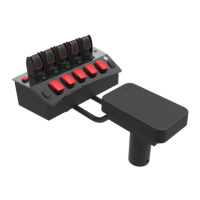
When equipped with a joystick armrest console, the system offers "Joystick Operation." Pressing the Deadman Trigger on the joystick displays a dedicated joystick screen, and releasing it reverts to the spreader layout. Joystick buttons can activate functions like PAUSE, BLAST, and Power Float, with voice output audibly confirming the selected mode.
While the manual primarily focuses on operational aspects, it implicitly suggests several maintenance-related features through its error messaging and data logging capabilities. The detailed error messages, such as "ERROR BLAST TOO LONG," "ERROR OVERSPEED," or "ERROR NO MATL DETECT," provide specific diagnostic information, aiding in troubleshooting and maintenance. For instance, messages like "Check cables, replace coil" or "Load material, check sensor" directly guide maintenance personnel to potential issues.
The data retrieval function, allowing the transfer of log data and parameter information, is invaluable for preventative maintenance and system diagnostics. By analyzing historical operational data, technicians can identify trends, anticipate potential failures, and schedule maintenance proactively. The ability to clear trip summaries also helps in managing data and ensuring system efficiency.
The "Settings" mode, accessible with a PGM key, implies a level of configurability that would be essential for maintenance and calibration. This mode likely allows for adjustments to various system parameters, ensuring optimal performance and accuracy over time. The mention of "calibration" in several warning messages, such as "Too few pulses, recalibrate" or "Calib gate needs to be non-zero," highlights the importance of regular calibration as a maintenance activity.
The system's robust design, with features like temperature signal monitoring (as seen in the initial display), also contributes to its maintainability by providing early warnings of potential environmental or component issues. The ability to update software (as mentioned in the manual's introductory notes) is a key maintenance feature, ensuring the controller remains up-to-date with the latest functionalities and bug fixes.
 General
| Product Lifecycle | Active |
|---|---|
| USB Ports | 4 x USB 3.0 |
| Type | Industrial PC |
| Series | CS |
| Operating System | Windows 10 IoT Enterprise |
| Ethernet Ports | 2 x Gigabit Ethernet |
| Serial Ports | RS-232/422/485 |
| Operating Temperature | 0°C to 50°C |



 To Next Page
