EasyManua.ls Logo

Bosch VIA - Page 59

Bosch VIA
61 pages
Print Icon
To Next Page IconTo Next Page
To Previous Page IconTo Previous Page
Loading...
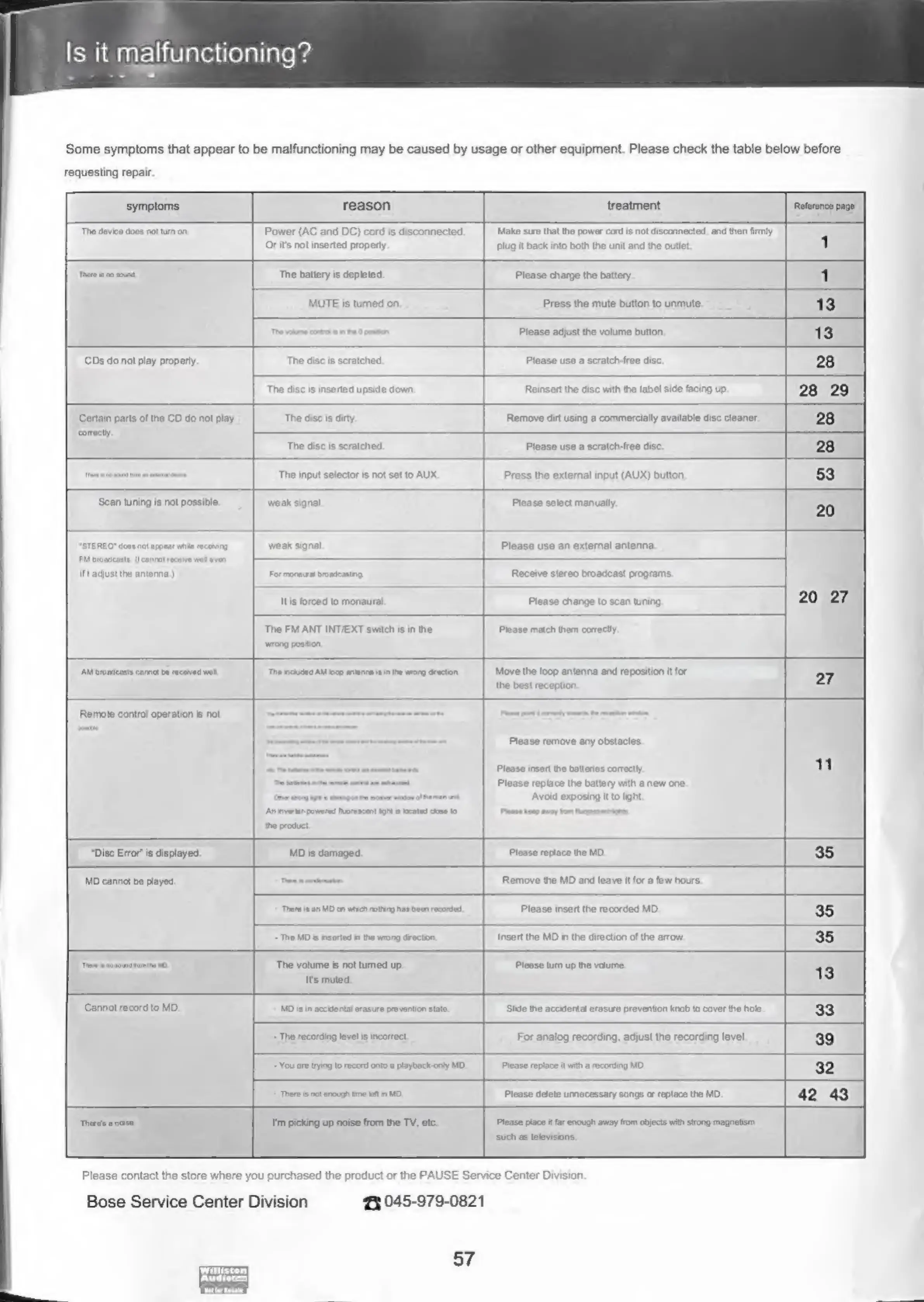
Is
it
malfunctioning?
..
oa
Some
symptoms
that
appear
to
be
malfunctioning
may
be
caused
by
usage
or
other
equipment.
Please
check
the
table
below
before
requesting
repair.
‘symptoms
reason
treatment
Reference
page’
“The
device
does
not
turn
on
Power
(AC
and
DC)
cord
is
disconnected.
Or
its
not
inserted
propery
‘Make
sure
that
the
power
cord
is
not
discannected,
and
then
firmly
pplug
it
back
into
both
the
unit
and
the
outlet.
There
no
sound.
The
battery
is
depleted.
Please
charge
the
battery.
MUTE
is
tured
on,
Press
the
mute
button
to
unmute.
Please
adjust
the
volume
button.
CDs
do
not
play
properly.
The
disc
is
scratched,
Please
use
a
scratch-free
disc.
The
disc
is
inserted
upside
down.
Reinsert
the
disc
with
the
label
side
facing
up.
Certain
parts
of
the
CD
do
not
play
‘comectly.
The
disc
is
dirty
Remove
dirt
using
a
commercially
available
disc
cleaner.
The
disc
is
scratched.
Please
use
a
scratch-free
disc,
The
input
selector
is
not
set
to
AUX.
Press
the
external
input
(AUX)
button,
Scan
tuning
is
not
possible.
'STEREO"
doos
not
appear
wile
recoving
FM
broadcasts,
(cannot
receive
wet
evan
If
adjust
the
antenna.)
weak
signal
Please
select
manually.
weak
signal
Please
use
an
external
antenna.
For
monaural
broadcasting
Receive
stereo
broadcast
programs.
Itis
forced
to
monaural
Please
change
to
scan
tuning,
The
FM
ANT
INT/EXT
switch
is
in
the
‘wrong
position.
Please
match
them
correctly.
AM
broadcasts
caret
ba
coved
wal
“The
chided
AM
loop
anianra
isin
th
wrong
drecton.
Move
the
loop
antenna
and
reposition
it
for
the
best
reception.
Remote
contro!
operation
is
not
An
inverter
powered
Inorescent
ight
kxaled
cme
to
the
product
Please
remove
any
obstacles.
Please
insert
the
batteries
correctly,
Please
replace
the
battery
with
a
new
one.
Avoid
exposing
it
to
light.
recent
gt
“Disc
Error’
is
displayed,
MD
is
damaged.
Please
replace
the
MD.
MD
cannot
be
played.
Remove
the
MD
and
leave
it
for a
few
hours.
hare
is|an
MD
on
wtich
noting
has
Please
insert
the
recorded
MD.
-
The
MD
is
inserted
in
the
wrong
drection.
The
volume
is
not
turned
up.
Its
muted.
Insert
the
MD
in
the
direction
of
the
arrow.
Please
turn
up
the
volume,
Cannat
record
to
MD.
‘Theres
a
cise,
MD
Is
in
accidental
erasure
pre
vention
state
Slide
the
accidental
erasure
prevention
knob
fo
cover
the
hole.
~The
recording
level
is
incorrect,
For
analog
recording,
adjust
the
recording
level
You
are
trying
to
record
onto
a
playbeck-only
MD.
Please
replace
it
with
a
recording
MD.
‘There
isnot
enough
time
let
in
MO,
{tm
picking
up
noise
from
the
TV,
etc.
Please
delete
unecessary
songs
or
replace
the
MD.
Please
piace
it
far
enough
away
from
objects
with
strong
magnetism
such
as
televisions.
Please
contact
the
store
where
you
purchased
the
product
or
the
PAUSE
Service
Center
Division.
Bose
Service
Center
Division
eed
045-979-0821
57

Related product manuals