EasyManua.ls Logo

Bosch VIA - Page 58

Bosch VIA
61 pages
Print Icon
To Next Page IconTo Next Page
To Previous Page IconTo Previous Page
Loading...
Continuation
of
applied
operations
When
connecting
external
digital
devices
|
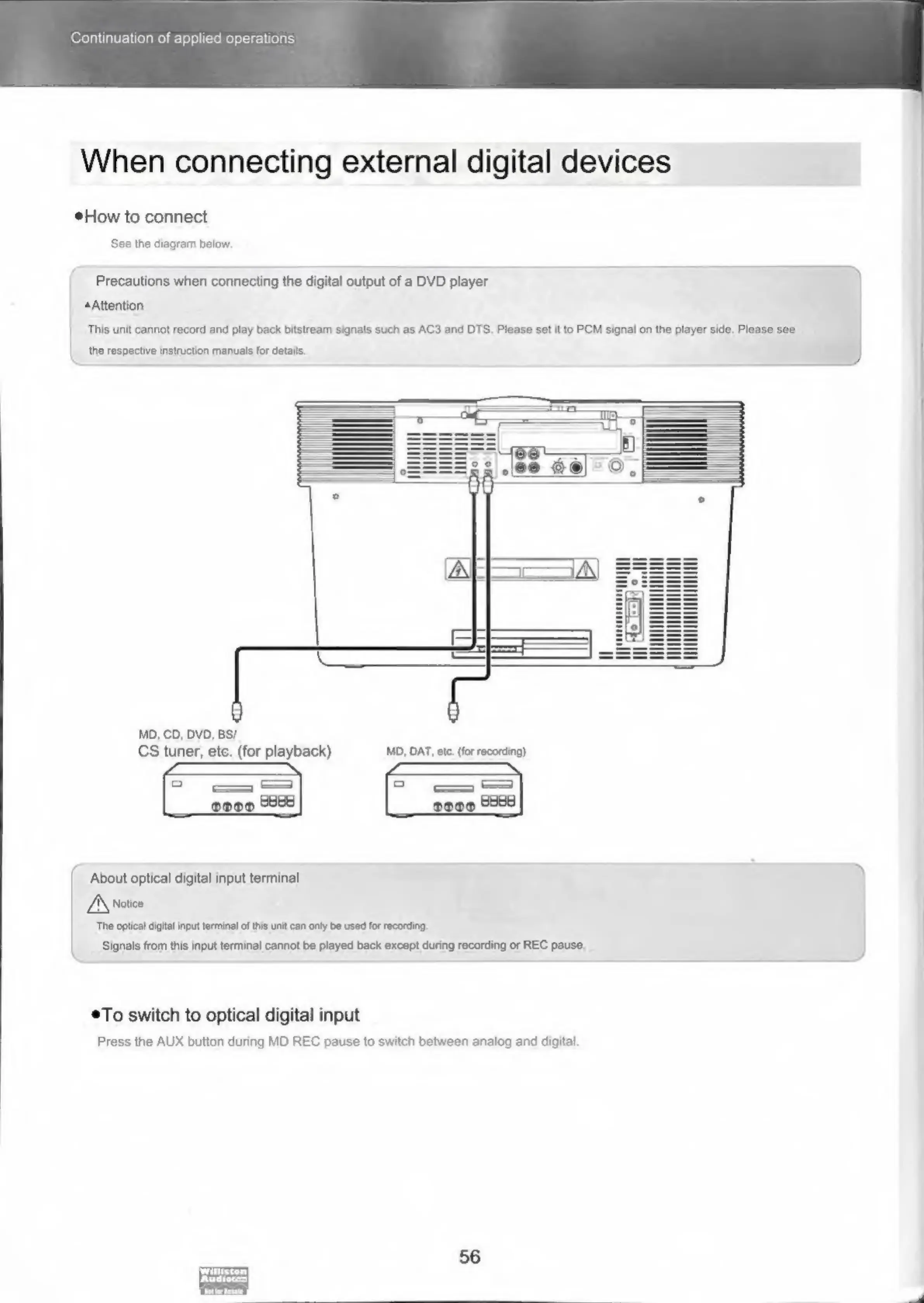
How
to
connect
See
the
diagram
below.
Precautions
when
connecting
the
digital
output
of
a
DVD
player
Attention
|
|.
This
unit
cannot
record
and
play
back
bitstream
signals
such
es
AC3
and
DTS.
Please
set
it
to
PCM
signal
on
the
player
side,
Please
see
|
the
respective
instruction
manuals
for
details.
MD,
CD,
DVD,
BS/
CS
tuner,
ete.
(for
playback)
MD,
DAT,
ete.
(for
recording)
About
optical
digital
input
terminal
]
A\natice
‘The
optical
digital
input
terminal
of
this
unit
can
only
be
used
for
recording
Signals
from
this
input
terminal
cannot
be
played
back
except
during
recording
or
REC
pause.
To
switch
to
optical
digital
input
Press
the
AUX
button
during
MD
REC
pause
to
switch
between
analog
and
digital
56

Related product manuals