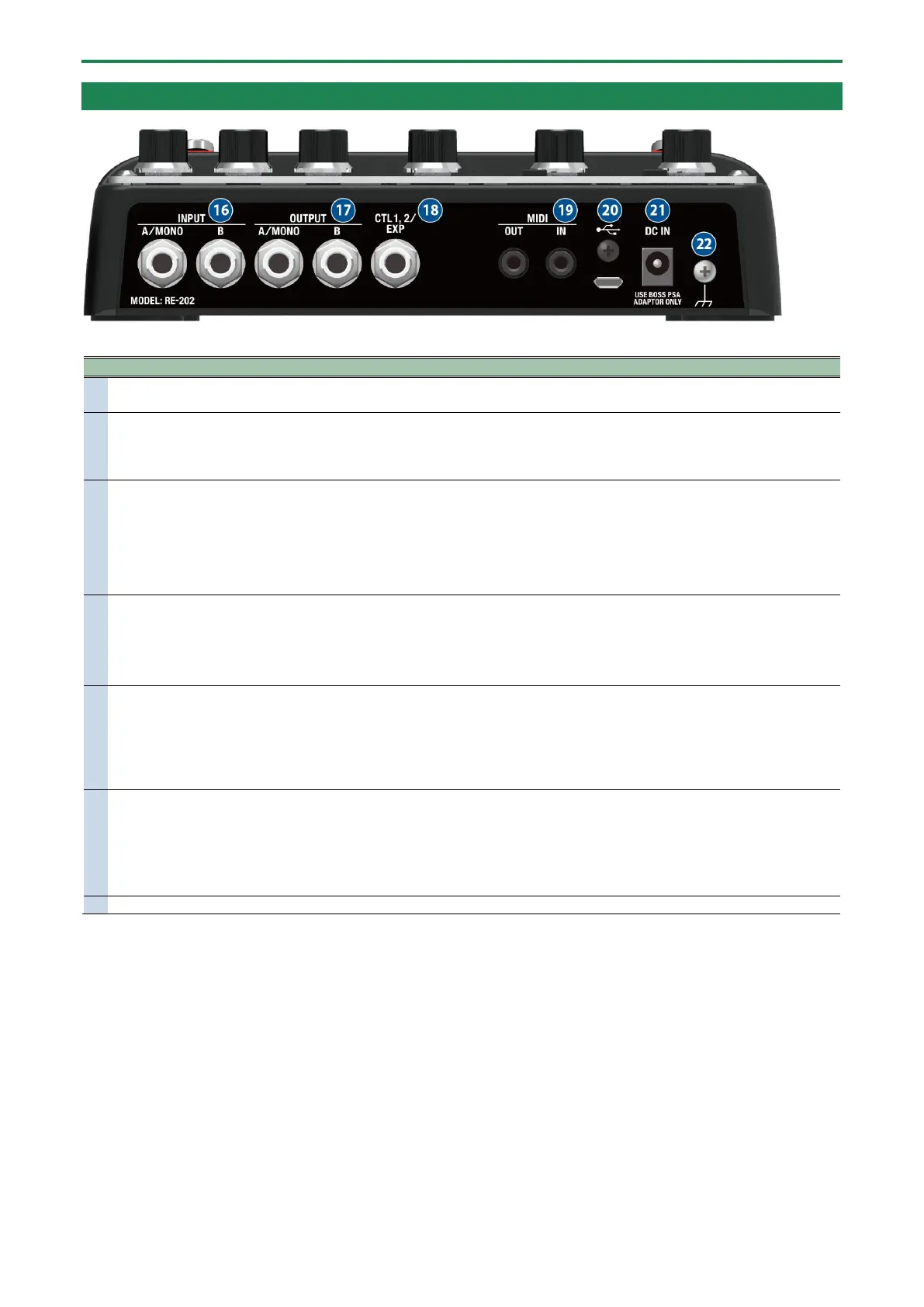
Panel Descriptions
5
Rear Panel
Connect your electric guitar, keyboard, or other musical instruments and effect units to these input jacks.
For mono output, connect to the A/MONO jack.
A/MONO, B
Connect your guitar amp, keyboard amp, other effect units or your mixer here.
When connected to both the A/MONO and B jacks, the reverb effect is heard in stereo if you apply this
effect.
For mono output, connect to the A/MONO jack.
Using as the CTL 1, 2 jack
You can connect a footswitch (FS-5U, FS-6, FS-7; sold separately) to switch between TWIST and WARP effects,
switch memories up/down and so on.
● Using as the EXP jack
Connect an expression pedal (such as the EV-30 or Roland EV-5; sold separately) to continuously change the
effect settings for the expression pedal’s pushed-up (horizontal) position and for the pushed-down (slanted)
connectors
Use TRS/MIDI connecting cables (BMIDI-5-35, BMIDI-1-35, BCC-1-3535; sold separately) to connect this
unit to an external MIDI device.
You can use an external MIDI device to switch between up to 127 memories on this unit.
* Do not use these connectors for connecting to audio devices. Doing so may cause a malfunction.
Connect your computer using a commercially available USB cable that supports USB 2.0.
* Do not use a micro USB cable that is designed only for charging a device. Charge-only cables cannot
transmit data.
* Used only for updating programs.
Connect the AC adaptor to this jack.
* Use only the specified AC adaptor (PSA-series), connected to a 100 V AC power source.
* When you connect the included AC adaptor to the DC IN jack, the unit turns on.
1.4. Turning the power on/off(P.7)
Connect this to an external earth or ground. This should be connected when necessary.
* To prevent malfunction and equipment failure, always turn down the volume, and turn off all the units before making any
connections.






 To Next Page