25
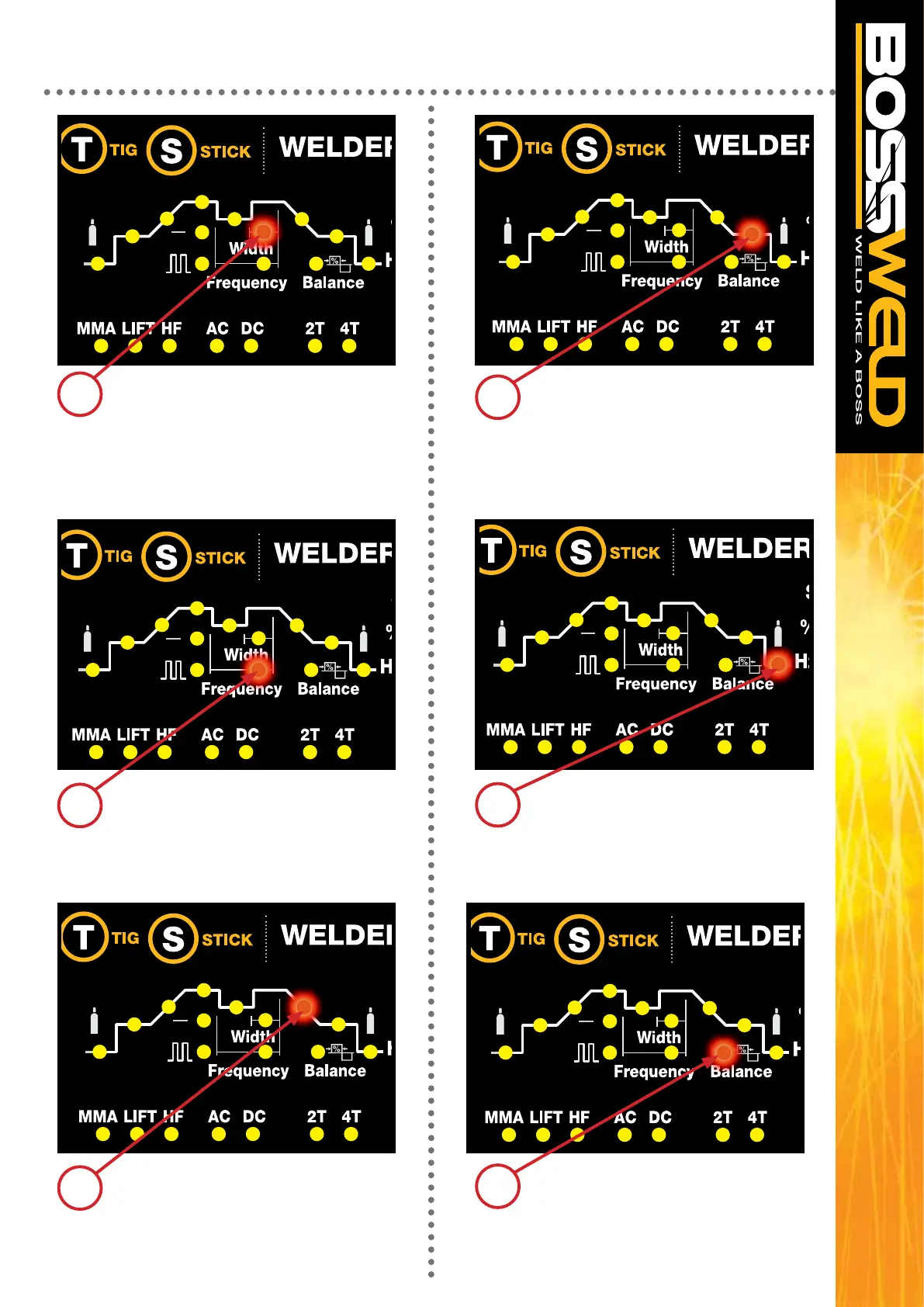
Pressing the Multi-Function Control
knob to cycle to Crater Arc Current then
adjusting to the required parameter
Seconds DC 10- 170
AC 110 – 200
Pressing the Multi-Function Control knob
to cycle to Width or duration of base
current then adjusting to the required
parameter
% 5-95
Pressing the Multi-Function Control knob
to cycle to Post gas then adjusting to the
required parameter
1.0 - 10.0 Seconds
Pressing the Multi-Function Control knob
to cycle to Frequency, then adjusting to
the required parameter
Hz 0.5 – 200
NOTE THIS STEP IS ONLY VALID
IN AC WELDING
Pressing the Multi-Function Control
knob to cycle to Balance then
adjusting to the required parameter
-5- +5 %
Pressing the Multi-Function Control knob
to cycle to Downslope then adjusting to
the required parameter
1.0 - 10.0 Seconds
AC/DC TIG WELD CYCLE SETUP
7
10
11
12
8
9


 To Next Page