11
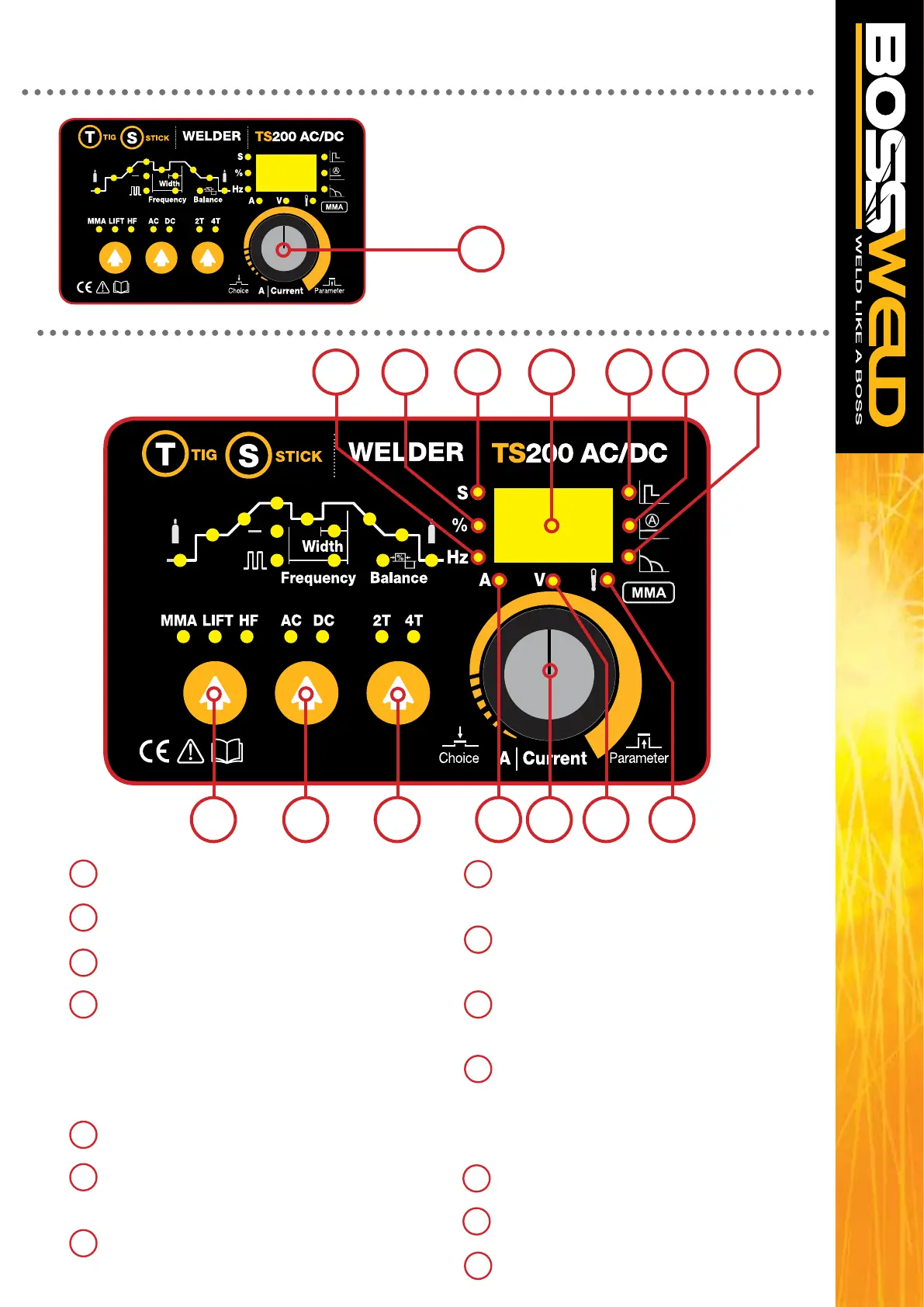
Multi-Function Control Knob
1. Press down to toggle through the menu.
2. Turn clockwise to increase the value
(or anti-clockwise to decrease the value)
of the selected function.
CONTROL PANEL
3
CONTROL DETAILS
15 MMA / LIFT / HF Selection Switch
16 AC / DC Selection Switch
17 2T / 4T Selection Switch
18 Parameter Selection / Adjustment control
press to change between Seconds / % / Hertz /
Amps / Volts, and scroll through weld cycle.
Turn to adjust selected parameter.
the selected parameter will be illuminated
19 LCD Display panel
On or off
20 Illuminates when Seconds is displayed
on LCD panel
21 Illuminates when Percentage is displayed
on LCD panel
22 Illuminates when Hertz is displayed on
LCD panel
23 Illuminates when Amps is displayed on
LCD panel
24 Illuminates when Volts is displayed on
LCD panel
25 Overload Indicator Light
Illuminates when the machine is overloaded
- Thermal Overload (Duty Cycle exceeded)
- Over Temperature
26 Hot Start Indicator
27 Welding Current Indicator
28 Arc Force Indicator
22 21 20 19 26 27 28
15 16 17 23 18 24 25


 To Next Page