24
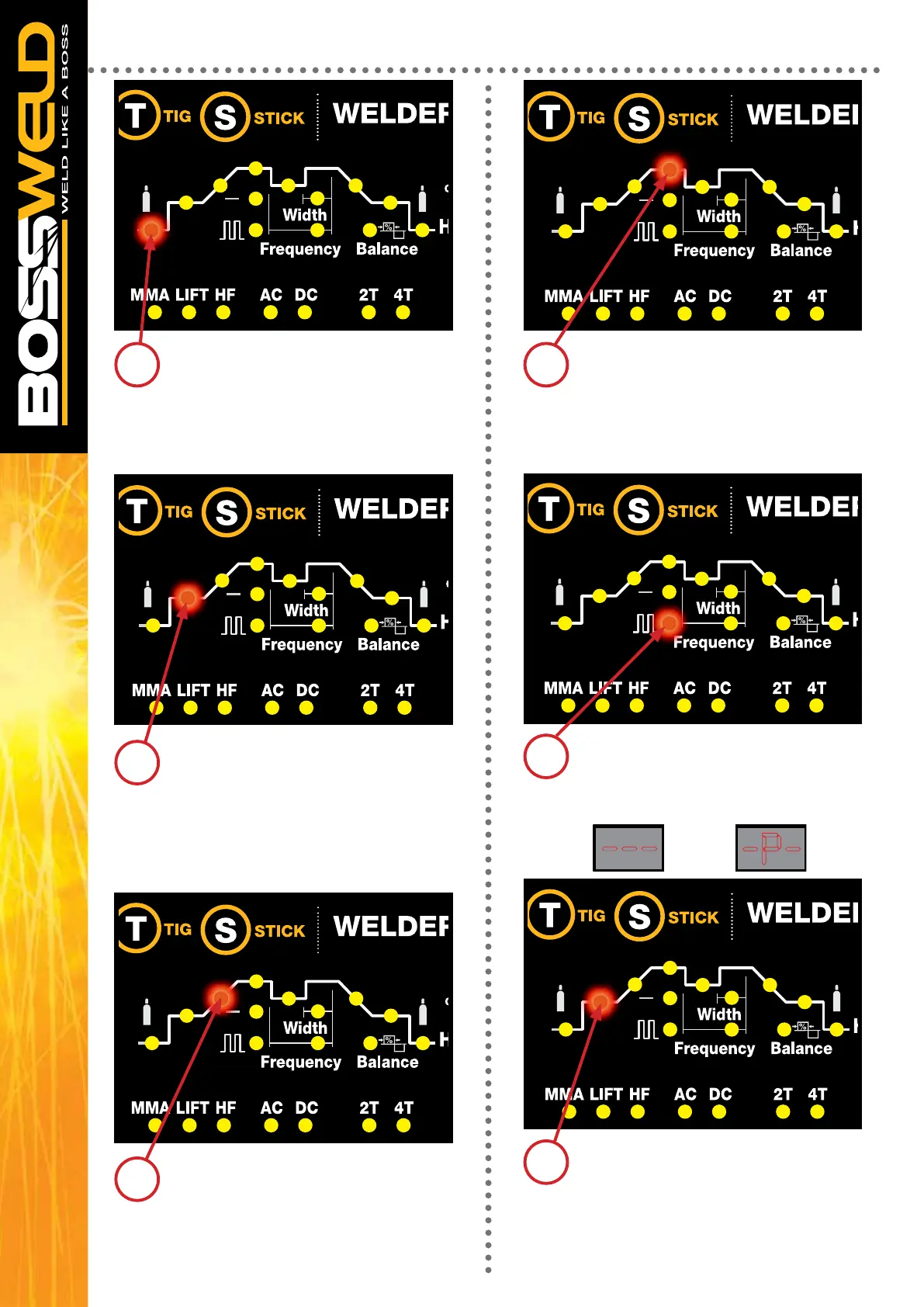
Pressing the Multi-Function Control knob
to cycle to Pre Gas then adjusting to the
required parameter
0.0 - 2.0 Seconds
Pressing the Multi-Function Control
knob to cycle to Peak Current then
adjusting to the required parameter
Amps TIG DC 10 - 170
TIG AC 10 - 200
MMA DC 10 - 200
MMA AC 10 - 200
Pressing the Multi-Function Control
knob to cycle to Start Current then
adjusting to the required parameter
Amps DC 10 - 170
AC 10 - 200
Pressing the Multi-Function Control knob
to cycle to Pulse Function, you can either
select No Pulse or Pulse the digital scree
will display like below
NO PULSE PULSE
Pressing the Multi-Function Control
knob to cycle to Upslope then
adjusting to the required parameter
1.0 - 10.0 Seconds
NOTE STEPS 6 to 8 ONLY VALID
IF PULSE IS SELECTED
Pressing the Multi-Function Control knob
to cycle to Base Current then adjusting to
the required parameter
Amps TIG DC 10- 170
TIG AC 10- 200
MMA DC 10- 200
MMA AC 10 – 200
-P----
1 4
2
5
3
6
AC/DC TIG WELD CYCLE SETUP


 To Next Page