Owner’s Manual
37
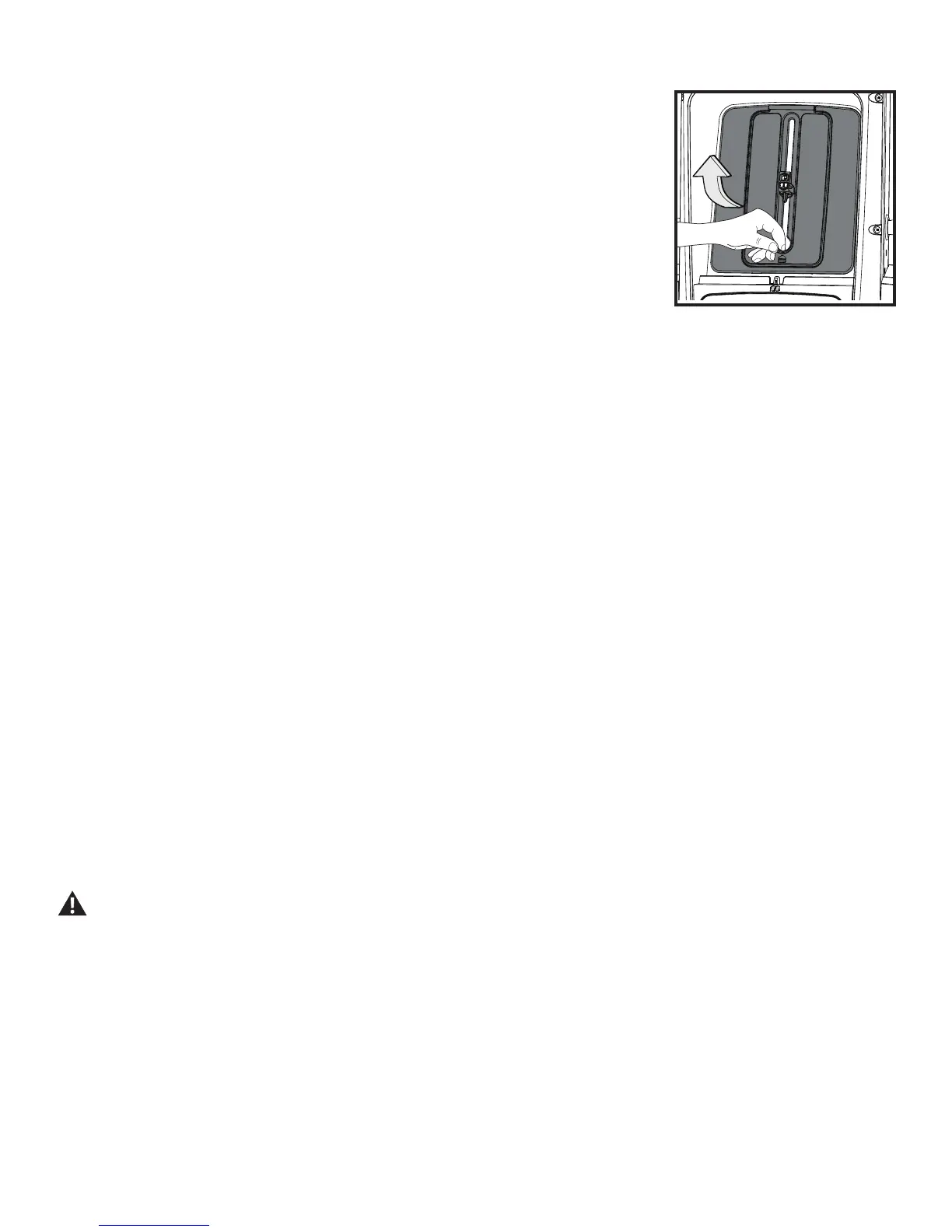
Accessory Storage Area behind Media Shelf
When the Bowex
®
HVT™ machine is not in use, place the Training Guide inside the Accessory Storage
Area. The Accessory Storage Area is within the Upper Shroud behind the Media Shelf. With nothing on the
Media Shelf, lift and pull outward the Media Shelf backing.
The clasp can be rotated to hold the Training Guide by inserting it into the spiral binding, or rotate and adjust
to the height of the device you have on the Media Shelf.
Connectivity on your fitness machine
This tness machine is equipped with Bluetooth
®
connectivity and can wirelessly connect with the “Bowex
®
HVT™” Software Fitness App on supported iOS and Android™ devices. When connected with the Software App, the Bluetooth
®
icon will activate. If
the icon light is not on, then the tness machine is not connected to the device.
The “Bowflex
®
HVT™” App
The “Bowex
®
HVT™” App connects with your tness machine to provide the sequence of exercises that make each of the workout programs. Each
exercise is presented with hints, descriptions, and video demonstrations. The App tracks the total time, calories burned, power score, resistance, and
heart rate (if supplied). Track your results and share with friends and family. Once you understand how the Bowex
®
HVT™ machine works with your
body, you can create your own workout program on the App.
1. Download the free App, named “Bowex
®
HVT™”. The App is available on Google Play™ and iTunes
®
.
2. Follow the instructions on the App to pair your device to your exercise machine.
Frequently asked questions and installation videos for the Software App can be found online at www.Bowex.com/help.
USB Charging
If a USB Device is attached to the USB Port, the Port will attempt to charge the Device. The power supplied from the USB Port may not be enough to
operate the Device and charge it at the same time.
Remote Heart Rate Monitor
Monitoring your Heart Rate is one of the best procedures to control the intensity of your exercise. The Console reads the telemetry HR signals from
the Heart Rate Chest Strap Transmitter that operates in the 4.5kHz - 5.5kHz range.
Note: The heart rate chest strap must be an uncoded heart rate strap from Polar Electro or an uncoded POLAR
®
compatible model. (Coded
POLAR
®
heart rate straps such as POLAR
®
OwnCode
®
chest straps will not work with this equipment.)
If you have a pacemaker or other implanted electronic device, consult your doctor before using a wireless chest strap or other
telemetric heart rate monitor.
Heart Rate Calculations
Your maximum heart rate usually decreases from 220 Beats Per Minute (BPM) in childhood to approximately 160 BPM by age 60. This fall in heart
rate is usually linear, decreasing by approximately one BPM for each year. There is no indication that training inuences the decrease in maximum
heart rate. Individuals of the same age could have different maximum heart rates. It is more accurate to nd this value by getting a stress test than by
using an age related formula.
Your at rest heart rate is inuenced by endurance training. The typical adult has an at rest heart rate of approximately 72 BPM, where as highly
trained runners may have readings of 40 BPM or lower.






 To Next Page