13
Contact Customer
Care for Advanced
Troubleshooting
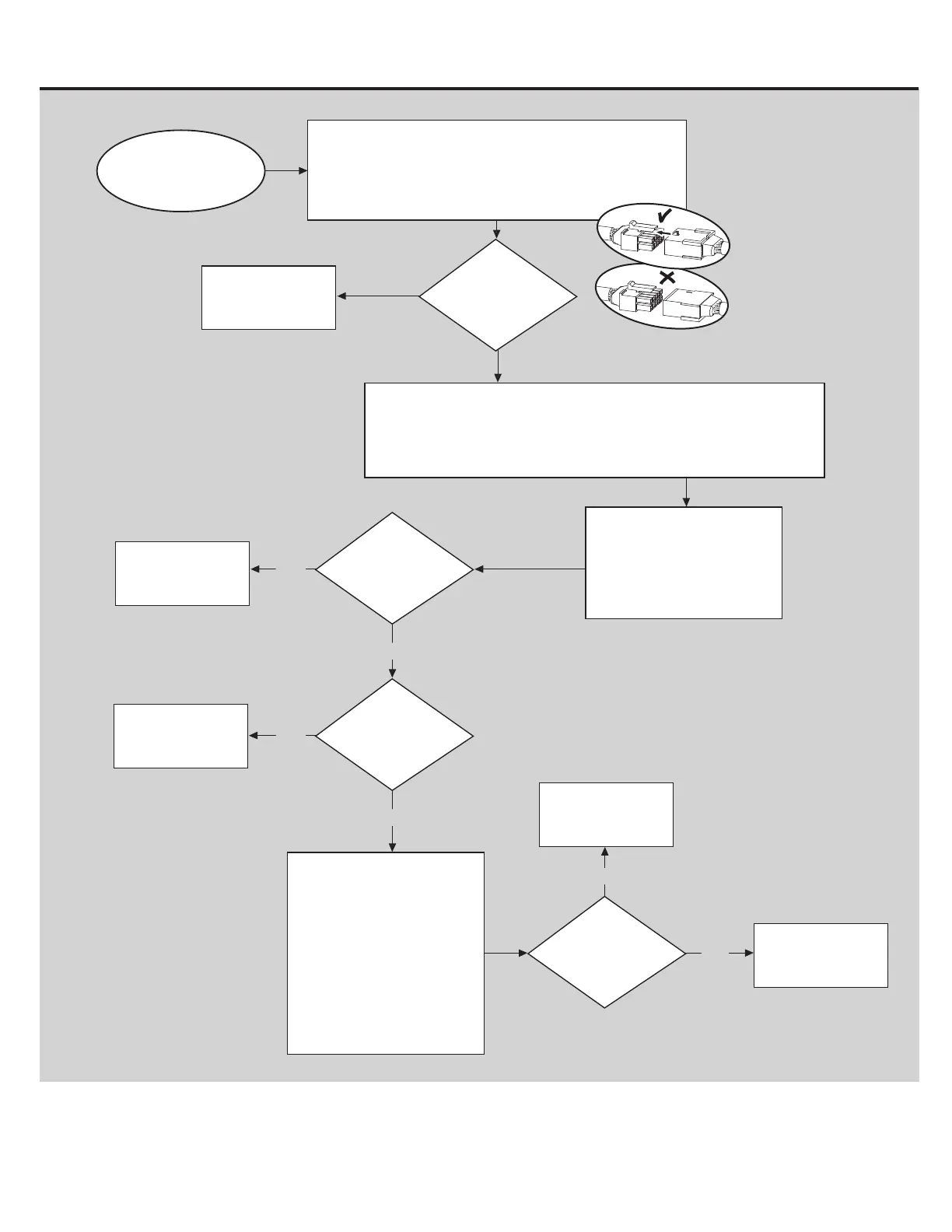
YES
Machine Goes to Sleep While in Use
BEGIN HERE
Replace the Speed
Sensor Assembly
Issue resolved.
YES
NO
Does the issue
persist?
Is the sensor wire
unplugged from the
main wire harness?
Rotate the fan so that one of the
magnets meets the tip of the
sensor. Adjust the sensor so
that there is an 1/8 inch (3mm)
gap between the sensor and the
magnet (about the thickness of
2 pennies held together).
Plug the power back in and test
the machine.
NO
YES
Is the sensor
damaged?
NO
Issue resolved.
The speed sensor is located at
the front of the frame pointing at
the fan. Look closely at the tip of
the sensor and check for any
damage.
Remove the hardware from the right lower round cover. To remove the right
lower round cover, the power plug inlet wire must be gently released from the
inside of the cover.
Once the power plug inlet wire is released, remove the cover from the machine.
YES
YES
Plug the cable in.
Remove console from console mast.
Unplug I/O cables and inspect for damage. Reconnect cables.
Each Cable connector (3-pin, 4-pin, 5-pin and 12-pin) has a
corresponding end connector with that many openings. Be
sure to orient the cables properly (as shown), and to fully connect
the cable connectors.
NO
Was a cable already
unplugged?














 To Next Page