8
Part Names
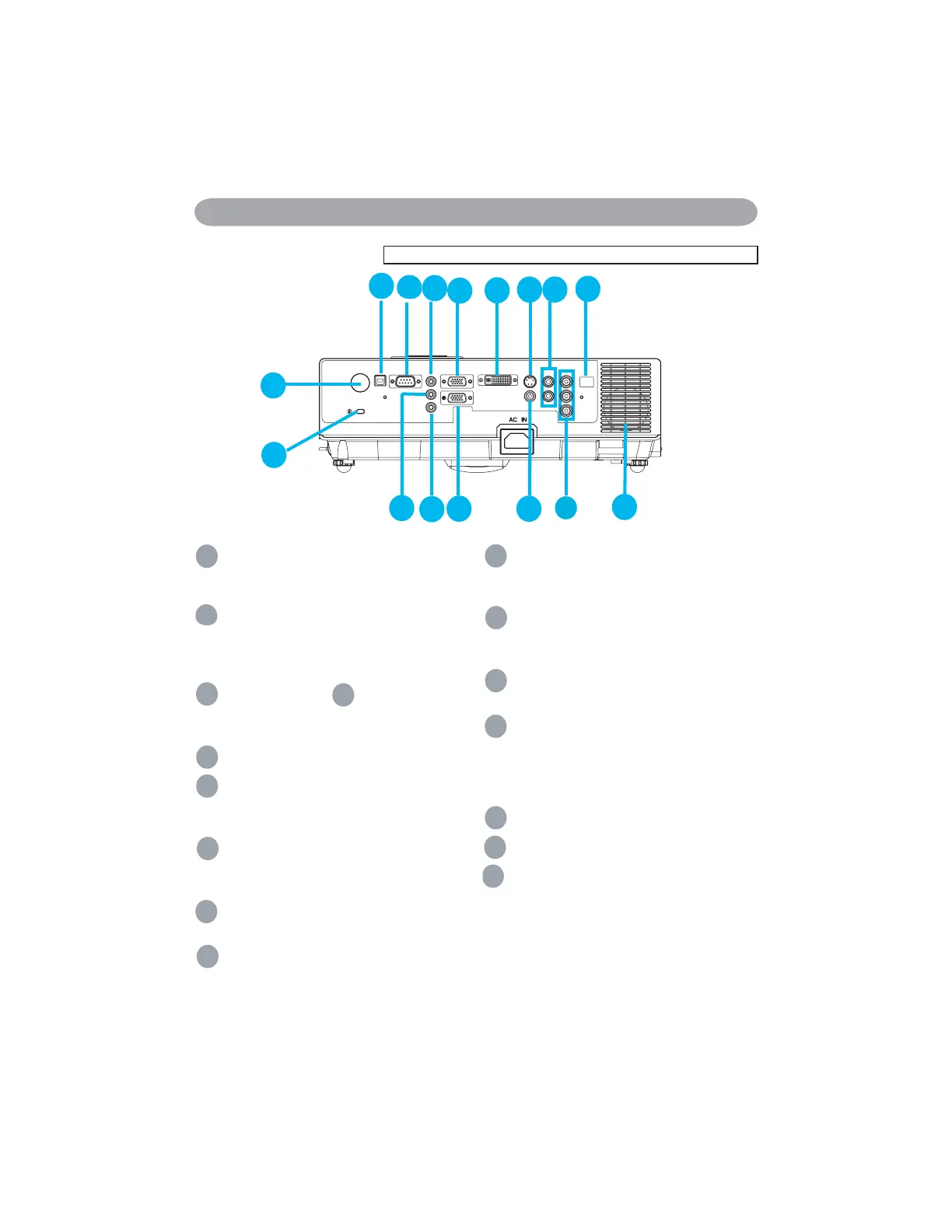
Rear
A
MOUSE
Connect a USB mouse cable to a computer
to control computer mouse functions.
B
RS232
Serial data port for controlling the projector
with a computer or other RS-232 control
device.
C
Audio IN 1 &
D
Audio IN 2
Mini jack port corresponds to computer
input.
E
Audio Out
F
RGB IN
Input analog RGB video signal from a
computer.
G
RGB OUT
Connect an external monitor to this
connection to view the “RGB IN” input.
H
DVI-I IN
Input digital DVI-I signal from a computer.
I
S-VIDEO
S-Video signal from a video source.
J
VIDEO
Component video signal from a video
source.
K
AUDIO IN 3, R / L
Stereo mini jack corresponds to video
input.
L
COMPONENT ,Y / Pb / Pr
Input Y,Pb,Pr signal from a DVD player.
M
LAN (Optional)
This function is optional.
Please see page 34 Network Control
Application for details.
N
Rear IR receiver
O
SPEAKER
P
Slot for Kensington Micro Saver
Security System
Built-in Security Slot
This security slot supports the MicroSaver
®
Security System. MicroSaver
®
is a registered
trademark of Kensington Microware Inc.
The logo is trademarked and owned by
Kensington Microware Inc.
A
B
C
D
E
F
G
H
I
J
K
L
M
N
P
O
3OHDVHFOLFNKHUHLI\RXUSURMHFWRULVZLWKKLJKHI¿FLHQF\¿OWHU


 To Next Page