26
MENU (PC Mode)
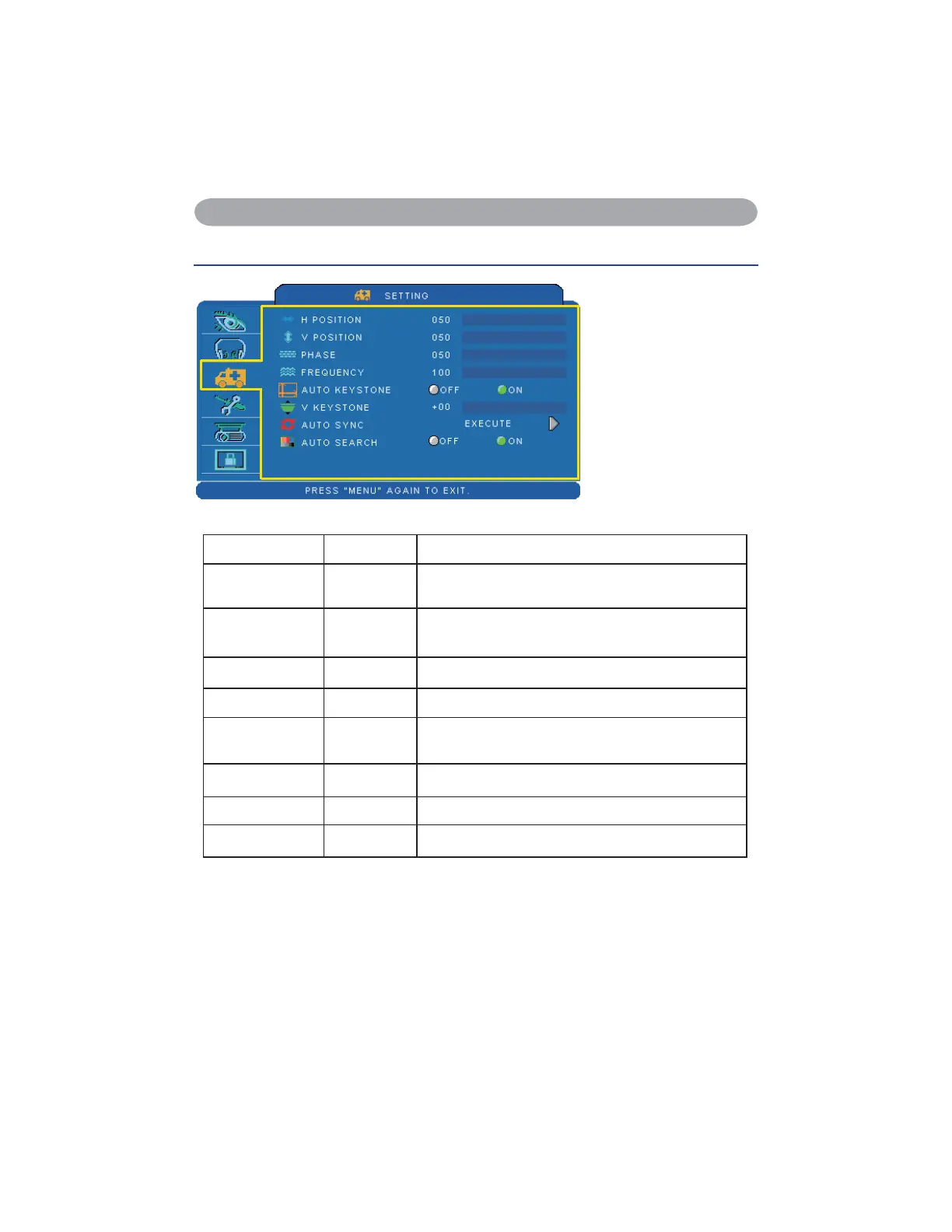
Setting Menu
Step:
8VHWKHŸźEXWWRQV
to select an item.
8VHWKHŻŹEXWWRQV
to select an item or
adjust the value.
Item Selection Description
H POSITION 000/100
Move the image position horizontally.
This function is only selected for computer signal.
V POSITION 000/100
Move the image position vertically.
This function is only selected for computer signal.
PHASE 000/100 Adjust the image sharpness.
FREQUENCY 000/200 Set the horizontal scanning frequency.
AUTO
KEYSTONE
OFF/ON Correct keystone distortion in image automatically.
KEYSTONE V -70/+70 Correct vertical keystone distortion in image manually.
AUTO SYNC EXECUTE Set all of the above setting automatically.
AUTO SEARCH OFF/ON Search signal source manually or automatically.
*DVI doesn't support H POSITION, V POSITION, PHASE, FREQUENCY and AUTO SYNC.


 To Next Page