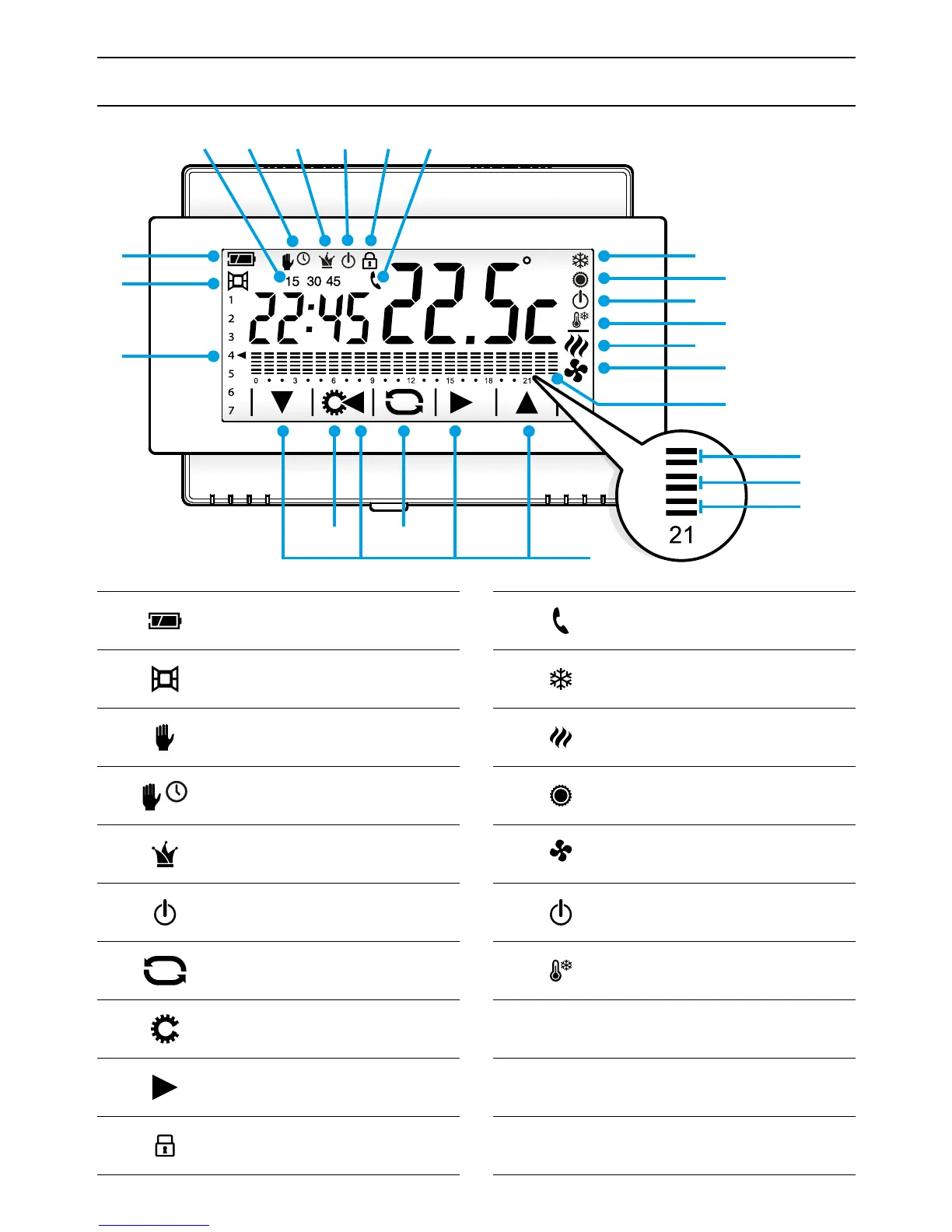
①
Battery charge status
(only on battery-powered version)
②
Window contact active
(only on battery-powered version)
③
Thermal zone in Manual
Mode
③
Thermal zone in timed Manual mode
④
Thermal zone in All-purpose mode
⑤
Thermal zone excluded from control
⑥
Button to change thermal zone mode
⑦
Button to access device set-up
⑧
Navigation buttons
⑨
Screen lock on
⑩
Remote activation in progress
(only on battery-powered version)
⑪
System in heating mode
⑫
Boiler in operation
⑬
System in cooling mode
⑭
Cooler in operation
⑮
System o
⑯
System in frost-protection mode
⑰
Delay set for thermal set-up
⑱
Days of the week; the arrow indicates the day
displayed on the diagram
⑲
T1, T2. T3 hours/temperature diagram
Description of device



 To Next Page