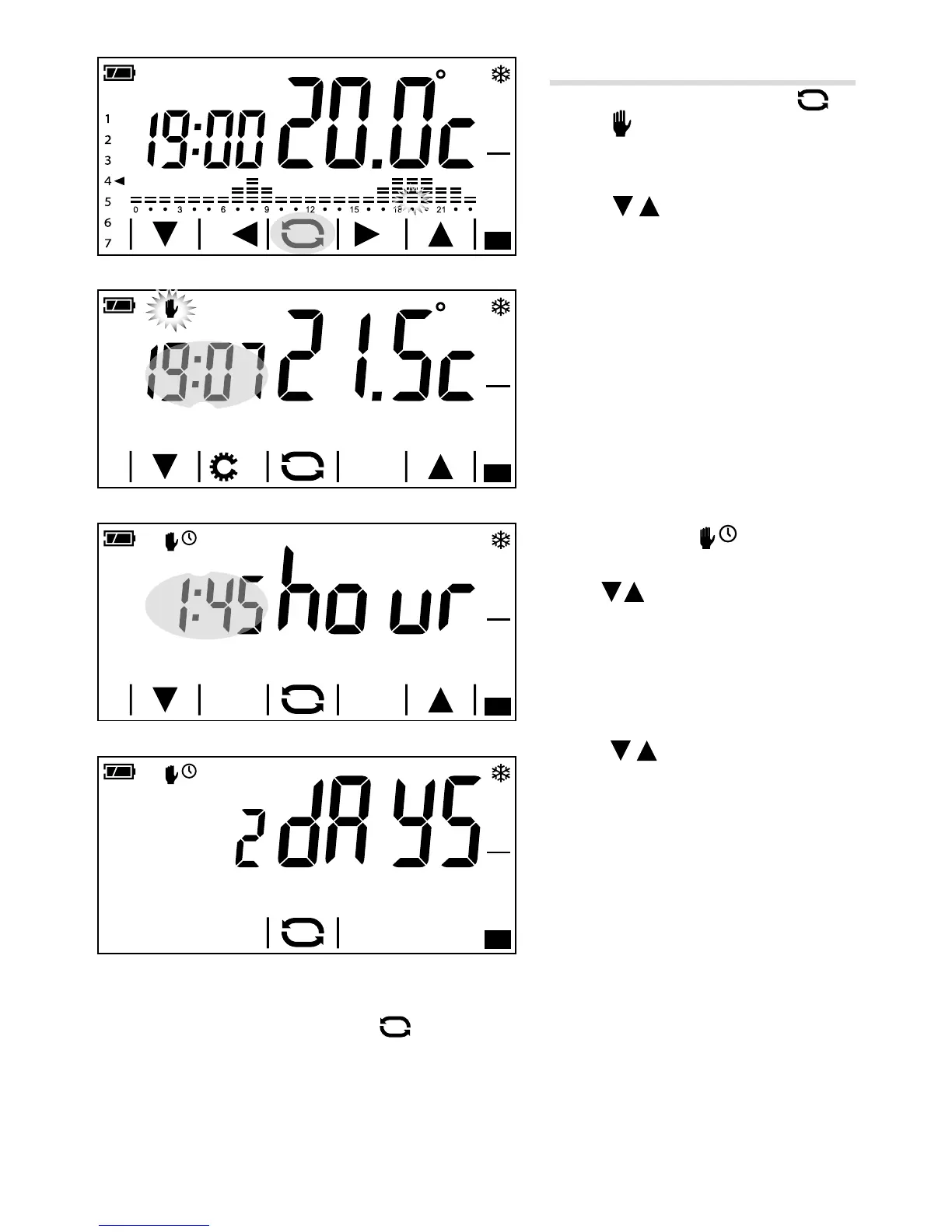
Manual mode
To activate this mode press button A
until the
icon appears B.
Use the
arrows to set the desired
zone temperature B; the value entered
will remain valid until the operating mode
or value set is changed.
Note. If no button is pressed for 5 seconds
the device goes back to showing the tem
-
perature detected.
Timed manual mode
If you want to keep the temperature manual
for a limited period, briey press on area ①
of gure B.
The appearance of the
icon C indicates
that timed manual mode has been activated;
use the
arrows to set the value in hours
and minutes (in 15 minute portions) during
which the mode will be active.
If you want to set an activation time for the
timed manual mode that is greater than 24
hours, press on area ① of gure C and
use the
arrows to set the value in
days during which the mode will be active.
If no button is pressed for 5 seconds
the adjusting arrows disappear and the
countdown begins D.
When the period set is over, the device will go back to operating in automatic mode. To stop timed manual
mode just change mode by pressing the
button.



 To Next Page