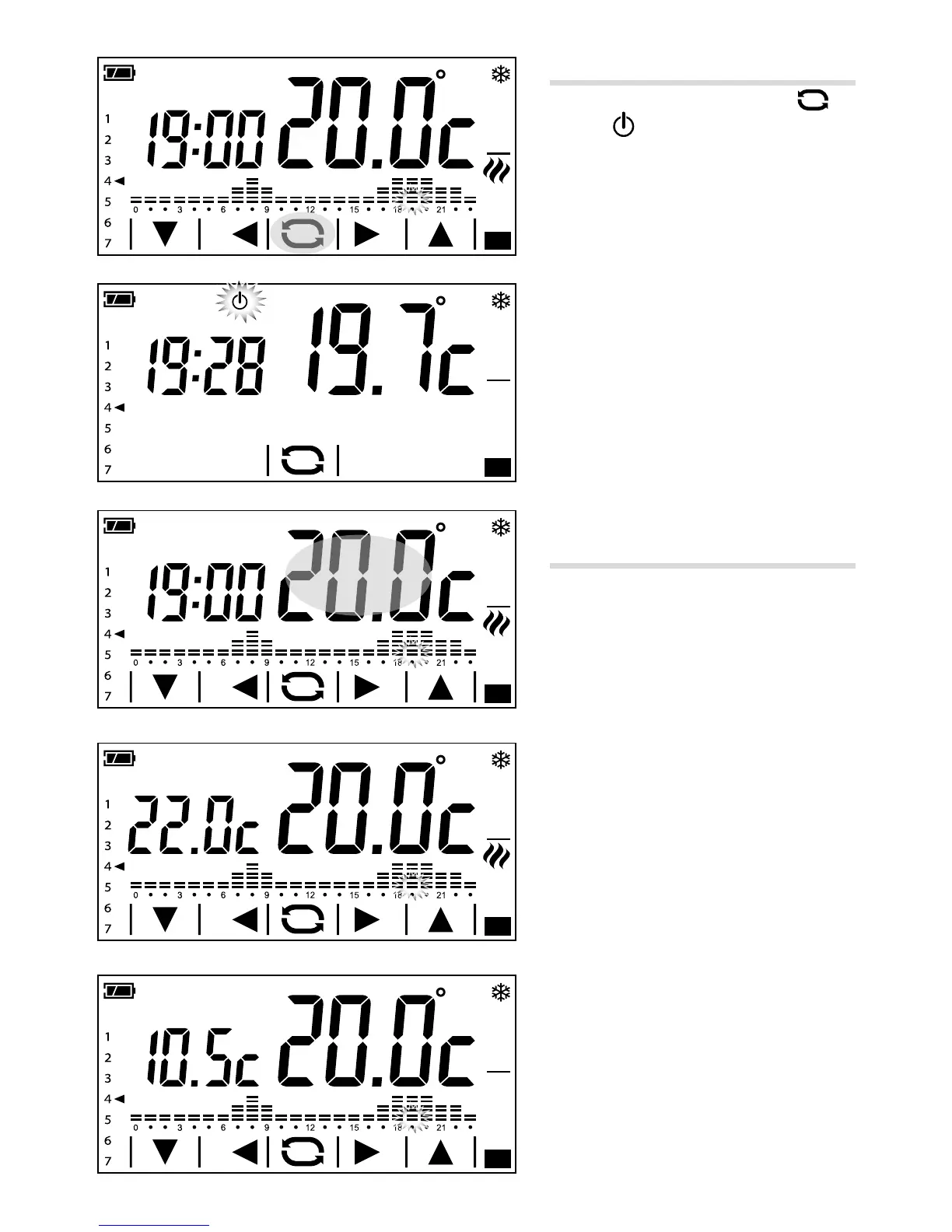
Exclusion from thermal control
To activate this mode press button A
until the
icon appears B.
If the system is in "Heating" mode, the
frost-protection function remains on.
The frost-protection temperature set is shown
for a few seconds, then the current time and
temperature detected are displayed.
If the system is in "Cooling" mode, the control
will be totally excluded.
Other information that can be
displayed on the main page
By briey pressing on the area where the
temperature detected is displayed C, the
objective temperature (set point) is displayed
in place of the time D.
Press again on the area where the temper
-
ature detected is displayed to return to the
previous display mode.
Displaying the temperature detected
by an external probe
If an external probe, set as secondary, is
connected to the device, by briey pressing
on the area where the temperature detected
is displayed C, the temperature detected
by the external probe is displayed in place
of the time E.
Press again on the area where the tempera
-
ture detected by the main probe is displayed
to return to the previous display mode.



 To Next Page