EN
EN
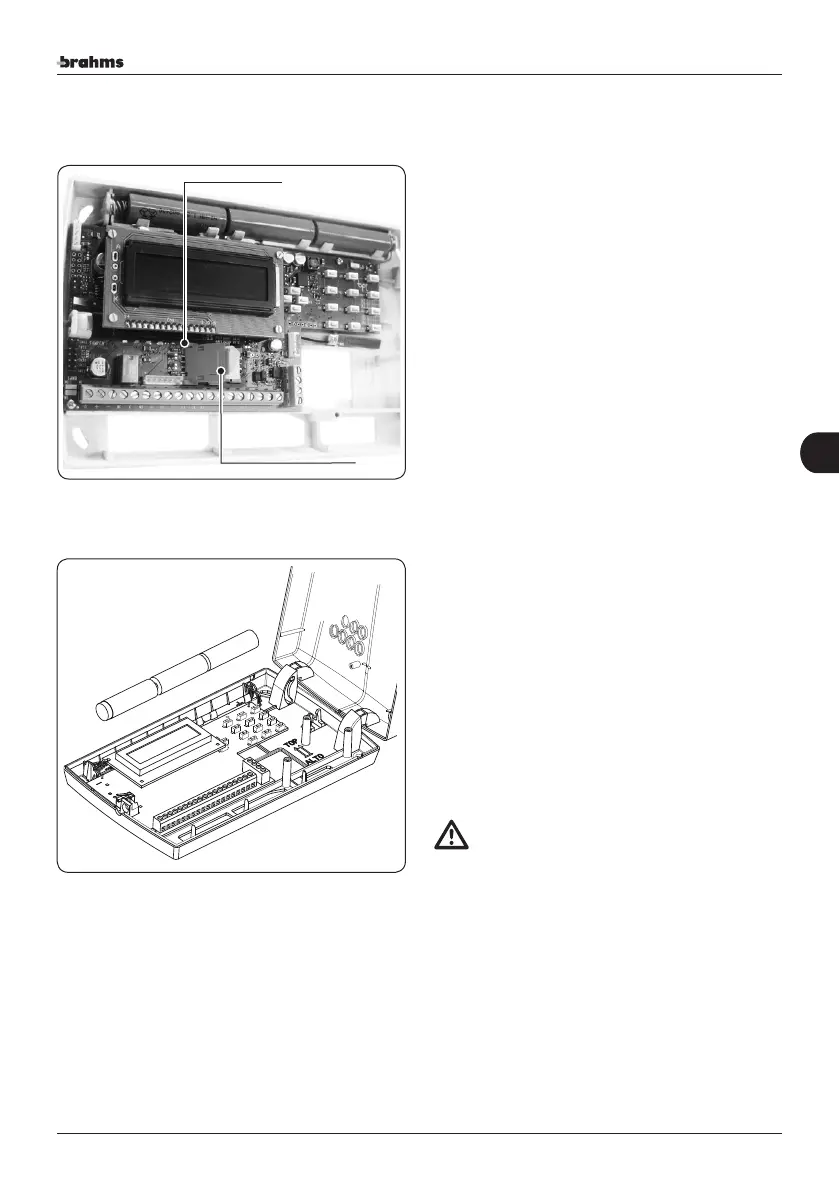
Sim Card insertion
In order to operate, the device must be equipped with a
SIM card, not included in the package, to be inserted in the
appropriate housing.
The SIM card must be inserted when the system is turned
off completely (disconnected from the power supply).
If the SIM card is new, prior to inserting it into the GSM
telephone dialler, make a call by inserting it into a cell
phone thus allowing the mobile telephone operator to
register the card.
The device requires that the SIM cards are enabled only for
voice and SMS (No SIM data cards!)
Before carrying out the programming operation, deacti-
vate the SIM card PIN code.
Battery housing
For safe and effective GSM telephone dialler operation,
it is recommended to install the back-up batteries (not
included).
The batteries MUST be housed in the GSM telephone dial-
ler when it is completely turned off (disconnected from
the power supply).
The GSM telephone dialler will send a “Battery Fault”
signal (if installed) if the voltage across the battery set is
below3.6 Vcc.
ATTENTION
• Only use AA nickel-metal hydride batteries with a
capacity of at least 2.2 ah.
SIM card
SIM card housing
47
Installer's Manual-Assembly instructions
47


 To Next Page