Setting and changing the address book via SMS
All models have an address book for 20 telephone numbers.
The address book of the numbers to call in the case of an alarm can be configured from a PC (all models), via SMS (all
models) or from the display (only for models GSM11 and GSM21).
PC configuration requires the installation of the optional application GSM
MANAGER
(refer to the software manual). For setting
via the display, refer to the “Setting manual”
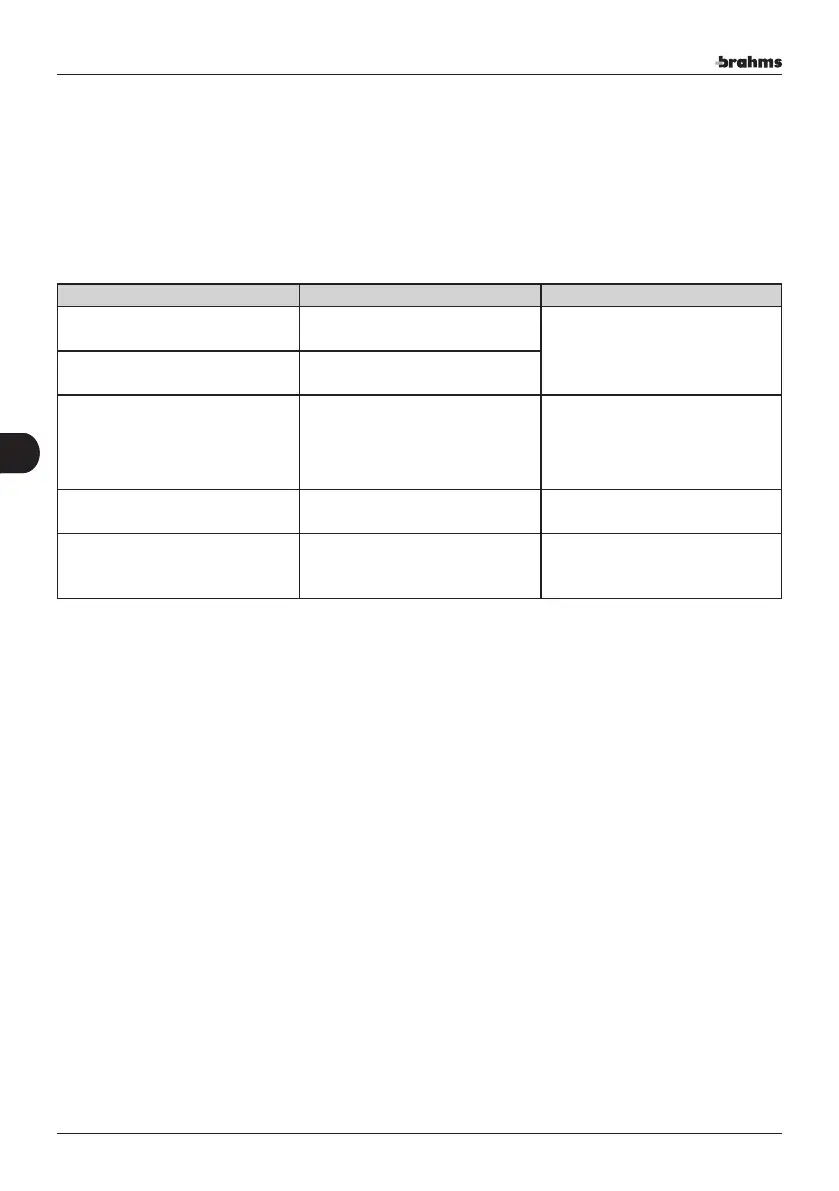
Setting via SMS is done by sending an SMS, as listed in the table below, to the GSM telephone dialler's SIM card.
SMS syntax Description Value legend
MODNUMTEL.x.numtel.
Adds the telephone number “num-
tel” to the user.
X: user number (1-20).
MODNUMTEL.x._.
Deletes the telephone number
associated with the user.
MODNUMTEL.numtel1.numtel2.
Replaces a number already present in
the address book with a new number.
numtel1: telphone number already
present in the address book
numtel2: telephone number to
be entered in place of the existing
number.
MODNUMTEL.y._.
Deletes the telephone number from
the address book.
Y: telephone number to be deleted
from the address book.
MODNUMTEL._.numtel.
Enters the “numtel” telephone
number in the first available loca-
tion.
MODNUMTEL is used to add, replace or delete numbers in the address book.
The SMS syntax varies as needed. The feedback of an SMS identical to the one sent means that the command has been
correctly received and implemeted by the Dialler.
The examples below explain the above table.
MODNUMTEL.X.numtel.
X represents the sequential number of the user in the address book (possible values 1-20);
numtel represents the telephone number to be associated with user X.
The telephone number must be written in the format +39335xxxxxx (the country code must always be indicated).
MODNUMTEL.numtel1.numtel2.
numtel1 telphone number to be modified.
numtel2 telephone number to be existing.
Y represents the new number to be used to change a number already in the address book.
The telephone number must be written in the format +39335xxxxxx (the country code must always be indicated).
MODNUMTEL._.numtel.
numtel represents the telephone number to be added to the address book. In this case, the telephone number will be
entered in the first available location in the address book.
The telephone number must be written in the format +39335xxxxxx (the country code must always be indicated).
52
Installer's Manual-Dialler use
52
EN


 To Next Page