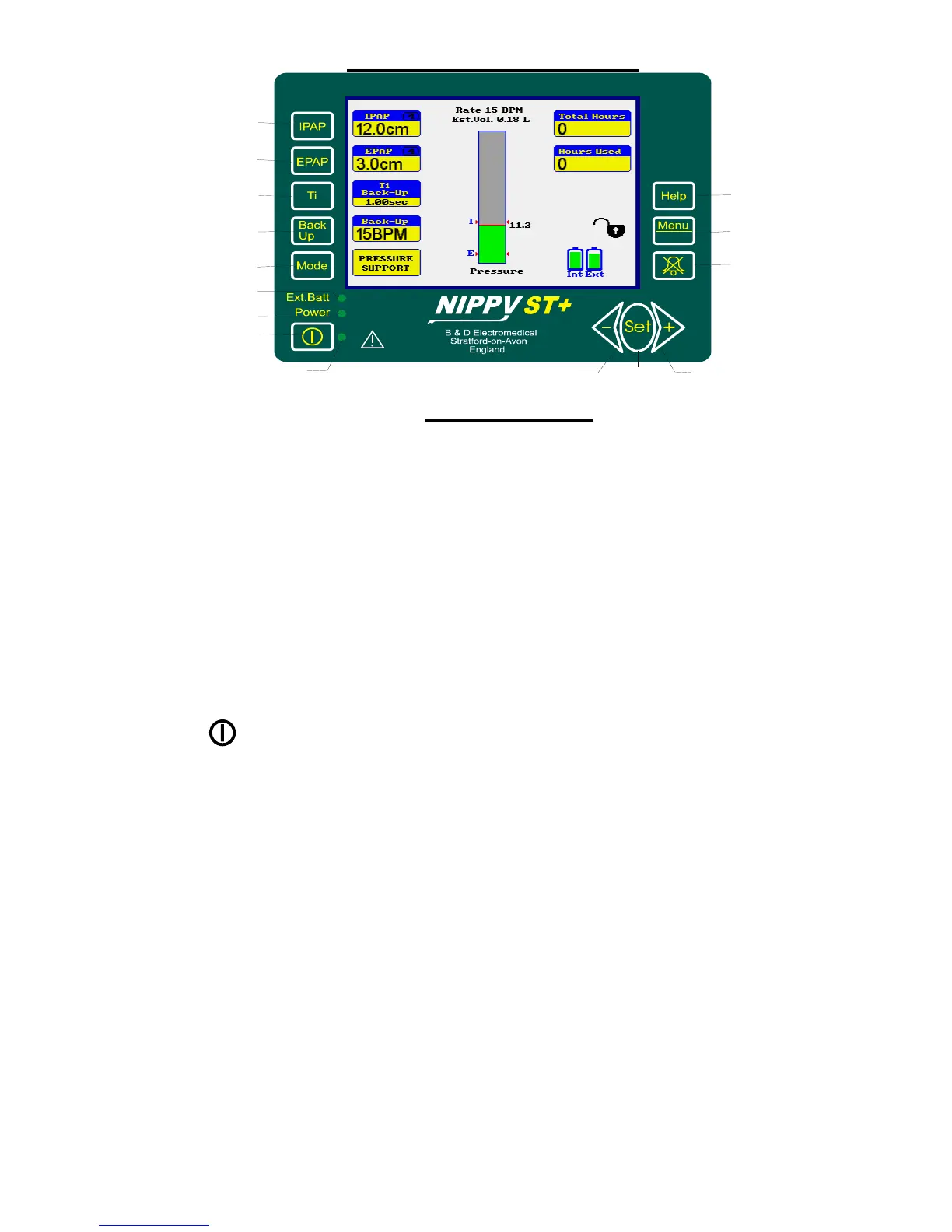
Fascia Buttons
1. IPAP - Selects the Inspiratory Positive Airway Pressure
adjustment (scaled in cm H
2
O). Value is displayed on
screen adjacent to the switch.
2. EPAP - Selects the Expiratory Positive Airway Pressure
adjustment (scaled in cm H
2
O). Value is displayed on
screen adjacent to the switch.
3. Ti - Selects the inspiratory time adjustment (scaled in
Seconds). Value is displayed on screen adjacent to the
switch.
4. Back up - Selects the Back-up Rate adjustment (scaled in Breaths
Per Minute). Value is displayed on screen adjacent to
the switch.
5. Mode - Displays the mode selection screen
6. - Starts and Stops the ventilator
7. ◄- - Decrements the selected parameter or moves the
selection bar down the menu.
8. Set - Selects the current menu function displayed by the
selection bar
9. +► - Increments the selected parameter or moves the
selection bar up the menu
10. Mute - Silences the alarm for 2 minutes. Press and hold for 2
seconds to cancel alarm mute.
11. Menu - Displays the menu screen
12. Help - Displays context sensitive help messages.
13. Ext. Batt - Indicates that ventilator is running on battery power.
This may be internal or external
14. Power - Indicates that external power is connected.
Ext Batt OFF and Power ON = Battery charging
15. Start - Indicates that the ventilator is running.



 To Next Page