10
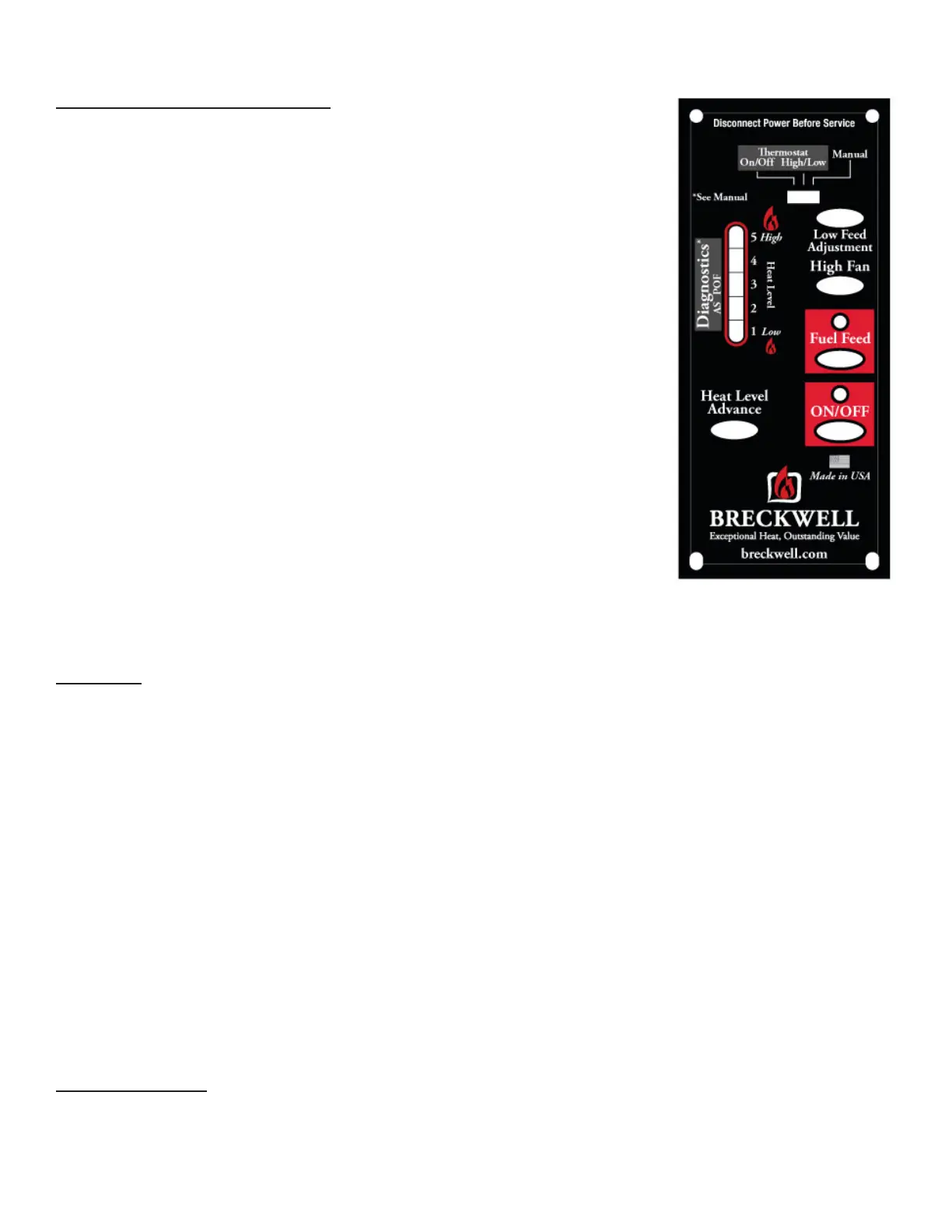
PANEL CONTROLS (SEE FIGURE 12)
The blowers and automatic fuel supply are controlled from a panel on the left-
hand side of this unit. The control panel functions are a follows.
a. ON/OFF SWITCH
• When pushed, the stove will automatically ignite. No other restarter is
necessary. The igniter will stay on for at least 10 and up to 15 minutes,
depending on when Proof of Fire is reached. The re should start in about 5
minutes.
• The green light located above the ON/OFF button (in the ON/OFF box) will
ash during the ignition start-up period. (See Figure 12)
• The Heat Level Advance is inoperable during the ignition start-up period.
When the green light continuously stays on, the Heat Level Advance can be
adjusted to achieve the desired heat output.
NOTE: If the stove has been shut off, and you want to re-start it while it is still
warm, the “On/Off” button must be held down for 2 seconds.
b. FUEL FEED SWITCH
• When the “Fuel Feed” button is pushed and held down, the stove will feed
pellets continuously into the burnpot.
• While the stove’s auger system is feeding pellets, the green light (in the “Fuel
Feed” box) will be on. (See Figure 12)
CAUTION: DO NOT USE THIS CONTROL DURING NORMAL OPERATION BECAUSE IT
COULD SMOTHER THE FIRE AND LEAD TO A DANGEROUS SITUATION.
c. HIGH FAN SWITCH
• The room air fan speed varies directly with the feed rate. The “High Fan”
switch overrides this variable speed function. It will set the room air blower
speed to high at any feed rate setting.
• When the “High Fan” button is pushed, the room air fan will switch to its
highest setting.
• When this button is pushed again, the room air fan will return to its original setting based on the Heat Level
Advance setting.
RESET TRIM
Different sizes and quality pellet fuel may require adjustment of the “1” feed setting on the Heat Level Advance
bar graph. This is usually a one-time adjustment based on the fuel you are using. The “Reset Trim” button, when
adjusted, will allow for 3 different feed rate settings for the #1 feed setting only. To adjust, simply push the “Reset
Trim” button while the stove is operating at setting “1” and watch the bar graph.
• When the “1” & “3” light are illuminated on the bar graph, the low feed rate is at its “lowest” setting. (approx.
0.9 pounds per hour)
• When the “1” light is illuminated on the bar graph, the low feed rate is at its “normal” setting.
• When the “1” & “4” lights are illuminated on the bar graph, the low feed rate is at its “highest” setting.
NOTE: When the stove is set on “1” the “Reset Trim” values will be shown in the Heat Level Advance bar graph.
For example: if the “Reset Trim” is set to its lowest setting every time the stove is set to low, the “1” and “3” lights
will be illuminated on the bar graph.
d. HEAT LEVEL ADVANCE
• This button, when pushed, will set the pellet feed rate, hence the heat output of your stove. The levels of
heat output will incrementally change on the bar graph starting from level “1” to “5.”
NOTE: When dropping 3 or more heat level settings (4 to 1, or 5 to 2 or 1), push the “High Fan” button and allow
the room air fan to run at that setting for at least 5 minutes to prevent the stove from tripping the high temp
thermodisc. If the high temp thermodisc does trip, see “SAFETY FEATURES.”
CAUTION: THE “5” SETTING IS DESIGNED FOR TEMPORARY USE ONLY. IF USED FOR EXTENDED PERIODS, IT CAN
SHORTEN THE LIFE EXPECTANCY OF THE UNITS COMPONENTS. AVOID USE AT THIS SETTING FOR MORE THAN ONE OR
TWO HOURS AT A TIME.
TAMPER WARNING
This wood heater has a manufacturer-set minimum low burn rate that must not be altered. It is against federal
regulations to alter this setting or otherwise operate this wood heater in a manner inconsistent with operating
instructions in this manual.
Operation


 To Next Page