BrightDrop Zevo 600 Owner Manual (GMNA-Localizing-U.S./Canada-
16569273) - 2023 - CRC - 11/3/22
12 Keys, Doors, and Windows
Caution
Always replace the battery with the
correct type. Replacing the battery with
an incorrect type could potentially create
a risk of battery explosion. Dispose of
used batteries according to instructions
and local laws. Do not attempt to burn,
crush, or cut the used battery, and avoid
exposing the battery to environments
with extremely low air pressures or high
temperatures.
Caution
If the remote key is not reassembled
properly, liquids could enter the housing
and damage the circuitry, resulting in a
remote key malfunction and/or failure. To
prevent damage, always follow the steps
for remote key reassembly in this manual
to ensure the remote key is sealed
properly whenever the remote key is
opened.
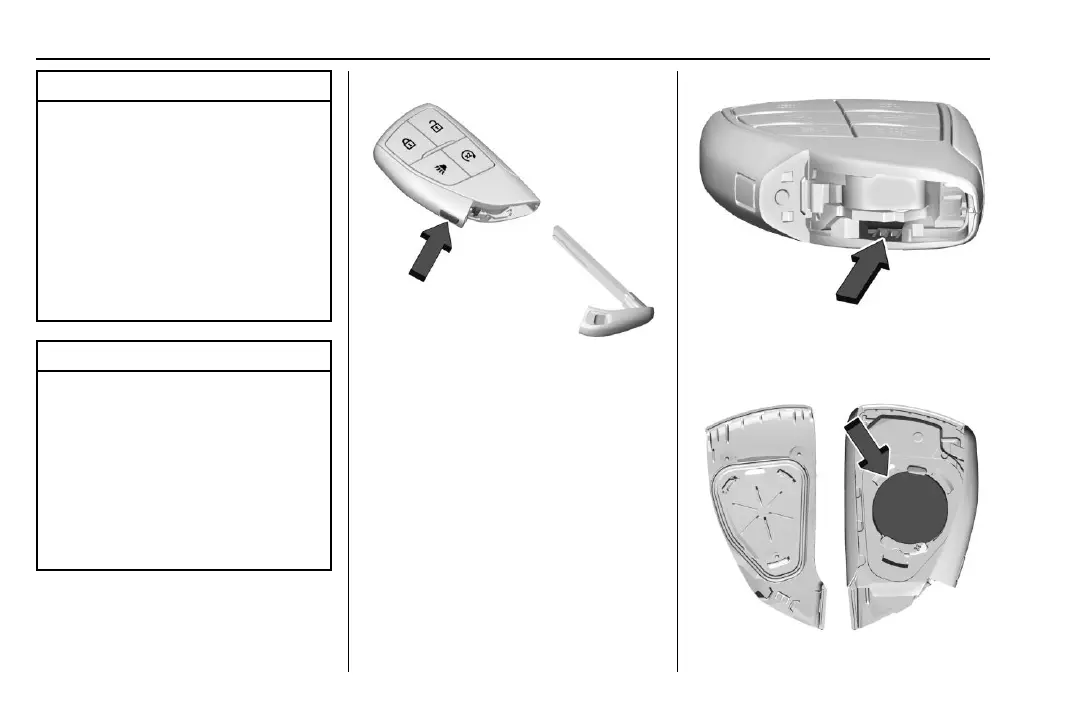
Replace the battery in the remote key soon
if the DIC displays REPLACE BATTERY IN KEY.
To replace the battery:
1. Press the button on the side of the
remote key near the bottom and pull the
mechanical key out. Never pull the
mechanical key out without pressing the
button.
2. Use the mechanical key blade in the slot
to separate and remove the back cover.
3. Pull on the tab to access the battery.


 To Next Page