25
8. Presstheadaptorcompartment’sliddownrmly.Anaudibleclickcanbeheardasthelidis
lockedrmlyintoposition,andthetopofthecapsuleispunctured.
9. Plug the Coffee Maker into a 120V AC electrical wall outlet.
10. Press the CAPSULE button to begin the brew cycle.
11.ThewhiteHEATINGindicatorlightwillbegintoashastheCoffeeMakerbeginsheating
the water.
12. When the water has reached the optimal temperature, the heating light will darken and the
white BREWING light will illuminate. Brewed coffee will begin to stream through the nozzle.
13. To interrupt the brewing cycle at any time, press the CAPSULE button.
14. At the end of the cycle, the Coffee Maker and all indicator lights will automatically turn OFF.
15. Allow unit to cool before removing the used capsule to discard.
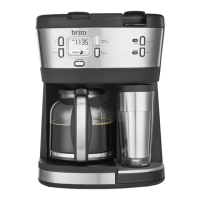
16. Unplug the BRIM Trio Multibrew System when not in use.
NOTE: Brew function of carafe side and single serve side cannot be
performed simultaneously. However, the brew function of the single serve
side can be performed during the keep warm period of the carafe side.
Using the Ground Coffee Adaptor
With the ground coffee adaptor, you have the ability to personalize your blends by adding a
dashofcinnamon,orangepeel,cardamomorvanillabeanforavoring.
• The ground coffee adaptor is ideal for those who prefer to grind and blend their
own coffee.
• The ground coffee adaptor can save money by buying and grinding your own.
• The ground coffee adaptor is environmentally friendly as there is no disposable waste;
only organic.
NOTE: For best results, use medium ground coffee.
1. Pull the adaptor compartment’s front tab up to unlock and lift the lid.
SO-315939_50017 BRIM Trio MultiBrew IM R2.indd 25 2019-03-07 1:46 PM


 To Next Page