Model 428 User’s Manual OPERATION
Bristol Instruments, Inc. 9
3 OPERATION
Start Up
Turn on the power switch located on the instrument’s front panel. The instrument’s self-
test takes approximately 20 seconds, at which point the model 428B is ready for
operation. The model 428A displays the message “Reference Laser Stabilizing” until the
laser is stabilized. Typical laser warm-up time is about 15 minutes, or less if the
instrument has been used within the past several hours.
Front Panel
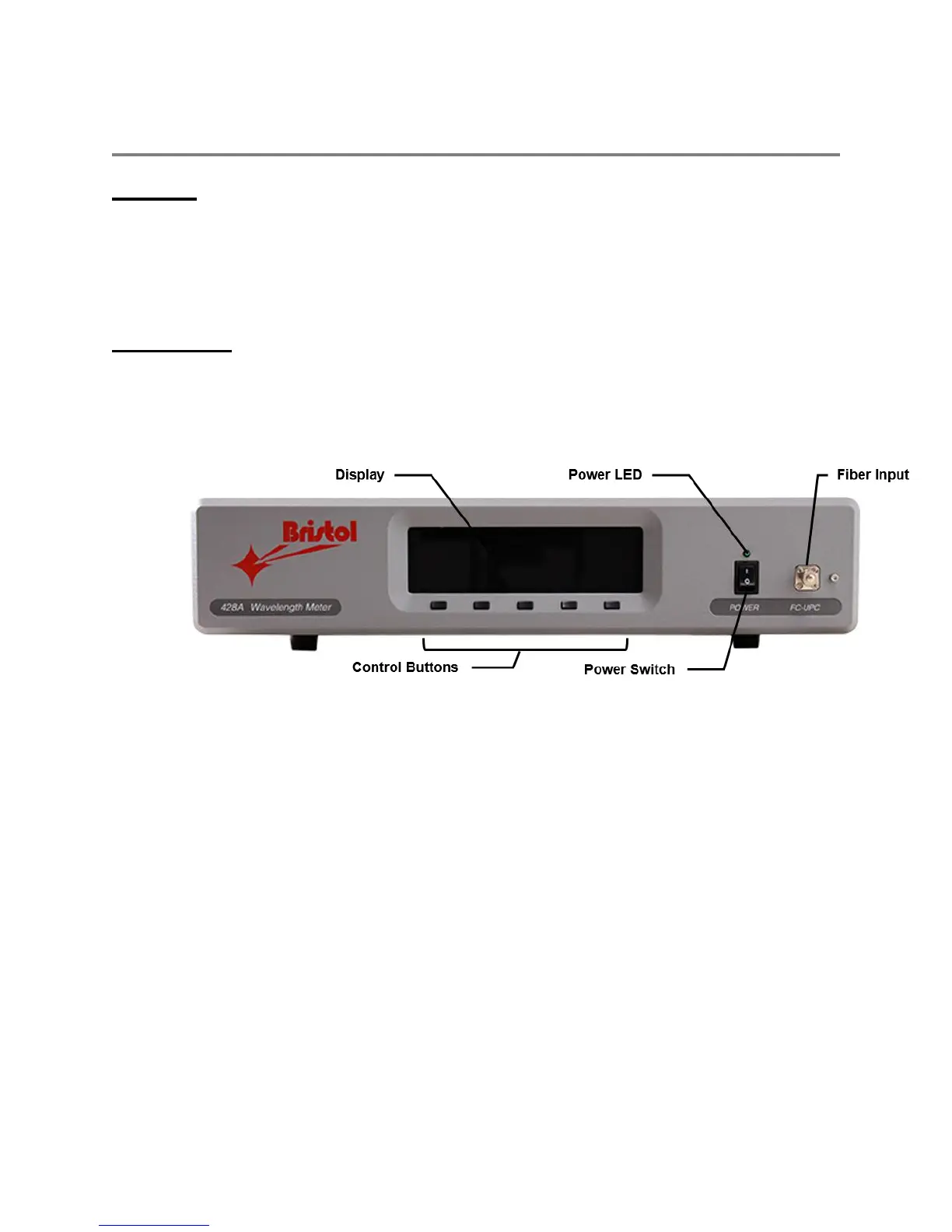
The front panel of the model 428 is shown in Figure 3.1. The display reports wavelength,
power, and OSNR in various formats. It also displays configuration information that
defines how data is collected and reported. The buttons control how data is collected and
reported.
Figure 3.1: Front Panel
Power Switch
Turns the system on and off.
Power LED
Shows the power status. When lit (green), the unit is on.
Fiber Input
The optical signal under test enters the system through an FC/UPC or FC/APC
fiber-optic connector.
Display
Reports the measurement data in several formats and shows various
configuration parameters.
Control Buttons
Select and change parameters that affect how data is collected and reported.



 To Next Page