12
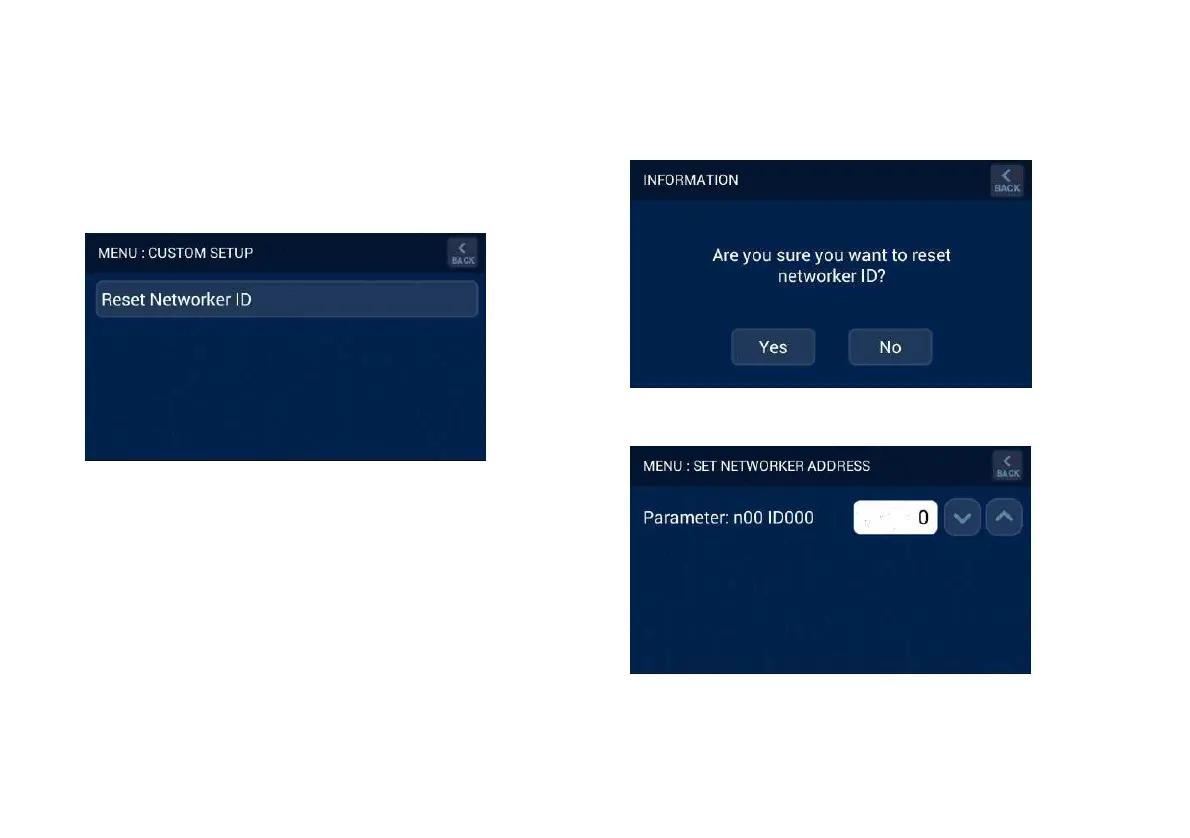
When accessing the CUSTOM SETUP screen through a Slave
Brivis Touch Controller the following option will be available.
1. Reset the identification of the Brivis Touch Controller, refer
Diagram 17.
Diagram 17: Slave Brivis Touch INSTALLER SETUP
3.4 Reset Networker ID
On either the Master Brivis Touch Controller or Slave Brivis
Touch Controller, pressing Reset Networker ID, refer Diagram
17, initiates a prompt to confirm clearing of its identification
(address), refer Diagram 18. Accepting this change clears the unit
identification and the Brivis Touch Controller is forced to restart.
Upon restarting the user is prompted to set the new identification
number as shown in Diagram 19. The unit identification number
shall be in the range from 1 to 10 inclusive, and once entered
press BACK to save and return to INSTALLER SETUP Screen.
Diagram 18: Confirmation to prompt ID change
Diagram 19: Set Networker Address


 To Next Page