13
3.5 Networker Parameters
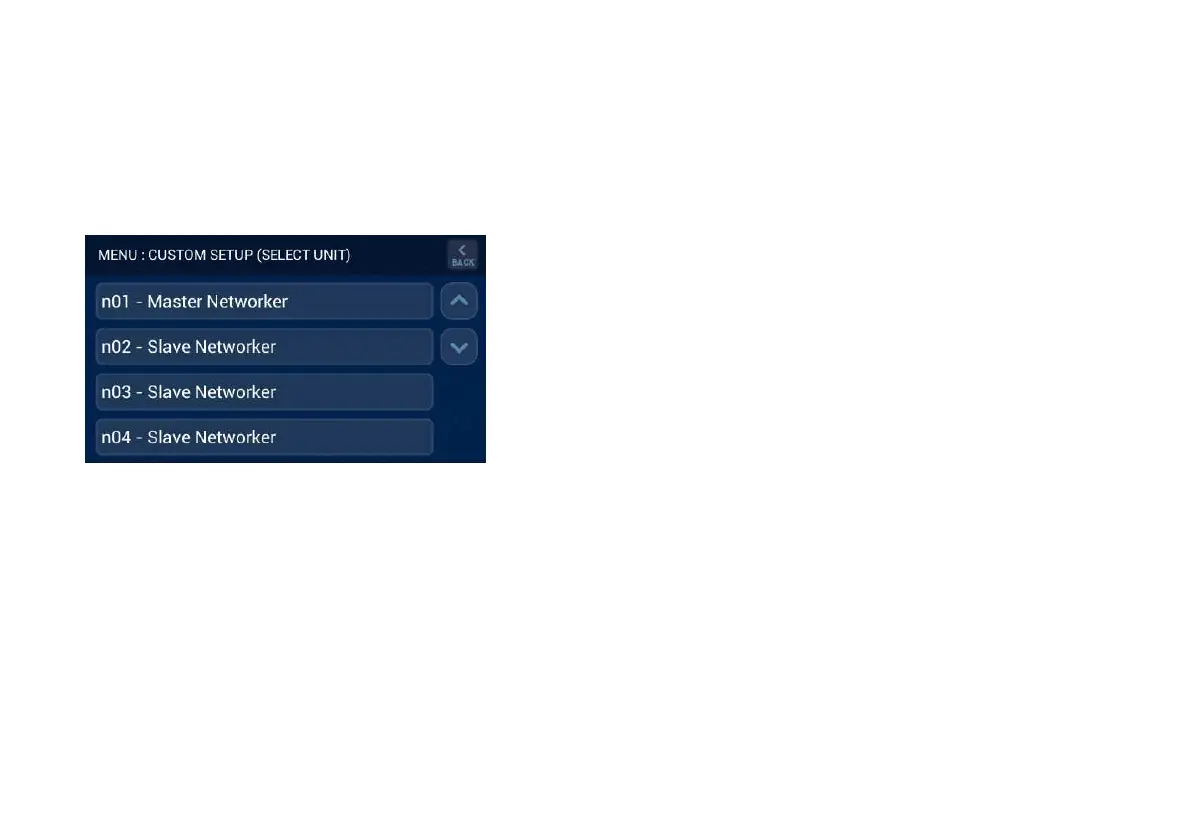
The ‘NETWORKER PARAMETERS’ section in the Master Brivis
Touch Controller provides access to all Networkers connected to
the system. This may range from n01 through to n10 if installed,
refer Diagram 20.
Diagram 20: All Networkers on the system
Accessing ‘n01 – Master Brivis Touch Controller
Press the ‘n01 – Master Networker’ button to gain access to:
- Zoning parameters for Add-On Cooling, Heating and
Evaporative Cooling systems.
- Fan scaling parameters for Add-On Cooling and Heating
systems.
- MTSP parameters for Add-On Cooling and Heating systems.
Refer to the appendix for a detailed list of the available Master
Networker parameters.
Accessing ‘n02 to n09 – Slave Controllers’
Press the ‘n02 – Slave Networker’ button through to ‘n09 – Slave
Networker’ (if available) to gain access to the parameters for each
Slave Controller.
Accessing ‘n10 – Outdoor Sensor’
This is the designated address (n10) for the outdoor sensor, if
connected.
3.6 Cooler Parameters
The Cooler parameters allow you to change the unit identification
number for zoning applications and other parameters depending
upon the model. For more information refer the product installation
manual supplied with the appliance.
3.7 Heater Parameters
The Heater parameters allow you to change the unit identification
number, high and low fan speeds, thermistor set point and zoning
requirements. For more information refer the product installation
manual supplied with the appliance.
3.8 System with no Zones
Some systems do not require ‘n01’ parameters to be changed, the
only requirement is to install the appliance(s), turn system power
ON, set the day and time on the Brivis Touch Controller and
press the ON/OFF button to start the system. This applies to
systems with no zoning and include:


 To Next Page