7. ADJUSTMENT
BAS-311G, BAS-326G
98
7-13. Changing the intermittent stroke
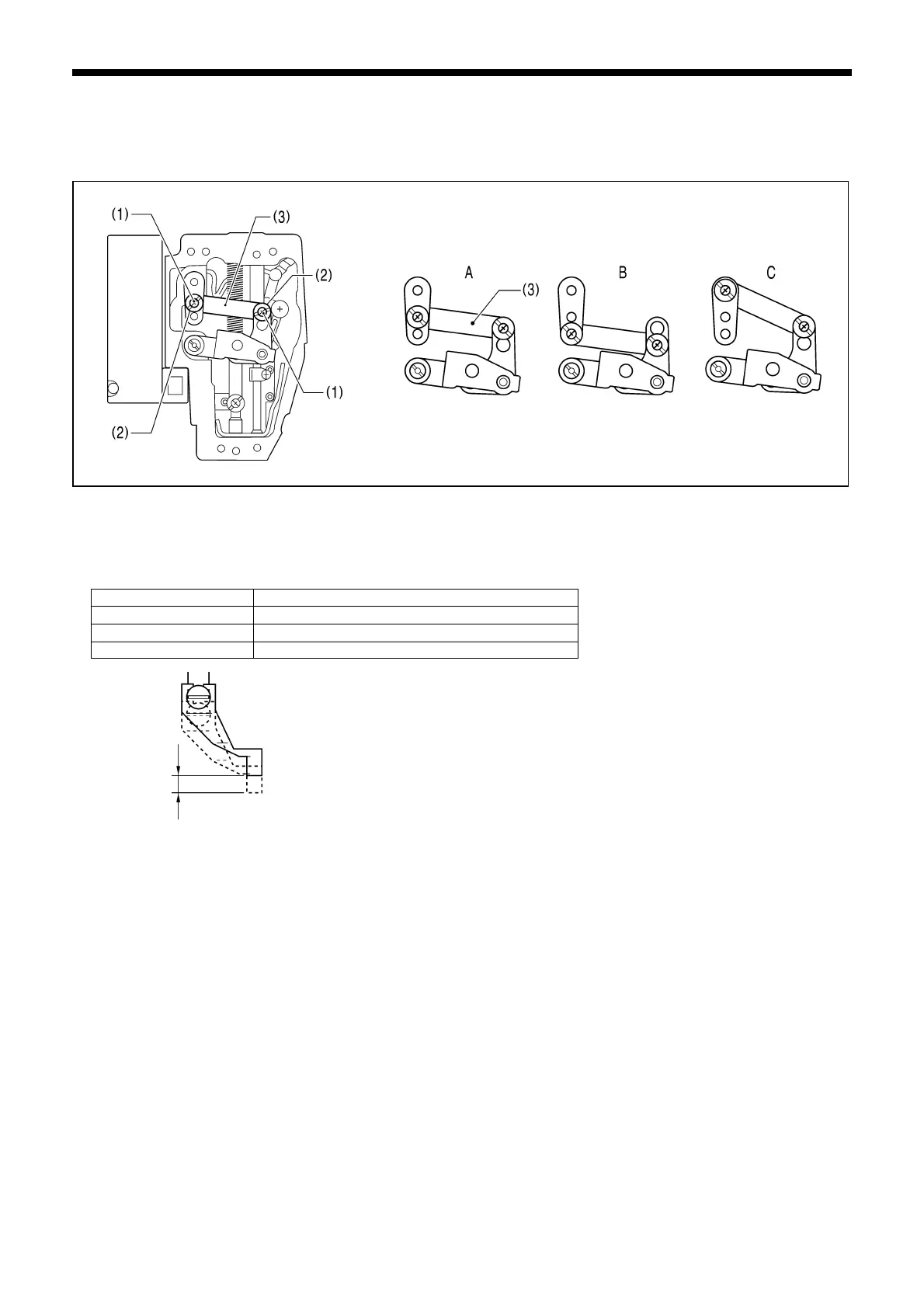
The intermittent stroke can be adjusted to within 2 − 10 mm by adjusting the position of the stepping clamp connecting rod
and changing the installation position of stepping clamp link A.
<Changing the installation position of stepping clamp link A>
1. Remove the face plate.
2. Remove the two screws (1) and the two shoulder screws (2), and then remove stepping clamp link A (3).
3. Change the installation position for stepping clamp link A (3) to either A, B or C above.
If the position of the stepping clamp connecting rod is adjusted as described in the following at any one of the installation
positions, the adjustment range for the intermittent stroke will as given in the following table.
Installation position Intermittent stroke range
A
2 − 4.5mm
B
4.5 − 10mm
C 0 mm (Presser foot does not move up and down)
5011Q5010Q
5012Q



 To Next Page
 Loading...