112
7
Internet fax Overview 7
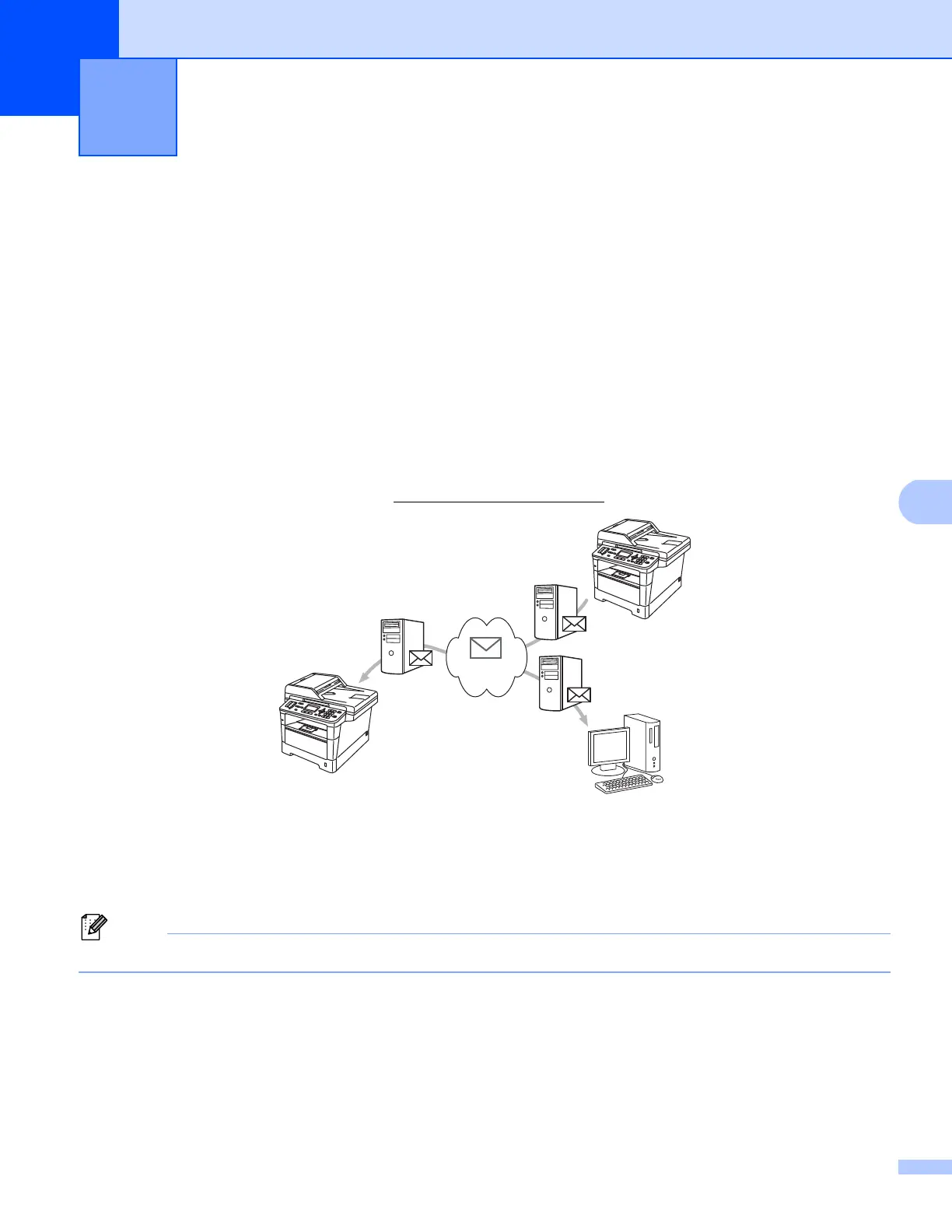
Internet faxing (IFAX) allows you to send and receive fax documents using the Internet as the transport
mechanism. Documents are transmitted in E-mail messages as attached TIFF-F files. This means that
computers are also able to receive and send documents, providing that the computer has as an application
that can generate and view TIFF-F files, you can use any TIFF-F viewer application. Any documents sent via
the machine will automatically be converted into a TIFF-F format. If you wish to send and receive messages
to and from your machine, your mail application on the computer must be able to support the MIME format.
(For MFC-8510DN, MFC-8520DN and MFC-8710DW)
In order to use this function, please download the necessary firmware from the “Downloads” page for your
model on the Brother Solutions Center at http://solutions.brother.com/
.
1 Sender
2 Internet
3 Receiver
4 E-mail server
Internet Fax is available in Black & White only.
Internet fax (MFC-8910DW and
MFC-8950DW(T): standard, MFC-8510DN,
MFC-8520DN and MFC-8710DW: available
as a download)
7
2
4
4
4
3
3
1


 To Next Page
 Loading...