72
Control panel setup
7.Network
(continued)
1.Wired LAN
(continued)
1.TCP/IP
(continued)
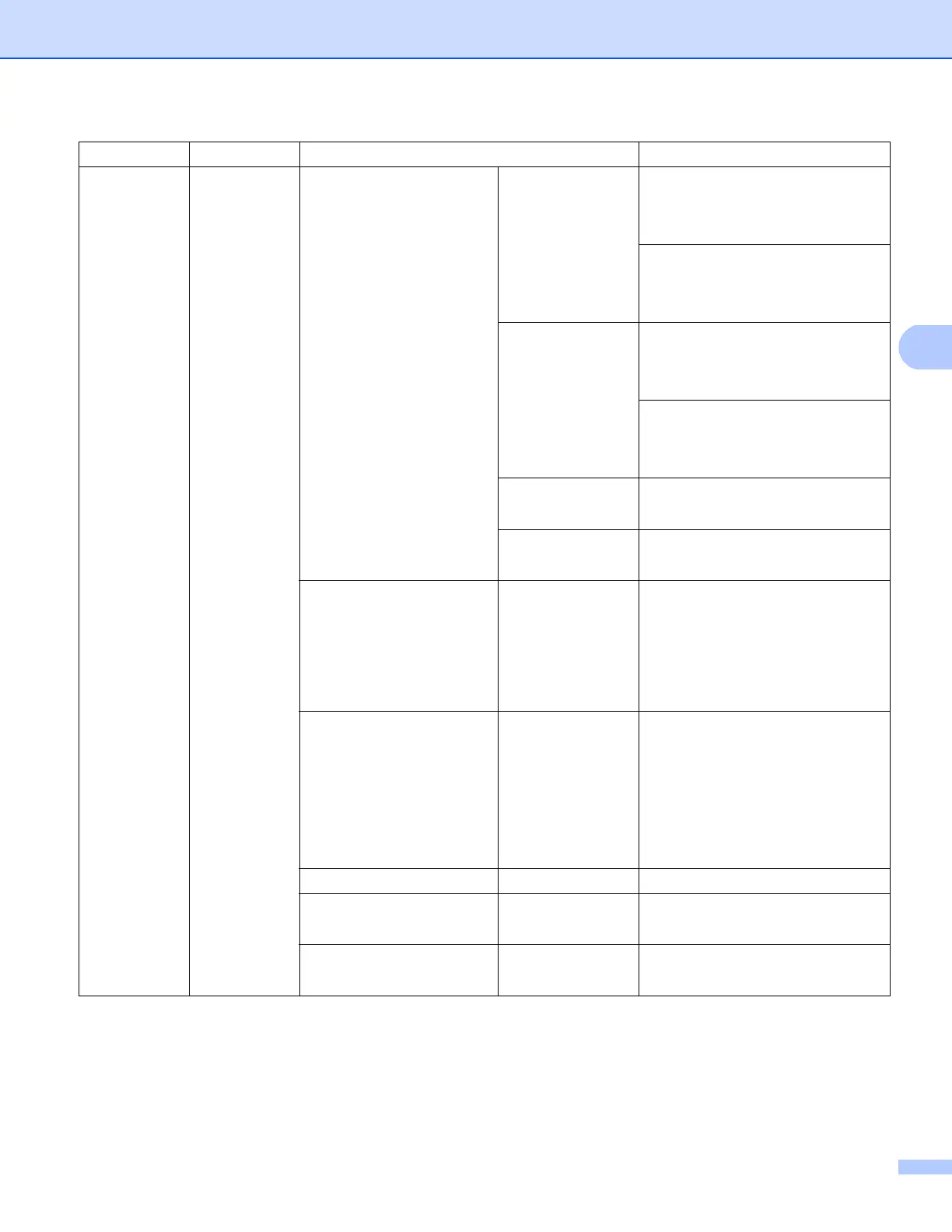
7.WINS Server Primary
[000-255].[000-255].[000-255].[000-255]
[000].[000].[000].[000]*
Secondary
[000-255].[000-255].[000-255].[000-255]
[000].[000].[000].[000]*
8.DNS Server Primary
[000-255].[000-255].[000-255].[000-255]
[000].[000].[000].[000]*
Secondary
[000-255].[000-255].[000-255].[000-255]
[000].[000].[000].[000]*
9.APIPA On*
Off
0.IPv6 On
Off*
2.Ethernet — Auto*
100B-FD
100B-HD
10B-FD
10B-HD
3.Wired Status — Active 100B-FD
Active 100B-HD
Active 10B-FD
Active 10B-HD
Inactive
Wired OFF
4.MAC Address ——
5.Set to Default — 1.Reset
2.Exit
6.Wired Enable — On*
Off
Main menu Submenu Menu selections Options


 To Next Page
 Loading...