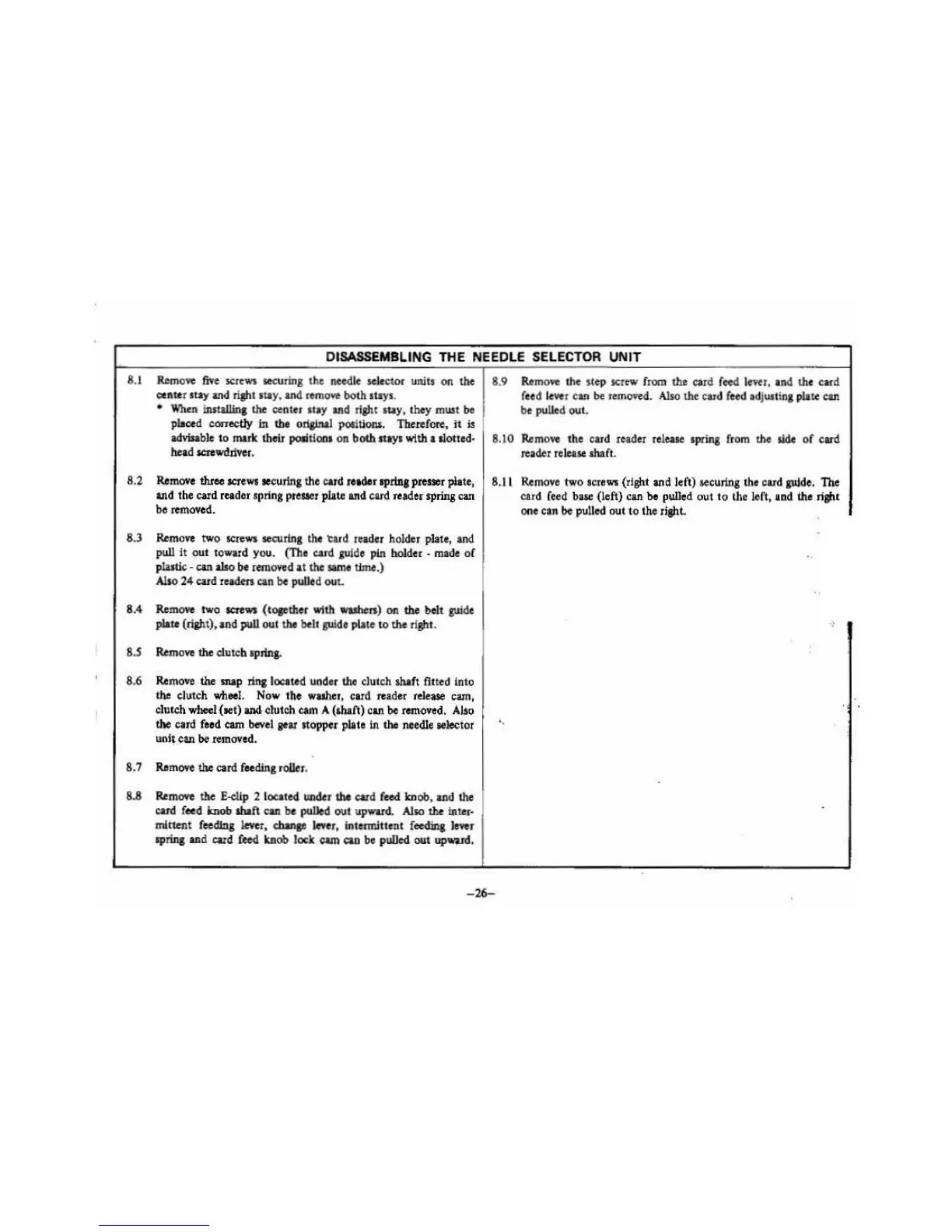
DISASSEMBLING THE NEEDLE SELECTOR UNIT
8.1
RJ.m
o
Ye
five
screws
securing the
nee
d
le
selector units on the
center
suy
and
right stay,
and
rem
oYe
both st
ays
.
•
When
installing
the
center
lily
and
ri
gh
t stay, they must
be
placed correctly in the oriainal
posiliOil$.
Therefore,
it
is
advisable
to
marie
their poli
tl011
1 on both stays with a llotted·
head screwdriver.
8.2
RJ.move
three
screws
se
curing the card reader
apriDJ
presser plate,
and
the card
re.tdor
sp
ring
pr
euer plate
a11d
card reader spring can
be removed.
8.3
Remove
two
screws
securing
tho
'Card
reader
ho
ld
er
plate,
and
pull
it
out toward you. (Tho card
guide
pin holder .
made
of
plastic· can
also
be
removed
at the
same
time.)
Also
24 card
readm
can
be pulled out.
8.4
Remove
two
screws
(tosether with
washers
) on the belt
guide
plate (right), and pull out the
belt
guide plate to the rigltt.
8
.S
RJ.m
o
ve
the clutch spring.
8.6
Remove
the
map ring located under the clutch
shift
fi
tt
ed Into
the
clutch
wheel.
Now the wuher, card
re
ader rele
ase
cam,
clutch
wheel (aet) and clutch
cam
A (shaft) c
an
be
removed
. Also
the card feed
cam
beve
l sear stopper plate in the needle selector
u
nl!_can
be
removed.
8
.7
Re
move
the
card feeding
roUer.
8.8
Re
move the
E-eiip
2 located under
the
card
feed
kn
ob,
and
the
card f
ee
d !mob abaft can
be
pulled out upward.
Also
the
Inter·
mitten! feeding l
eve
r,
chana<
lever
, intermittent f
eedinJ
l
ever
spring
and
card feed
kn
ob lock cam
c:ao
be
pulled
out
upward
.
8.9
RemoYe
the step
screw
from
the
card
fee
d lever,
and
the card
f
ee
d
lever
can
be
removed.
Also
the
car
d feed adjust
in
g plate can
be
puU
ed out.
8.10
Re
move
the card reader release spring from the
side
of
card
reader re
lease
abaft.
8.11
Remo
ve
tw
o
screws
(rigltt and left) securing the card guide. The
card
feed
base
(left)
ca11
be
pulled out to the left, and the rigltt
one can
be
puUed
out to the righL
..
-2
6-





 To Next Page