3
Label outlet maintenance
If a label causes the machine to jam
due to glue attached to the label outlet,
remove the power cord and clean the
label outlet with a cloth dipped into
ethanol or isopropyl alcohol.
4
Remove the backing paper and feed the edge of the
cleaning sheet into the printing unit until it reaches the area shown
by an arrow in the diagram below.
• Insert the sheet without removing the part of the sheet.
• Check that the printing surface of the cleaning sheet is facing upwards.
5
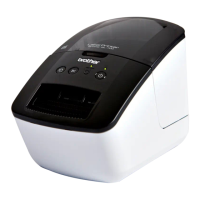
Close the DK Roll compartment cover and press the ON/OFF
button ( ) to turn the Brother QL-700 on.
6
Press the Feed button for more
than one second.
The roller spins by 10 cm.
The adhesive face of the cleaning sheet
removes the stain or dust on the roller.
• If you do not press the Feed button for
more than one second, the roller spins
only 8 mm.
• Dispose of the cleaning sheet after
use.
Feed button
Label outlet


 To Next Page
 Loading...