126
5.
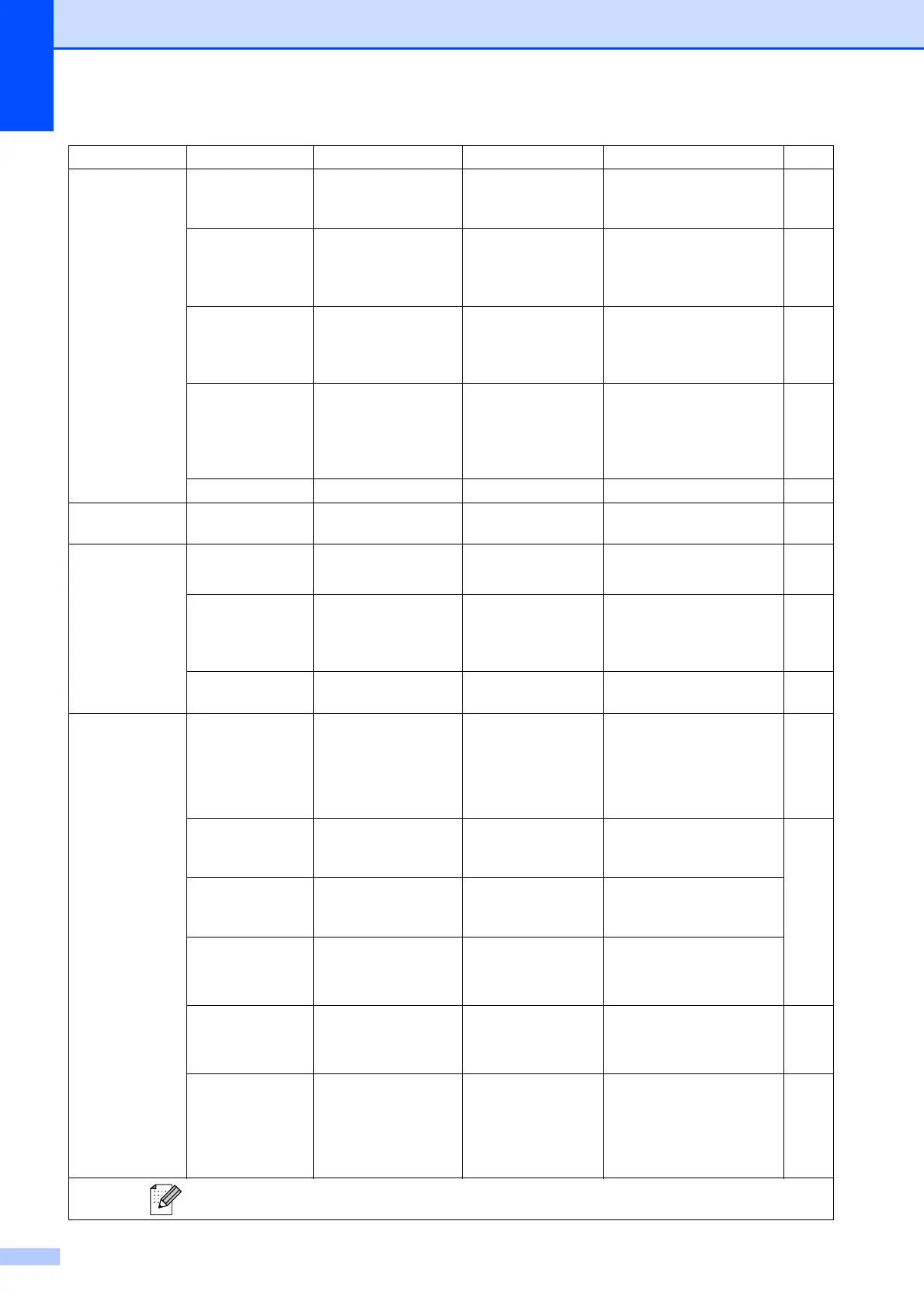
Print Reports
1.XMIT Verify — — Prints a Transmission
Verification Report for your
last transmission.
52
2.Help List — — Prints the Help List so you
can see at-a-glance how to
quickly program your
machine.
52
3.Quick Dial — — Lists name and numbers
stored in the Speed Dial
memory, in numerical
order.
52
4.Fax Journal — — Lists information about the
last incoming and outgoing
faxes.
(TX means Transmit.)
(RX means Receive.)
52
5.
User Settings
— — Lists your settings. 52
6.
Machine Info.
1.Serial No. — — Lets you check the serial
number of your machine.
116
7.
Ink Management
1.Test Print — Print Quality
Alignment
Lets you check the print
quality or alignment.
115
2.Cleaning — Black
Color
All
Lets you clean the print
head.
114
3.Ink Volume — — Lets you check the
available ink volume.
116
0.
Initial Setup
1.
Receive Mode
— Fax Only*
Fax/Tel
External TAD
Manual
Choose the receive mode
that best suits your needs.
32
2.Date&Time — — Puts the date and time on
the LCD and in headings of
faxes you send.
See
Quick
Setup
Guide.
3.Station ID — Fax:
Name:
Set your name and fax
number to appear on each
page you fax.
4.Tone/Pulse
(Not Available in
New Zealand)
— Tone*
Pulse
Choose the dialling mode.
5.Dial Tone
(4.Dial Tone
for New Zealand)
— Detection
No Detection*
Turns Dial Tone Detection
on or off.
100
0.Local
Language
(Not Available In
Australia and New
Zealand)
— English*
Spanish
Always you to change the
LCD language for your
country.
—
Main Menu Submenu Menu Selections Options Descriptions Page
The factory settings are shown in Bold with an asterisk.












 To Next Page