The FT Series Heating Only, Boiler
Page 57
5.3 Operating Mode
Operating Mode
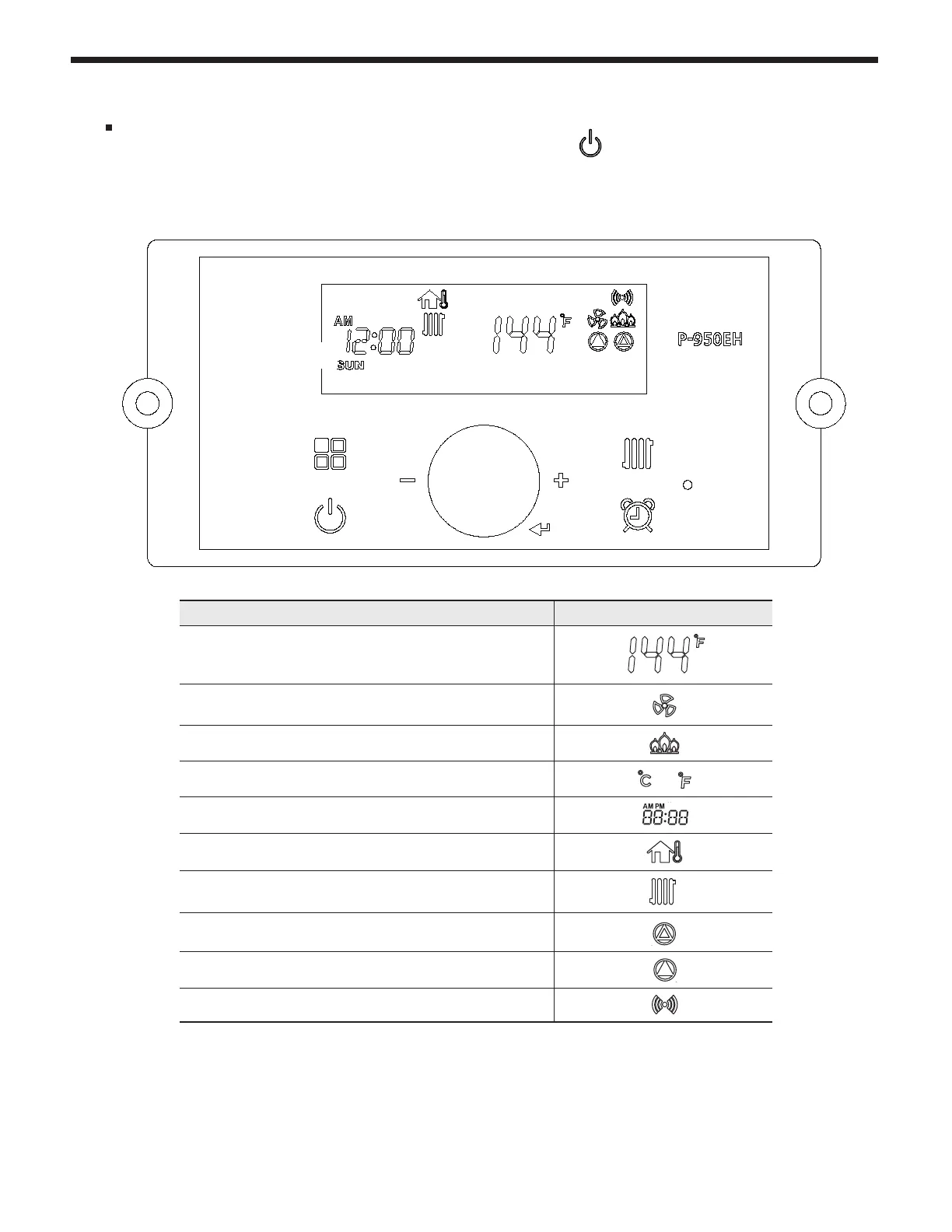
After the Power is turned on, and/or the Control Display is turned on , the Control Display
will go through a ‘Start Up’ checklist and briey show a sequence of diagnostic codes before
entering into the ‘Operating Mode. It will then display the following information.
The Control Display can operate through user and service modes that have specic LCD output
and dedicated controls:
• Set point change mode • Lock mode • Error mode • Status display mode
• Outside Temperature mode • Installer mode
* Control Display will not allow changing of button in case of lock mode activated.
Indicate Indicator
Current Operating Temperature Set point
If the Fan is operating
If a ame is detected
Celsius or Fahrenheit
or
Date and Time indicator
If Outside Temperature Sensor is operating
If there is a Demand for Central Heat (CH)
If CH pump state is
operating
If Internal recirculation pump is operating
If Communication state is activated
B
C
E
A
D


 To Next Page