5. Connecting to a Cell Base
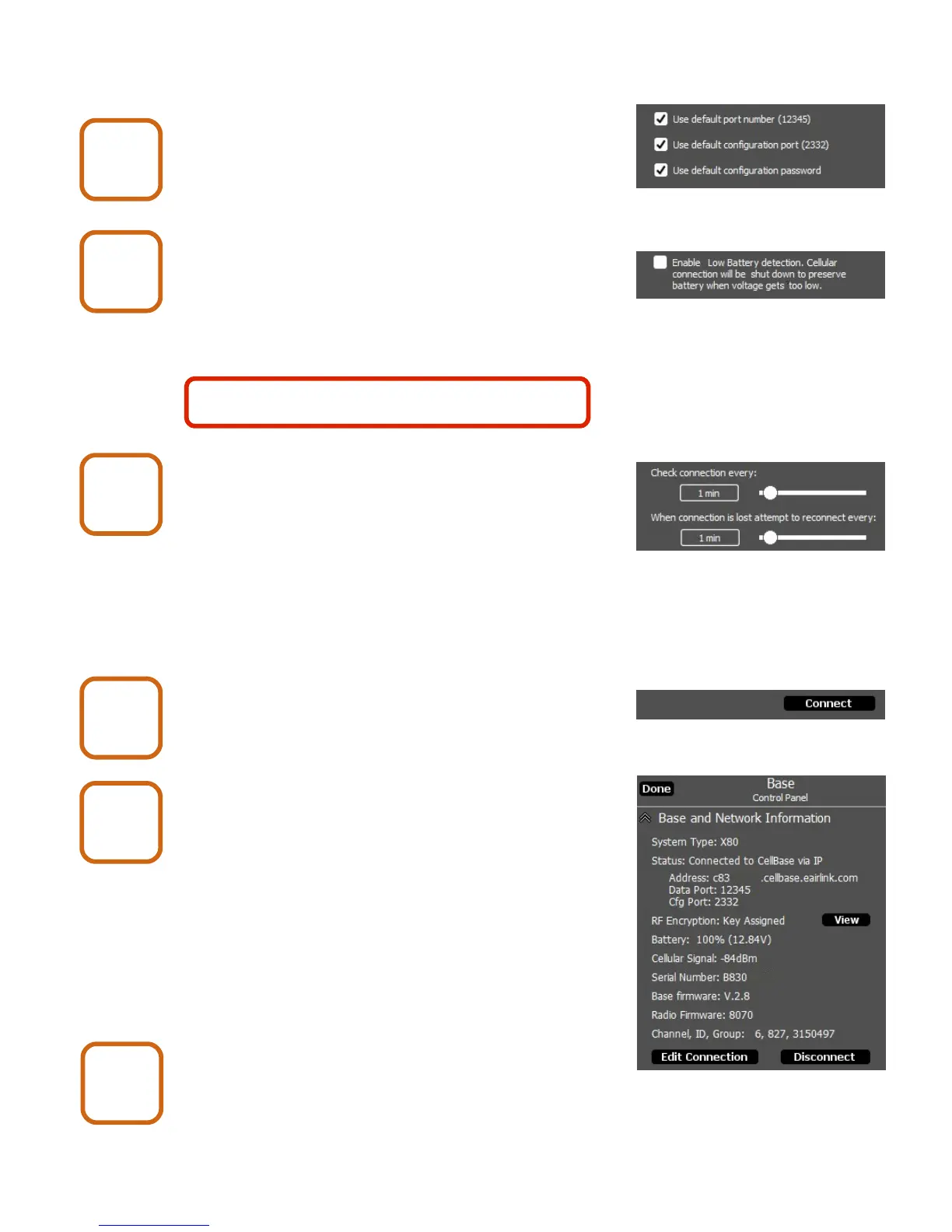
Set connection default options.
These should be checked for normal use.
Enable or Disable Low Battery Detection.
If this box is checked, the cellular connection will
be turned off when the battery is low. This will
prevent battery damage. It will be automatically
turned back on if the battery charges back up to
a sufficient level (e.g. by solar charger).
Select the check connection and lost
connection times.
The connection to the Cell Base may be lost due
to a temporary Internet outage or a dropped cell
signal. X-Series Network Manager will periodically
check the connection and try to reconnect if it is lost.
Shorter time settings will result in less down time
but will use slightly more battery power.
Click the Connect button.
Click the Done button.
Close the enclosure lid.
X80 Wireless Camera User's Manual v2.0 11 of 35
Cell Base
9
Cell Base
10
Cell Base
11
Cell Base
13
Cell Base
14
Cell Base
15
It is recommended to check this box if the
Cell Base is powered with a battery.


 To Next Page