Operational Description
POWERplus User Guide 1.1.0 11 350-00104-4
Viewing Status
Input Status
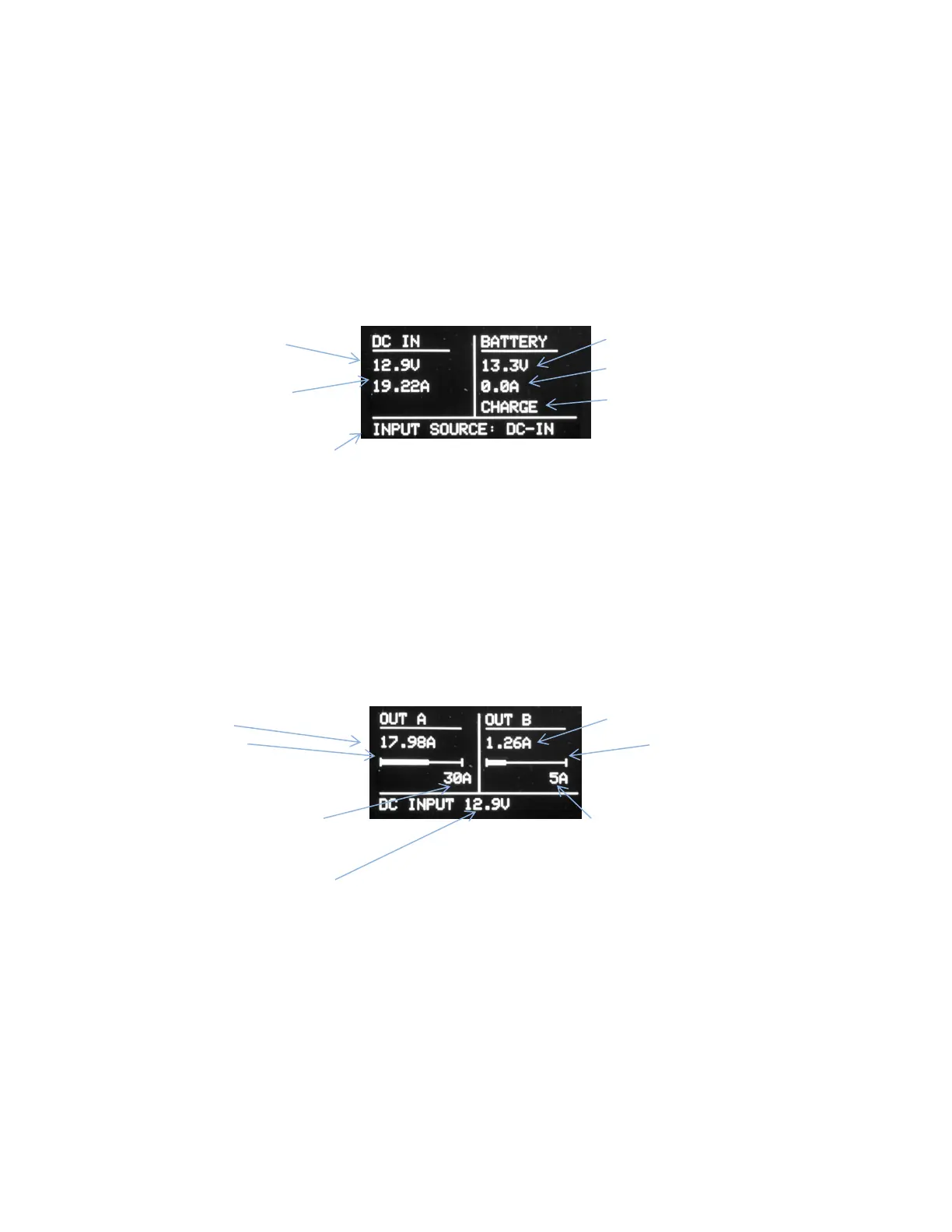
View the Input Status Page (FIGURE 6) for information about the DC and Battery inputs. Information about
the DC input power is displayed in the left panel and Battery power information is displayed in the panel
on the right side.
The currently selected input is shown at the bottom of the Input Status page.
DC Input Voltage
DC Input Current
Battery Voltage
Battery Current.
Charge Indicator
Figure 6 Input Status Page
Output Status
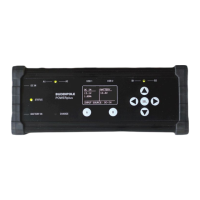
View the Output Status page for useful information about the output groups.
The two output groups (A and B) are displayed side by side. Real time display of the load current for each
group is provide as well as a graphical display of the load current in the form of a horizontal bar graph.
Each graph is scaled to correspond with the maximum current you have selected in the user settings.
The output voltage is displayed at the bottom of the Output Status page (Figure 7).
Output Current
Bar Graph
Indicates A output current and
shows max current setting.
Group A Max Current
Figure 7 Output Status Page
Output Current
Bar Graph
Indicates B output current and
shows max current setting.
Group B Max Current
Voltage of selected input


 To Next Page