Operational Description
POWERplus User Guide 1.1.0 12 350-00104-4
Changing User Settings
View the current user settings by using the UP/DOWN buttons to navigate to the specific page (Figure 4).
• Edit the current user settings by briefly pressing the SEL button to enter the edit mode. A white box
is drawn around the item that is selected for change.
• Select the line that you wish to change using the UP/DOWN buttons
• Change the selected parameter using the ADJUST buttons.
• Exit the edit mode and return to navigating the menus using the UP button to scroll off the top of the
parameter list.
All settings are saved automatically when you exit the edit mode and confirmed by a long beep.
Control Settings
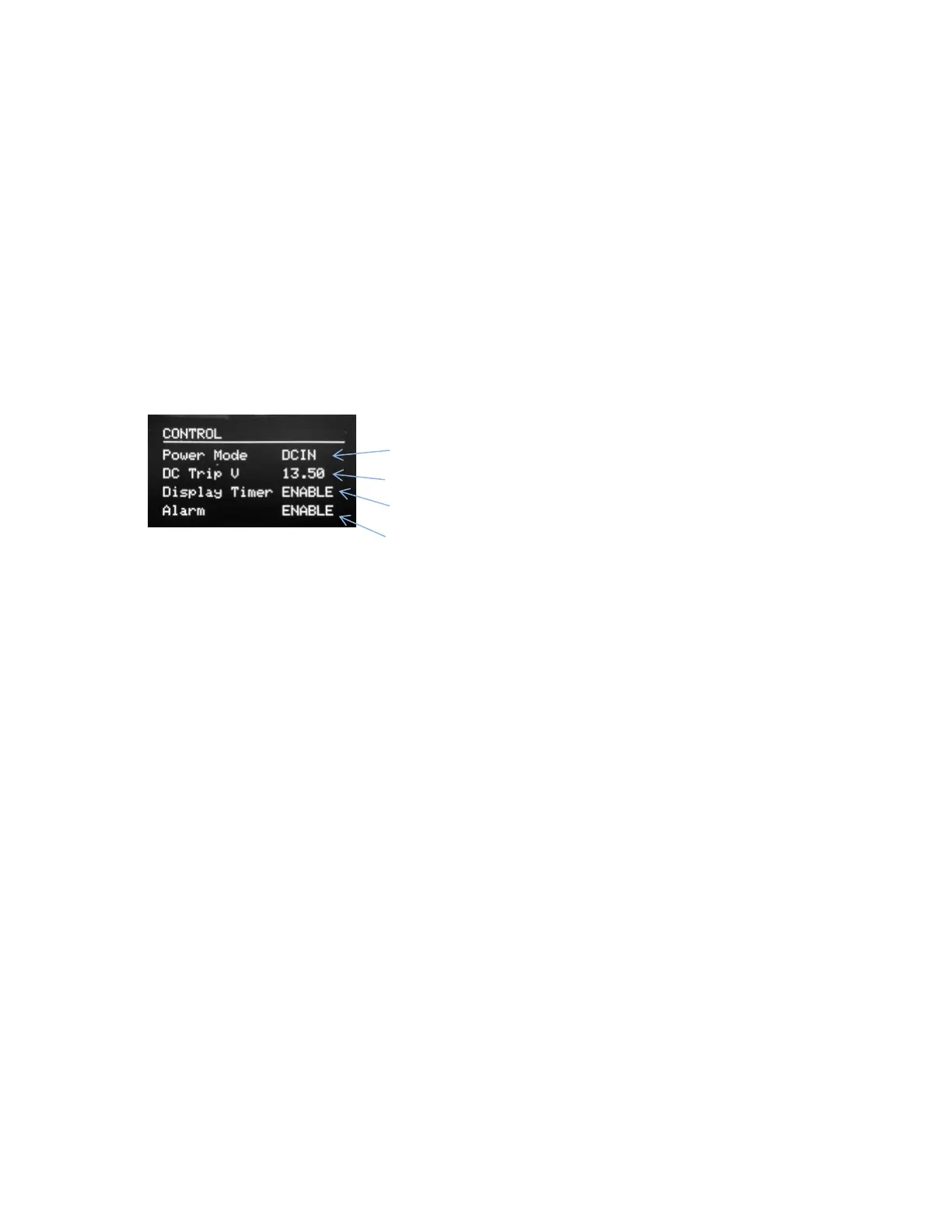
Use the Control Settings page (Figure 8) to view and change system settings.
• Power Mode
o DC IN - Selects the DC input source. If the DC input is below the DC threshold, POWERplus
will automatically switch to the battery input.
o BATT - Forces the Battery input to be used even if the DC input is connected.
o MOBILE - In the mobile mode POWERplus will select the DC input if the DC input is above
the DC trip voltage. When the DC input falls below the DC trip voltage the battery input is
selected. The DC Trip voltage should be set so the changeover to the battery input occurs
when the vehicle engine is not running (See below).
• DC Trip Voltage
o In the MOBILE mode POWERplus will accept power from the vehicle battery if the vehicle
battery is above the DC Trip Voltage threshold. When the vehicle alternator is charging the
vehicle battery the battery voltage will be above the DC Trip Voltage. When the engine is
stopped the alternator will not be providing charge to the battery and the voltage will fall
below the DC Trip Voltage. The default trip voltage of 13.5V works well with many vehicles.
If POWERplus does not switch to the Auxiliary battery when the engine is shut-off, or does
not re-connect to the vehicle battery when the engine is restarted adjust the DC Trip Voltage
to a value better suited to your vehicle.
• Display Timer
o Select Enable to turn on the display timer so that it will automatically blank the display after
5 minutes.
o Disable the timer to keep the display always on.
• Alarm Off
o Select ENABLE to activate the audible alarm or OFF to prevent the alarm from sounding.


 To Next Page