General Description
POWERplus User Guide 1.1.0 3 350-00104-4
QUICK START
You can plug a DC power supply and connect outputs to POWERplus and start using it right away, but
before you connect a battery you must select the correct setting to match the type of battery that you
intend to use. The default battery type is Lithium Iron Phosphate (LiFePO4) and the default charge
current is 1A. Please refer to the OPERATIONS section for information on how to setup the POWERplus
to suit your operational needs.
Connections – Base Station
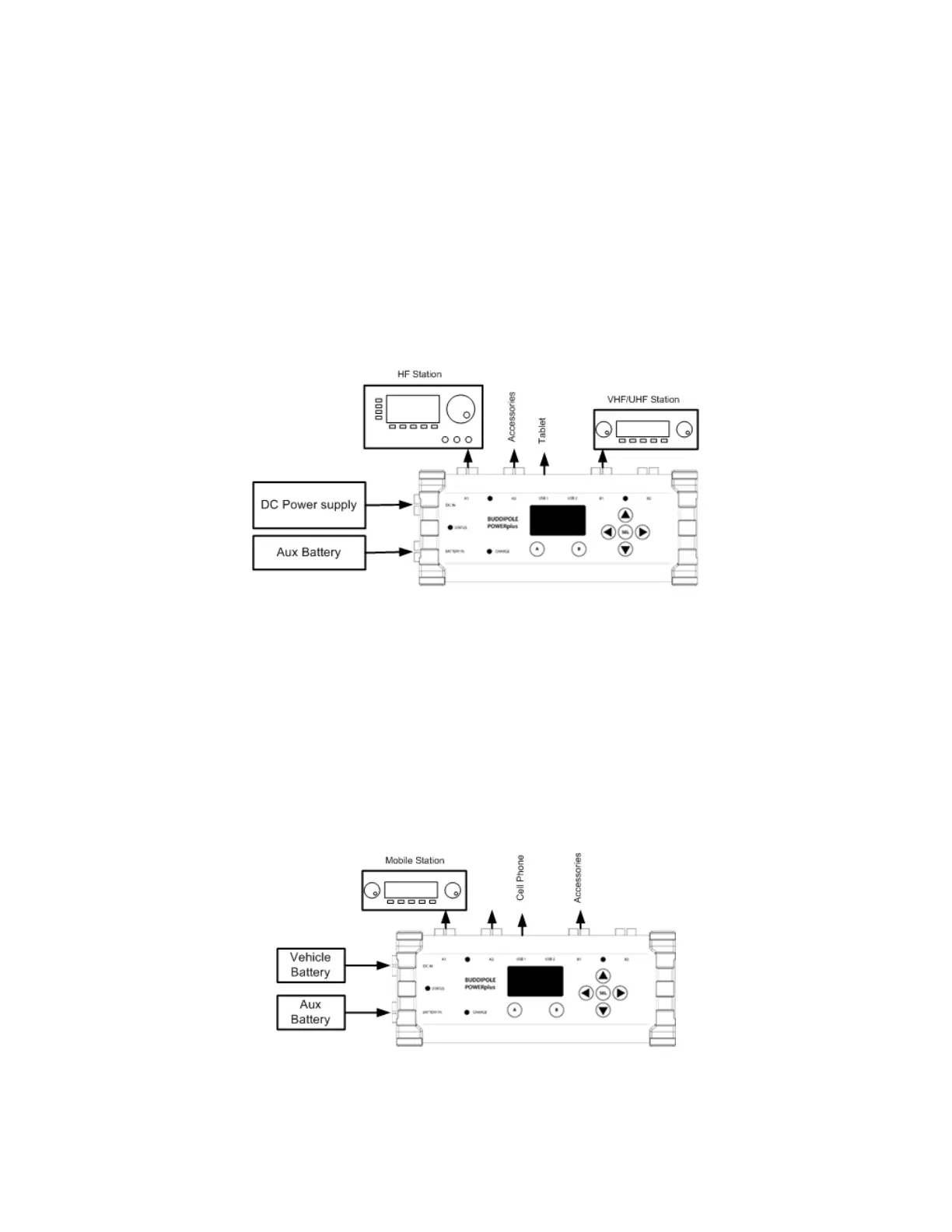
The unit can be setup with a DC power supply and an optional external battery backup as shown in the
figure below. In this example the main station is connected to output group A and a second station (VHF)
is connected to output group B. This provides an easy way to manage the stations separately.
Figure 1 Example POWERplus connections for base station
Connections – Mobile Station
POWERplus can operate from a vehicle battery directly or it can be used with a vehicle battery as the
primary source and an auxiliary backup battery as a secondary power source. When the vehicle engine is
running and the alternator is charging the vehicle battery, POWERplus will power the radio and charge the
auxiliary battery from the vehicle battery. When the engine is stopped the alternator will stop charging
the battery and POWERplus will automatically disconnect from the vehicle battery and switch to
operating from the Auxiliary battery.
Figure 2 Example POWERplus connections for mobile station with auxiliary battery


 To Next Page