The functions 4
19
We reserve the right to make any changes due to technical modifications.
Operating instructions RC20 room controller • Issue 08/2006
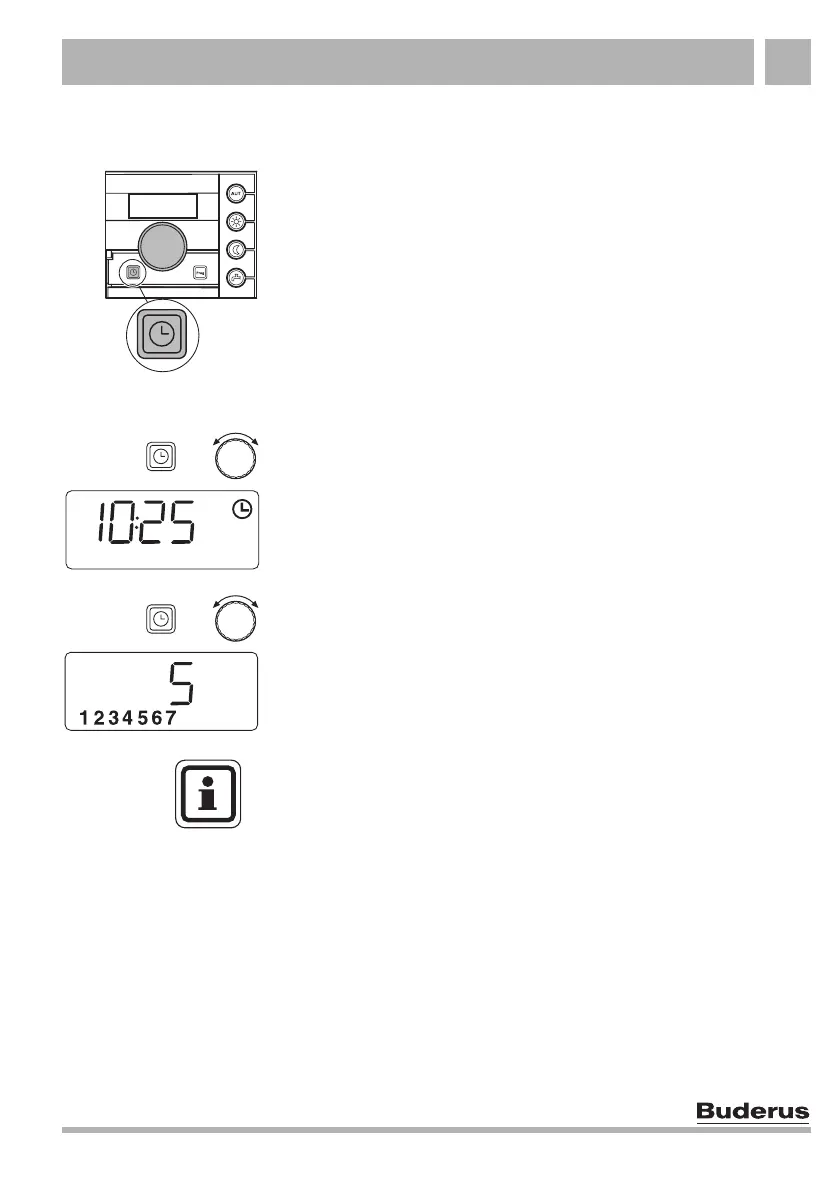
4.4 Setting day and time
In order to function correctly, the correct day and time must be set
on your heating system. Both can be selected on the room
controller, for example after an extended power failure.
Day and time can only be selected on the RC30/RC35 if the RC20
room controller is allocated to a RC30/RC35 as remote control
unit. The RC30/RC35 then assumes the setting on the RC20.
z Open flap.
Release the "Time" key to store the time.
Release the "Time" key to store the day.
Hold down "Time" and select the current time using the
rotary selector.
+
Hold down "Time" again, and select the current day using the
rotary selector (1 = Mo, 2 = Tu,... 7 = Su).
+
USER NOTE
Even after a power failure, the clock continues to run for
approx. 10 hours, as long as the room controller was supplied
with power for at least six hours before the failure.
If the clock constantly loses or gains time, ask your heating
contractor to make the necessary adjustments.



 To Next Page