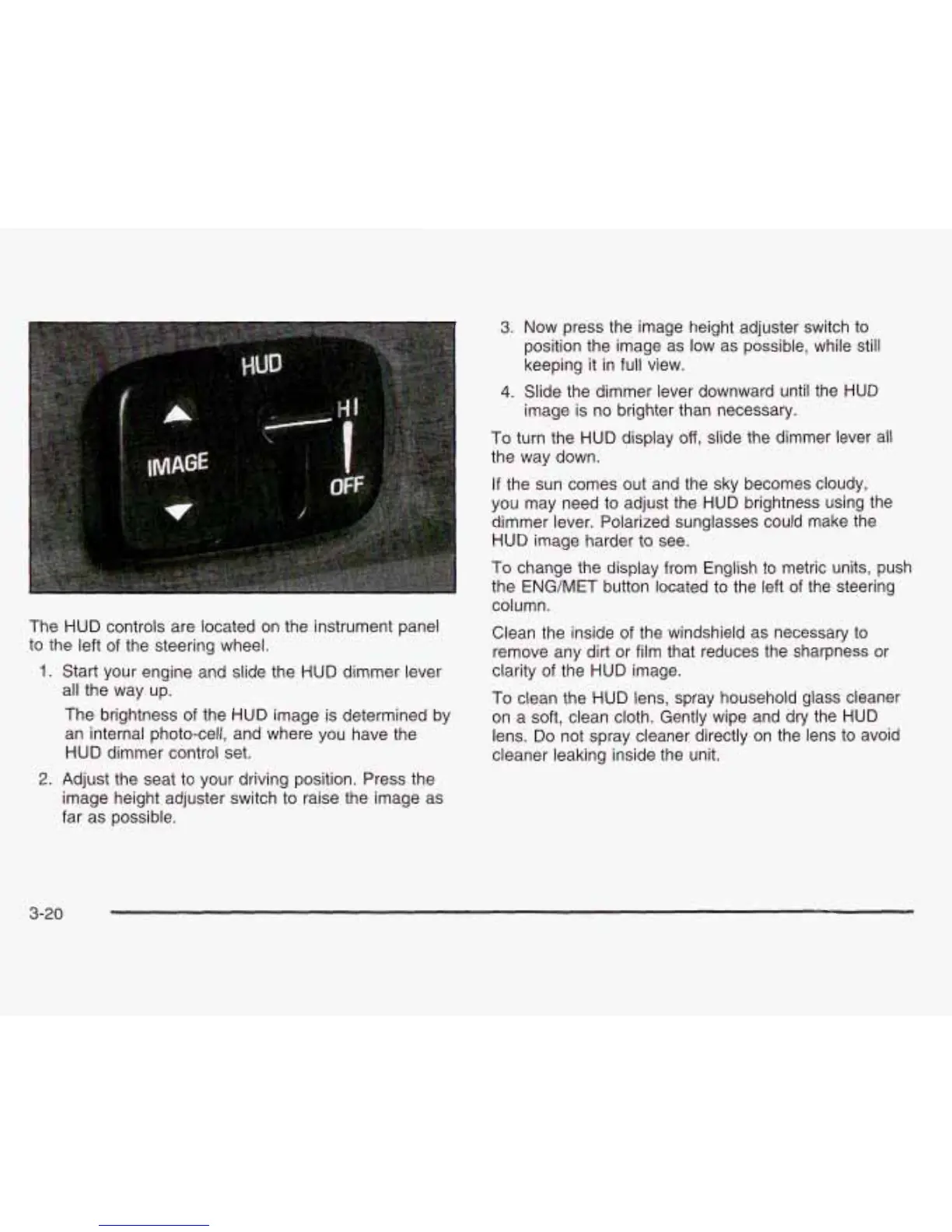
The HUD controls are located on the instrument panel
to the left of the steering wheel.
1.
Start your engine and slide the HUD dimmer lever
all the way up.
The brightness of the HUD image is determined by
an internal photo-cell, and where you have the
HUD dimmer control set.
3.
Now press the image height adjuster switch to
position the image as low as possible, while still
keeping it in full view.
4.
Slide the dimmer lever downward until the HUD
image is no brighter than necessary.
To
turn the HUD display off, slide the dimmer lever all
the way down.
If the sun comes out and the sky becomes cloudy,
you may need to adjust the HUD brightness using the
dimmer lever. Polarized sunglasses could make the
HUD image harder to see.
To
change the display from English to metric units, push
the ENG/MET button located to the left
of
the steering
column.
Clean the inside of the windshield as necessary to
remove any dirt or film that reduces the sharpness or
clarity of the HUD image.
To
clean the HUD lens, spray household glass cleaner
on a soft, clean cloth. Gently wipe and dry the HUD
lens.
Do
not spray cleaner directly on the lens to avoid
cleaner leaking inside the unit.
2.
Adjust the seat to your driving position. Press the
image height adjuster switch to raise the image as
far as possible.
3-20







 To Next Page