132
107774-01 - 9/17
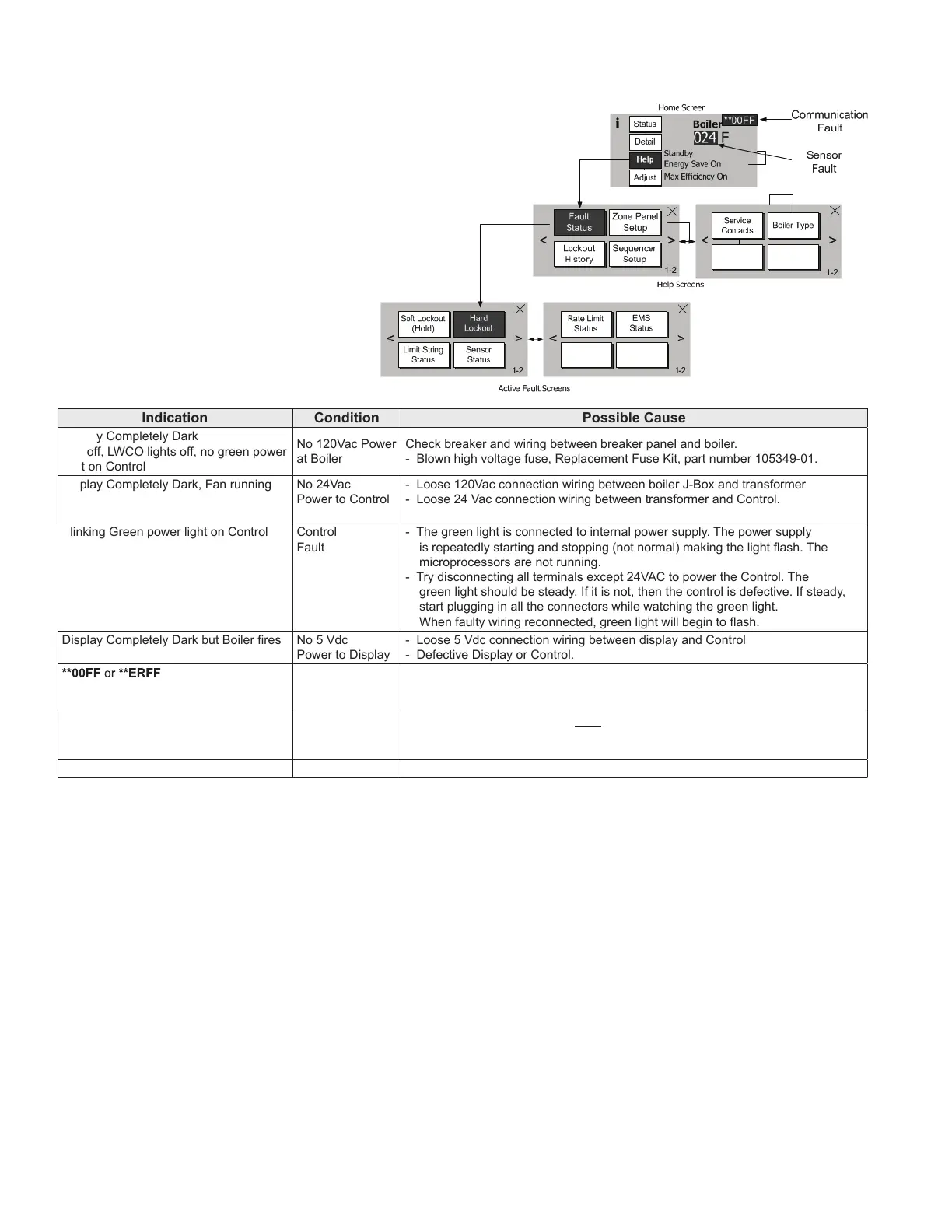
Faults are investigated by selecting the “Help”
button from the “Home” screen. When a fault
isactivethe“Help”buttonashesandthehome
screenturnsaredcolor.Continuetoselectashing
buttons to be directed to the Fault cause.
B. Display Faults:
Indication Condition Possible Cause
Display Completely Dark
Fan off, LWCO lights off, no green power
light on Control
No 120Vac Power
at Boiler
Check breaker and wiring between breaker panel and boiler.
- Blown high voltage fuse, Replacement Fuse Kit, part number 105349-01.
Display Completely Dark, Fan running No 24Vac
Power to Control
- Loose 120Vac connection wiring between boiler J-Box and transformer
- Loose 24 Vac connection wiring between transformer and Control.
Blinking Green power light on Control Control
Fault
- The green light is connected to internal power supply. The power supply
is repeatedly starting and stopping (not normal) making the light ash. The
microprocessors are not running.
- Try disconnecting all terminals except 24VAC to power the Control. The
green light should be steady. If it is not, then the control is defective. If steady,
start plugging in all the connectors while watching the green light.
When faulty wiring reconnected, green light will begin to ash.
Display Completely Dark but Boiler res No 5 Vdc
Power to Display
- Loose 5 Vdc connection wiring between display and Control
- Defective Display or Control.
**00FF or **ERFF Display lost
Communication
with Control
- Loose or defective display harness
- Defective Display
- Defective Control
ER0011 Adjustment
Mode Password
Timeout
- The Control and Display are NOT defective. The password has timed out.
Simply cycle power to the Display to restore operation.
ER0012 Control Failed - Defective Control.
Figure 15.1: Help Menu
XV. Troubleshooting (continued)


 To Next Page