Getting to know your Handheld DAB Radio
12
If you require any technical guidance or find that your product is not operating as intended, a simple solution can often be found in the Troubleshooting
Getting to know your Handheld DAB Radio
You’ll be up and running in no time
Ready? Let’s begin...
Please read these instructions carefully. They contain important information which will
help you get the best from your product and ensure safe and correct installation and
operation.
If you require any further assistance, our technical experts are happy to help. For full
details, refer to the product support section at the end of these instructions.
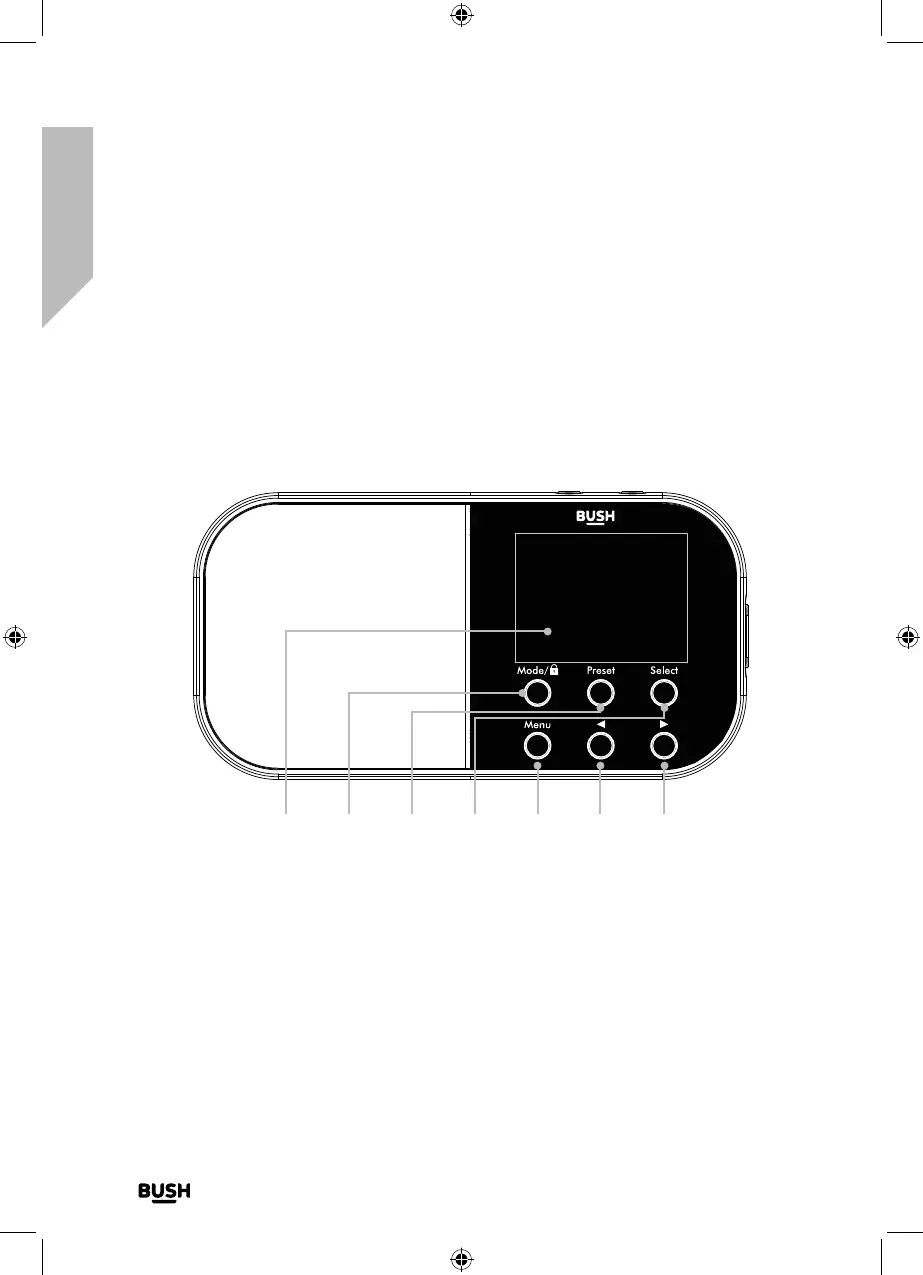
1 32 4 5 6 7
1. 2” Colour Display
2. Mode/Keylock
• Press and release to change the
mode (DAB+/FM)
• Press and hold to turn the Keylock
On/Off
3. Preset (20 DAB+/20 FM)
• Press and hold to store radio station
presets
• Press and release to recall radio
station presets
4. Select
• Press and release to Select/Confirm
an option in the Menu
• Press and release to Snooze when
an Alarm sounds



 To Next Page